Total Access 372 Small Business Unit ONT Installation and Maintenance Guide
26 61287722G1-5B
Subscriber Connections
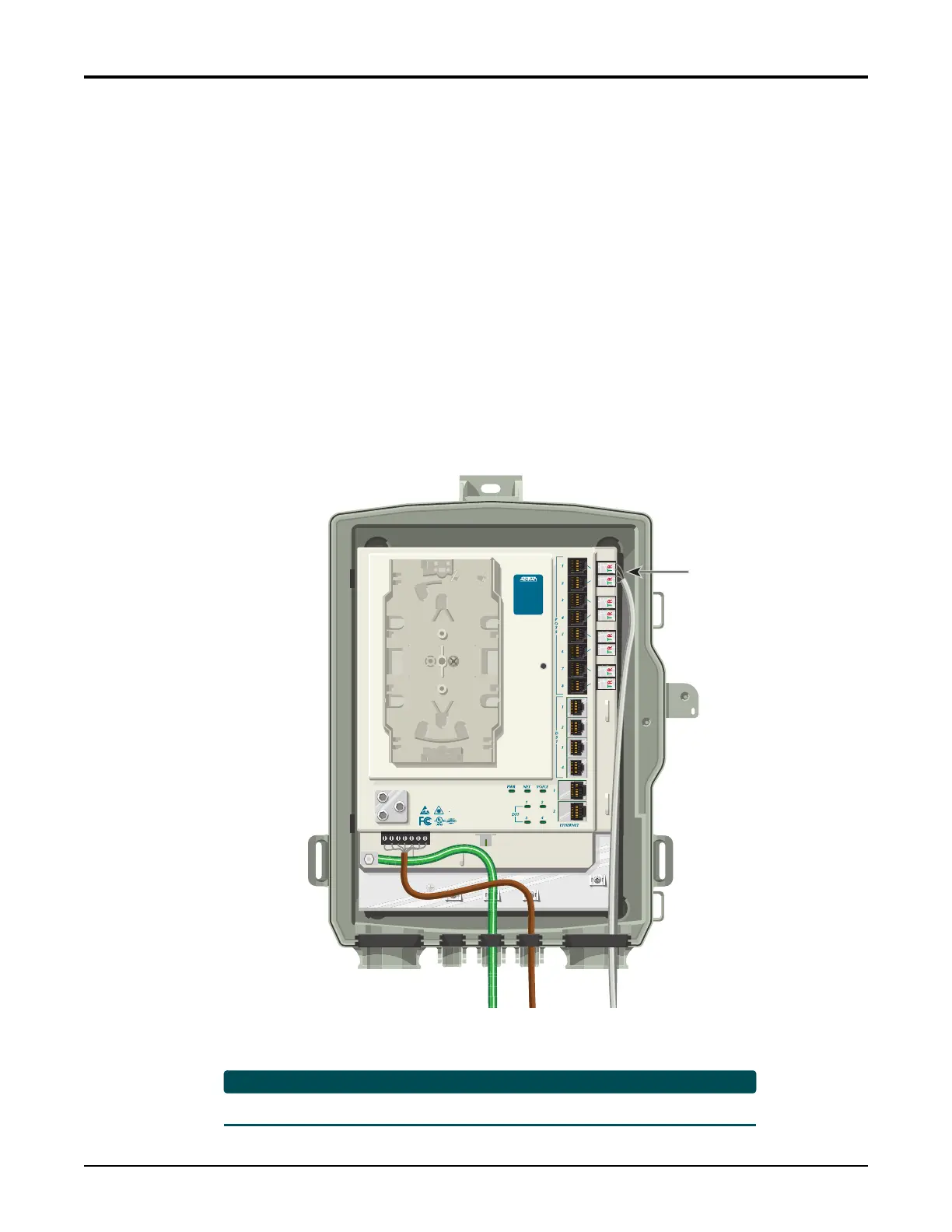
RefertoFigure13andFigure 14onpage27toinstallsubscriberPOTS,EthernetandDS1
services.
POTS Connections
ToconnectPOTS,refertoFigure13tocompletethe followingsteps:
1. Trimeachwiretolength.Identifyeachpairintheservicecable.
2. RemovetherubbergrommetfromthehousingandinsertthePOTScablesthroughthe
grommet.
3. Flipthepivotconnectortothe“up”position.
4. Inserttheappropriatewires
TIP(green)andRING(red).
5. Flipthepivotconnectorstothe“down”position.
6. Replacetherubbergrommetinthehousing.
Figure 13. POTS Connections
TheRJ‐11POTSportsareusedfortest ingonly.
Pots
Connection
TELEPHONE TROUBLESHOOTING:
1. Identify the bad line (POTS 1-8).
2. Plug any working phone into
the appropriate jack.
If the telephone works, the unit
is functioning normally.
If the telephone does not work,
contact your service provider.
3. Remove the telephone from the
POTS jack.
TOTAL ACCESS 372
1287722G1








 To Next Page