Installation
61287722G1-5B 29
Install Fiber to the Unit
EnsurethatfiberusedisULListedOpticalFiberCablesuitableforthis
application,anddoesnotcontainanymet allicmembersorotherelectrica l
conductivematerials.
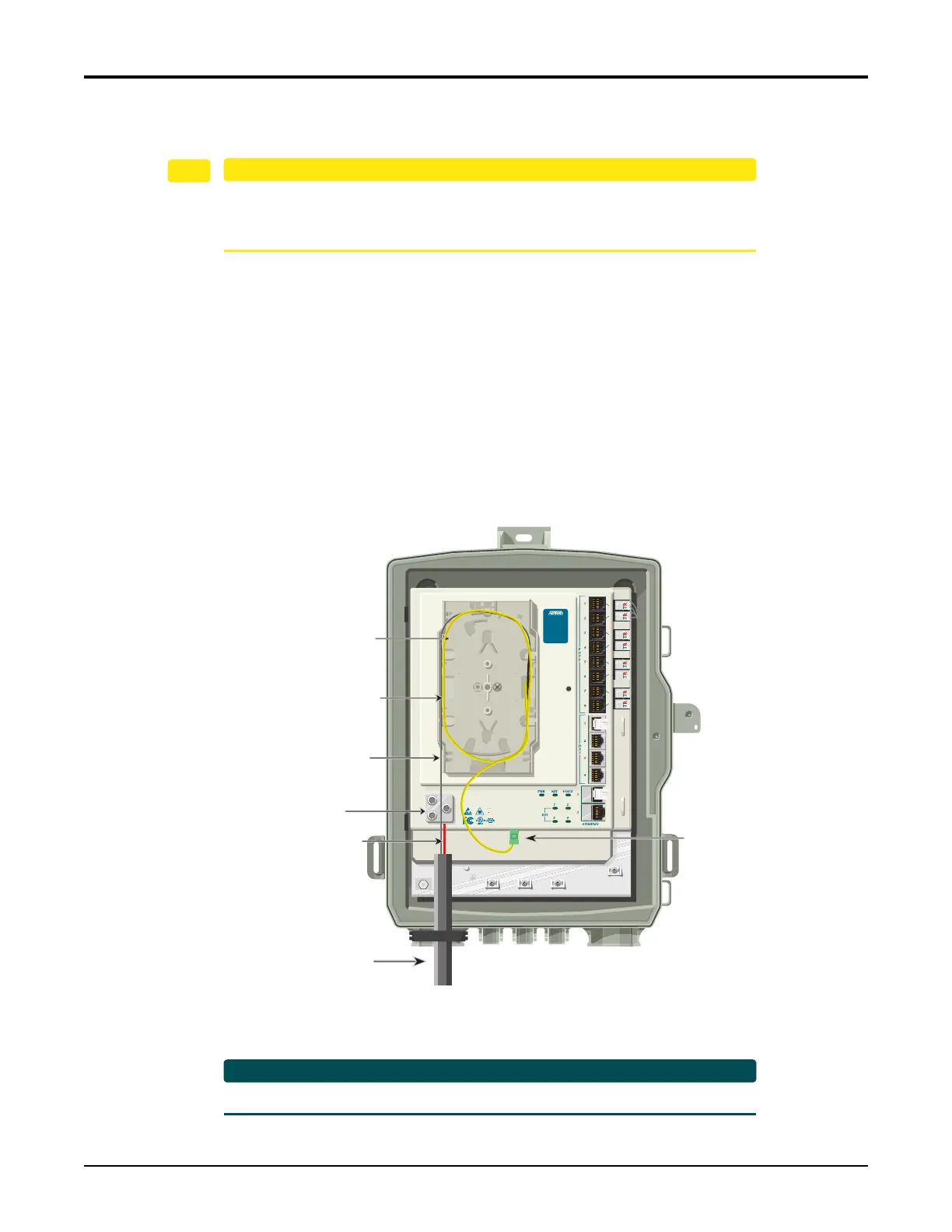
ToinstallfibertotheSBUONT,refertoFigure15andcompletethefollowingsteps:
1. Routethefibercomingtothecustomerpremesisthroughtherubbergrommetasshown.
2. Trimtheinsulationonthefibercablebacksothereisasufficientlengthoffibertoattach
thefiberconnectortotheendofthefi
bercable.
3. LoosentheCableSupportClampandroutetheStrength MemberthroughtheCable
SupportClamp.RetightentheCableSupportClamp.
4. SplicetheFibertotheFiberJu mper Cable(Yellow)(P/N31251291‐E).
5. ConnecttheFiberJumperCabletotheSC/APCconnectoratthebottomof th
eElectronics
Modu
le.
6. ReplaceSpliceTraycover.
Figure 15. Install Fiber to the Unit
RefertoFigure7onpage18foranillustrationofacompletedinstallation.
Fiber In
Note: All cables removed
for clarity purposes.
TELEPHONE TROUBLESHOOTING:
1. Identify the bad line (POTS 1-8).
2. Plug any working phone into
the appropriate jack.
If the telephone works, the unit
is functioning normally.
If the telephone does not work,
contact your service provider.
3. Remove the telephone from the
POTS jack.
TOTAL ACCESS 373 E
1287723G1
Splice Tray
Cable Support
Clamp
Fiber
Strength
Member
(Red)
Fiber Jumper
Cable (Yellow)
SC/APC Connector
(Green)








 To Next Page