Advantech-DLoG DLT-V72 Series Manual V2.00 81 / 94
13.2.1. Remove the integrated keyboard
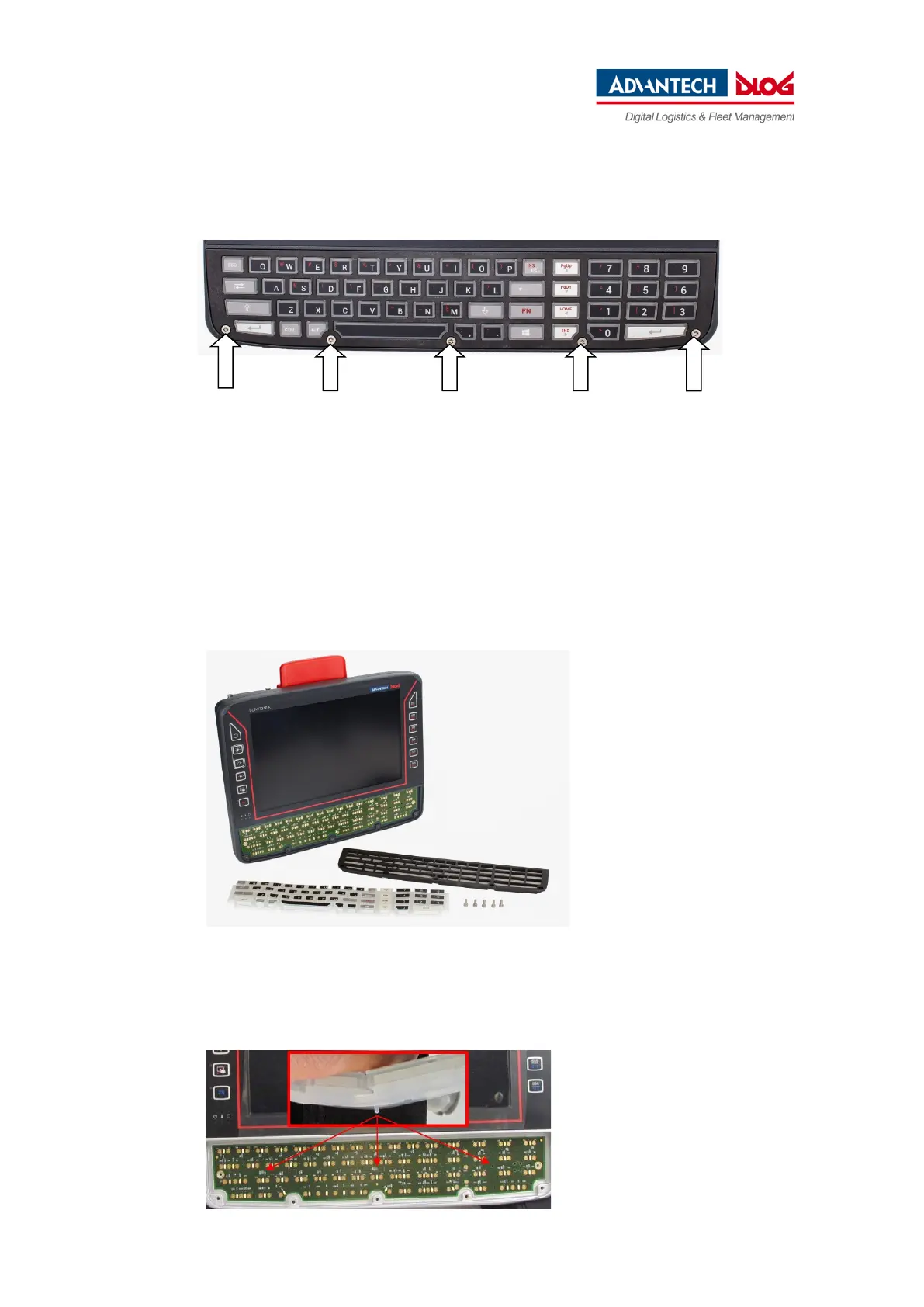
Fig. 13.1: Unscrew the mounting screws of the integrated keyboard
Use a TX10 screwdriver to loosen the 5 mounting screws of the integrated keyboard.
Carefully remove the keyboard grid; it will be used again later.
Carefully remove the silicon keyboard mat; make sure you do not damage the circuit board or
components on the circuit board.
13.2.2. Attach the integrated keyboard
Fig. 13.2: DLT-V7210K plus integrated keyboard components
Reuse:
− Keyboard grid, black
New, replacement parts:
− Silicon keyboard mat
− 5 x screws
ISO14580-m3x8 A2
Procedure
Fig. 13.3: Position at which the 3 nubs are inserted
− Place the silicon keyboard mat on the
circuit board



 To Next Page