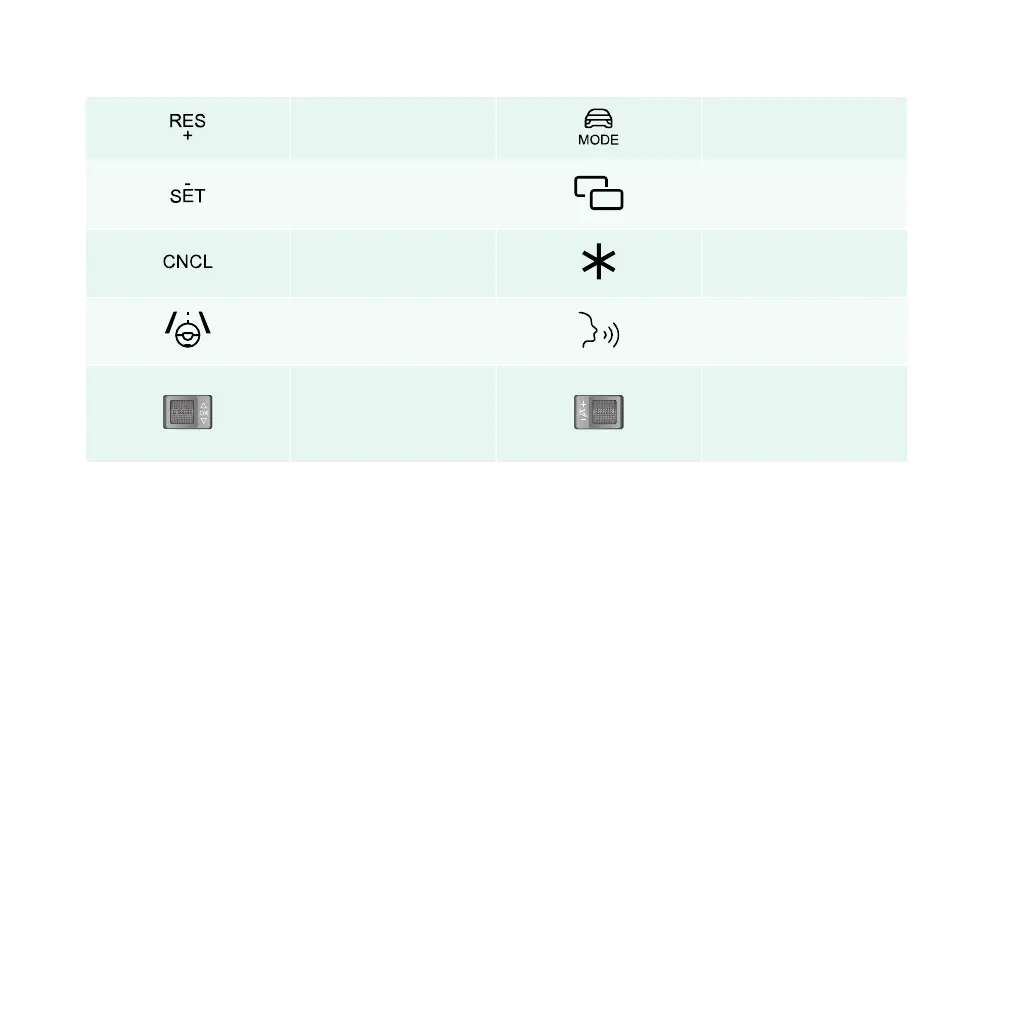
Recovery / speed+ Driving mode switch
Activation / speed
Medium screen mode
switch
Cancel
Custom (default next
track)
Intelligent driving mode
Voice wake-up / call con-
trol
Cruising distance / con-
firmation/ left screen
switch
Volume regulator /
mute / right screen
switch
“SET/-,” “RES/+,” “Intelligent Driving Mode,” “CNCL,” “Left Roller,” and “Right Roller” are composite
function buttons that have different functions in different scenarios; “*” is a custom function button that
can be defined in the setting interface.
If you need to restart the central control system, you can do so by pressing the left and right rollers on the
steering wheel at the same time for 10 seconds.
Driving mode
Your car is equipped with three driving modes: ECO, Normal and Sport, which can be selected using the
driving mode switch button on the steering wheel.
ECO: reduces power consumption by decreasing acceleration. Use this mode for maximum range and for
urban traffic.
Normal: default settings for acceleration and power range.
Sport: provides maximum acceleration with higher power consumption. Use this mode for a sporty driving.
When restarting your car, the previous driving mode setting will be applied.
72 | AIWAYS U5



 To Next Page