EasyManua.ls Logo

Alcatel-Lucent Enterprise ALE-500 - Page 87

Alcatel-Lucent Enterprise ALE-500
113 pages
Print Icon
To Next Page IconTo Next Page
To Previous Page IconTo Previous Page
Loading...
Accessories
8AL91446ENAA ed02 87 /113
5.2.4 Installing or replacing the Bluetooth
®
handset battery
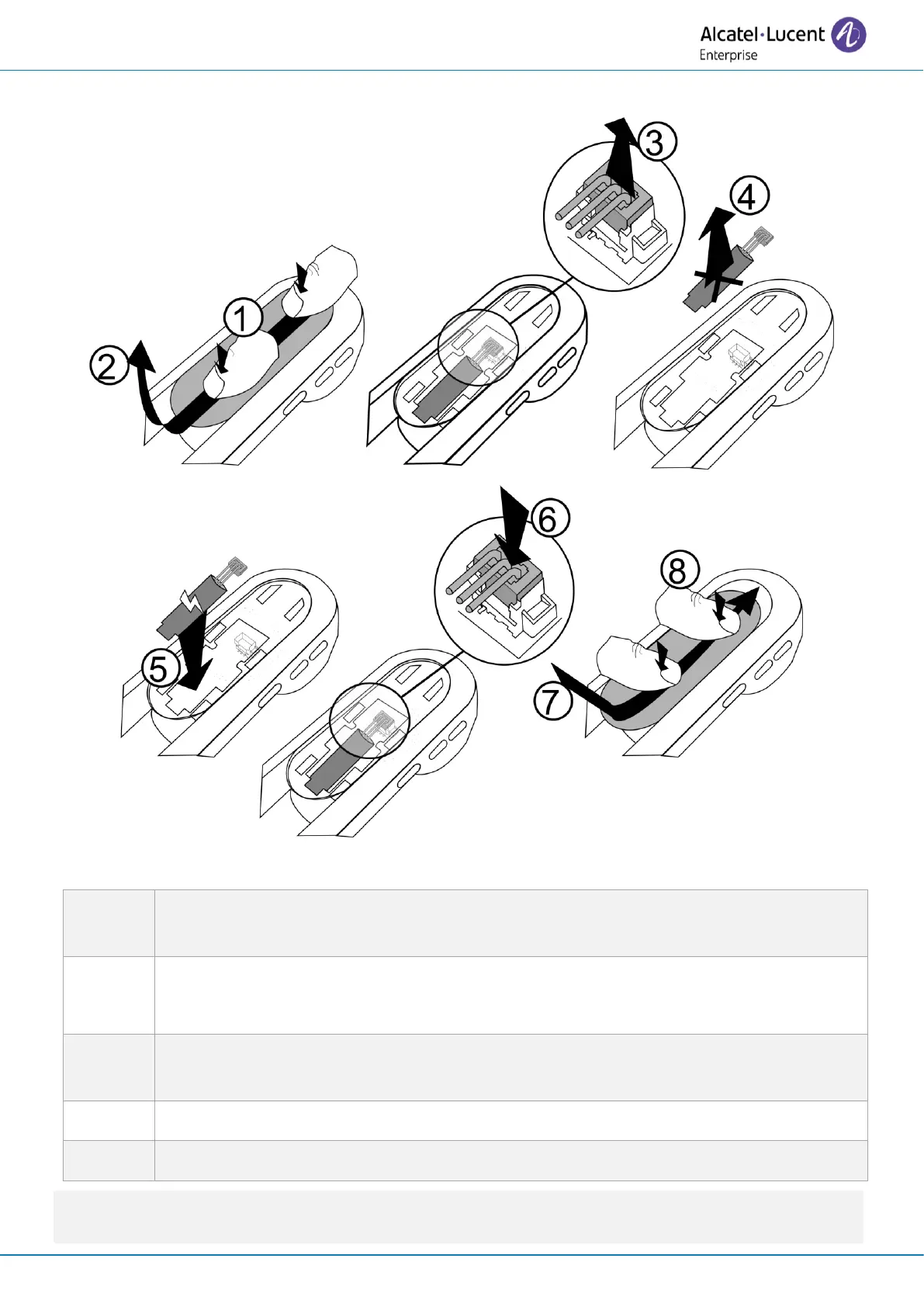
To replace the battery, with the handset turned off:
1
Press, then slide the piece towards the bottom of the device a few millimeters with
your thumbs.
2
Remove the piece by lifting it.
Be careful not to break the clips.
3, 4, 5, 6
Disconnect the old battery and replace it with the new one by joining the 2
connectors.
7
Place the piece by respecting the notches.
8
Slide the piece to the top of the handset a few millimeters with your thumbs.
A spare battery can be ordered from your business partner: ALE-161 WB Cordless Handset Battery
Pack.

Table of Contents

Related product manuals