20130115_rev1.1_A2_Configuration_Manual_-_1.0.6.48.doc
Commercially Confidential
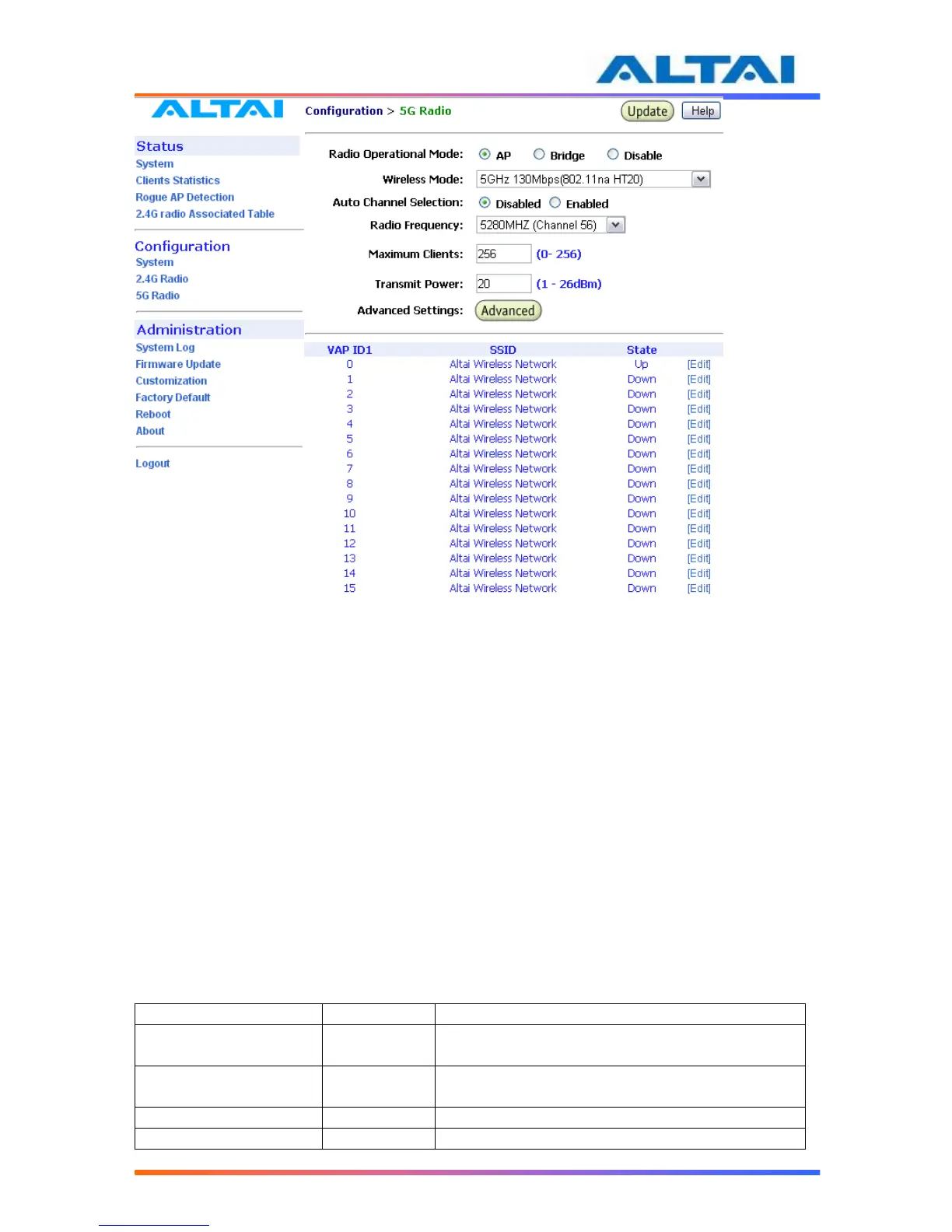
Figure 30 5GHz Radio Parameter Configuration
4.20.1 AP Mode
A2 offers AP mode in 5GHz Radio. 5GHz Radio working on AP mode is used for clients
association. Altai A2 combines 802.11a, 802.11na HT20 and 802.11na HT40 together to offer
access for clients.
4.20.2 Bridge Radio Wireless Mode
A2 can work under either 802.11a mode or 802.11na mode by selecting on pulling down list. If
A2 is set to 802.11a mode, A2 allows only 802.11a bridges to connect as peers, if A2 work in
802.11a turbo static mode, A2 will allows only same 802.11na bridges to connect as peers.
4.20.3 Data Rate & Radio Frequency
The choice of this item depends on the environment where A2 is used and which wireless mode
A2 is working in.
36, 40, 44, 48, 52, 56, 60, 64, 100, 104, 108, 112,
116, 120, 124, 128, 132, 136, 140
36, 40, 44, 48, 52, 56, 60, 64, 100, 104, 108, 112,
116, 120, 124, 128, 132, 136, 140
36, 44, 52, 60, 100, 108, 116, 124, 132
40, 48, 56, 64, 104, 112, 120, 128, 136
Table 7 5GHz Radio channel and Data Rate for ETSI



 To Next Page