S-4000
1-9
Revised 01/2005
e-mail: service@amfreece.cz; parts@amfreece.cz; website: www.amfreece.com
Phones: +420 582 309 146 (Service), +420 582 309 286 (Spare Parts); Fax: +420 582 360 606
OPERATOR CONTROLS
On/Off Push Buttons
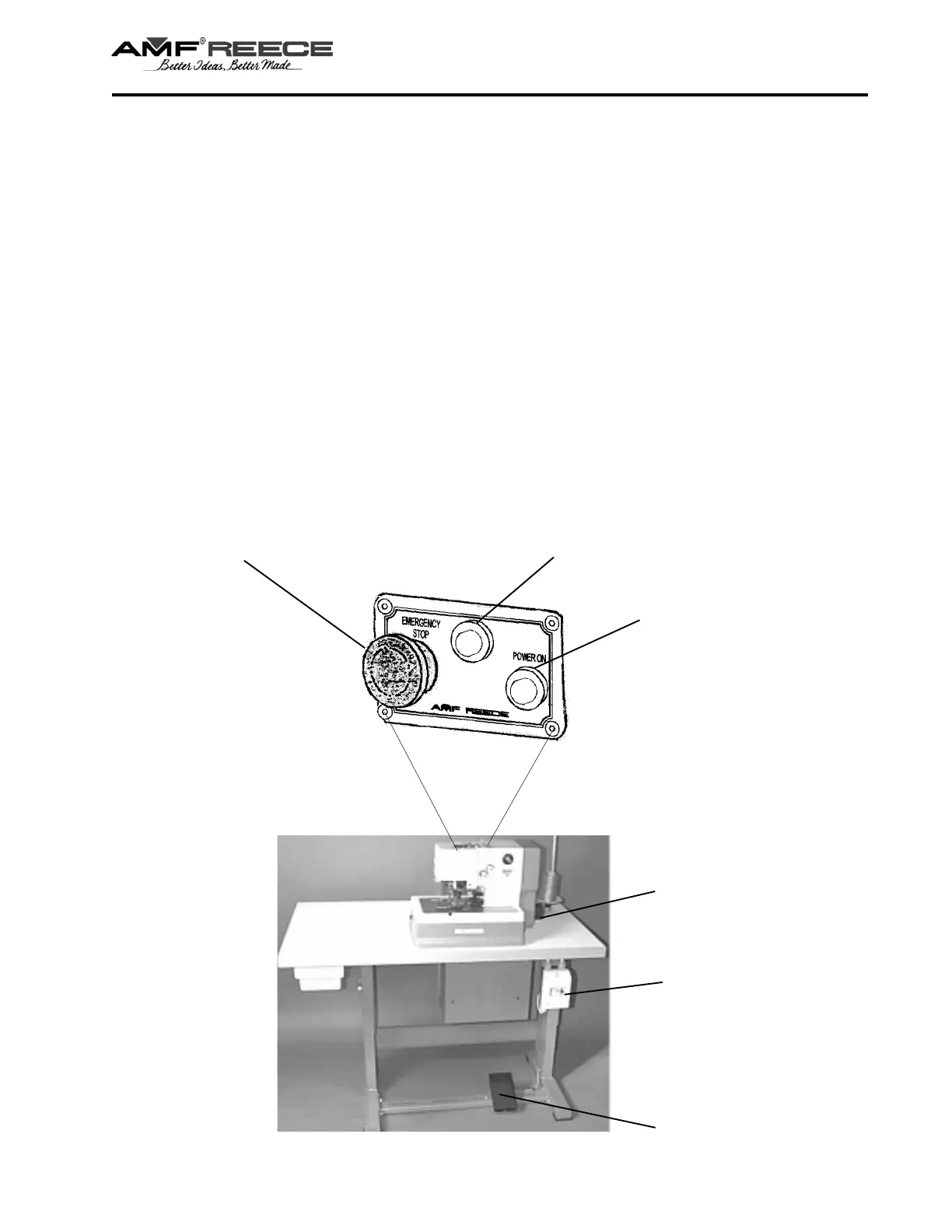
The main switches regulate power supply to the machine. There are two buttons as a part of the main
switch:
- black button - for machine switch on
- red button - for machine switch off
When you switch the machine on by means of main switch, greed LED lights on the main panel. This LED
indicates power supply to the machine.
Emergency Stop
Pressing the red emergency stop push-button, located on top of the sewing head, immediately stops the
sewing cycle. The red lamp flashes and the machine will not start. To release the emergency stop, press the
red emergency stop push-button and the green light will activate, the machine is ready to sew. The machine
may stop anywhere in the cycle. If the machine stops with the needle in the fabric, the fabric cannot be
removed, manually rotate the handwheel to raise the needle out of the fabric.
Foot treadle
Machine main
power push-
button switches
Emergency stop push-button switch
Red lamp
Green lamp
Handwheel



 To Next Page