Page 21
1) Some devices require also other pins to be connected
to GND, this can be found in a picture in the device
datasheet in chapter "High-voltage Serial
programming".
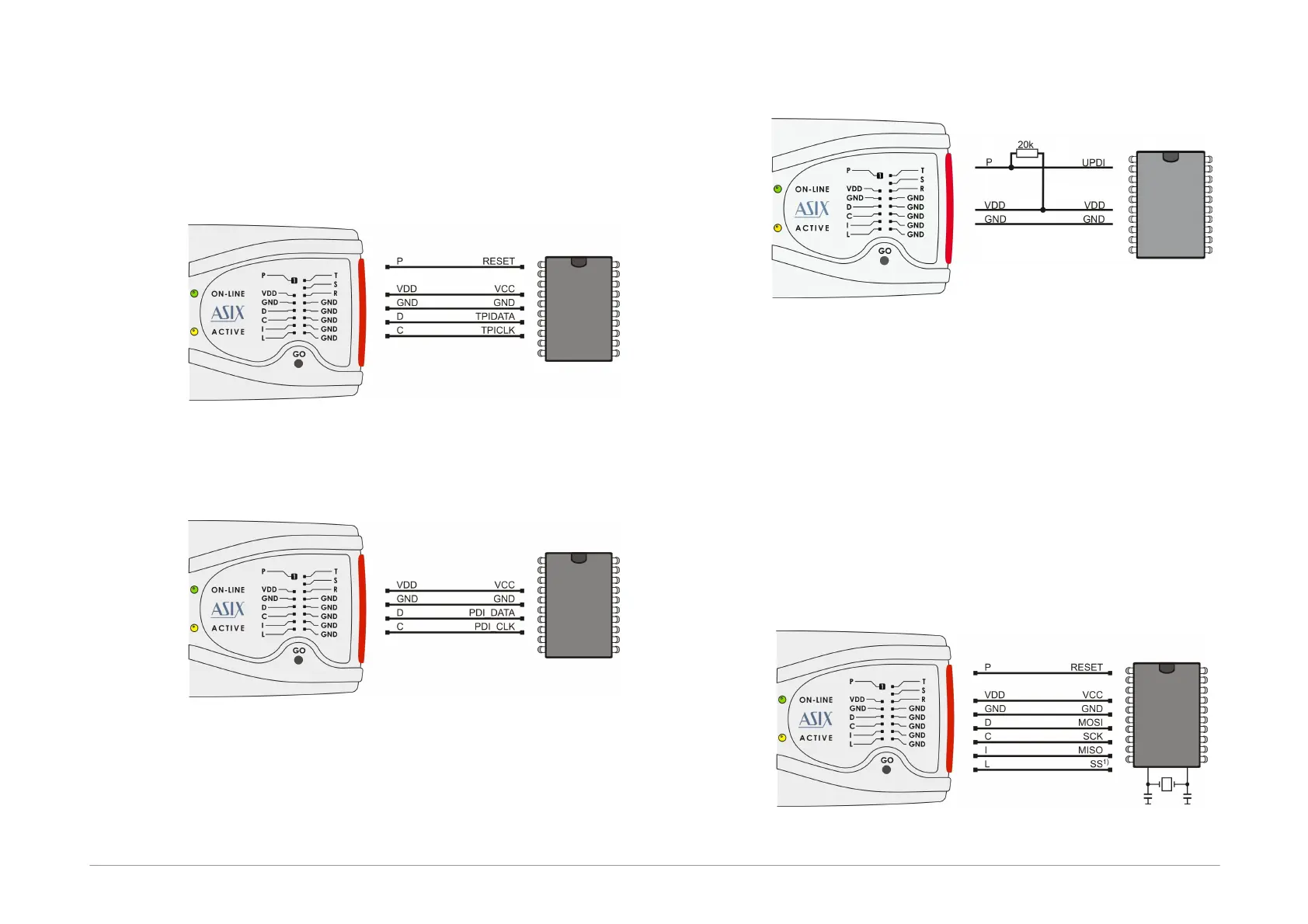
AVR with TPI Interface (e.g.
ATtiny10)
Fig.12: AVR microcontroller, TPI interface
ATxmega with PDI Interface
Fig.13: ATxmega microcontroller, PDI interface
1) For programming that uses the JTAG interface,
devices must be connected as described in the JTAG
Interface section.
AVR with UPDI Interface
Fig.14: AVR microcontroller, UPDI interface
1) On UPDI pin a 12V pulse is used to enter the
programming mode of ATtiny UPDI.
2) When the programmed device quiets the
programming mode or the UPDI interface is disabled
during programming, a power-on reset of the
programmed device have to be done.
3) For AVR with UPDI data files with memories mapped
from zero are expected and their fuses save to a
project file same as for older AVRs, because Atmel
Studio creates the data files this way.
Atmel 8051
Fig.15: Atmel 8051 microcontroller


 To Next Page