CHAPTER 3 FLYING THE EVOLUTION BACKUP DISPLAY
Page 3-2
091-00027-001 REV A Evolution Backup Display Pilot’s Guide
Page 3-3
091-00027-001 REV A
Evolution Backup Display Pilot’s Guide
FEATURE SETTING FEATURE SETTING
Selected
Airspeed
Set as desired
Top and Bottom
Buttons
Map RNG
(Range) Buttons
Set as desired
Center Button
Selected
Altitude
Set as desired
Barometric
Pressure Setting
Field
on/o
Compass Mode
Hot Key: 360 or
ARC
Set as desired
Barometric
Pressure (BARO)
Hot Key
Allows
for BARO
adjustment
Heading Bug
Value
Set as desired
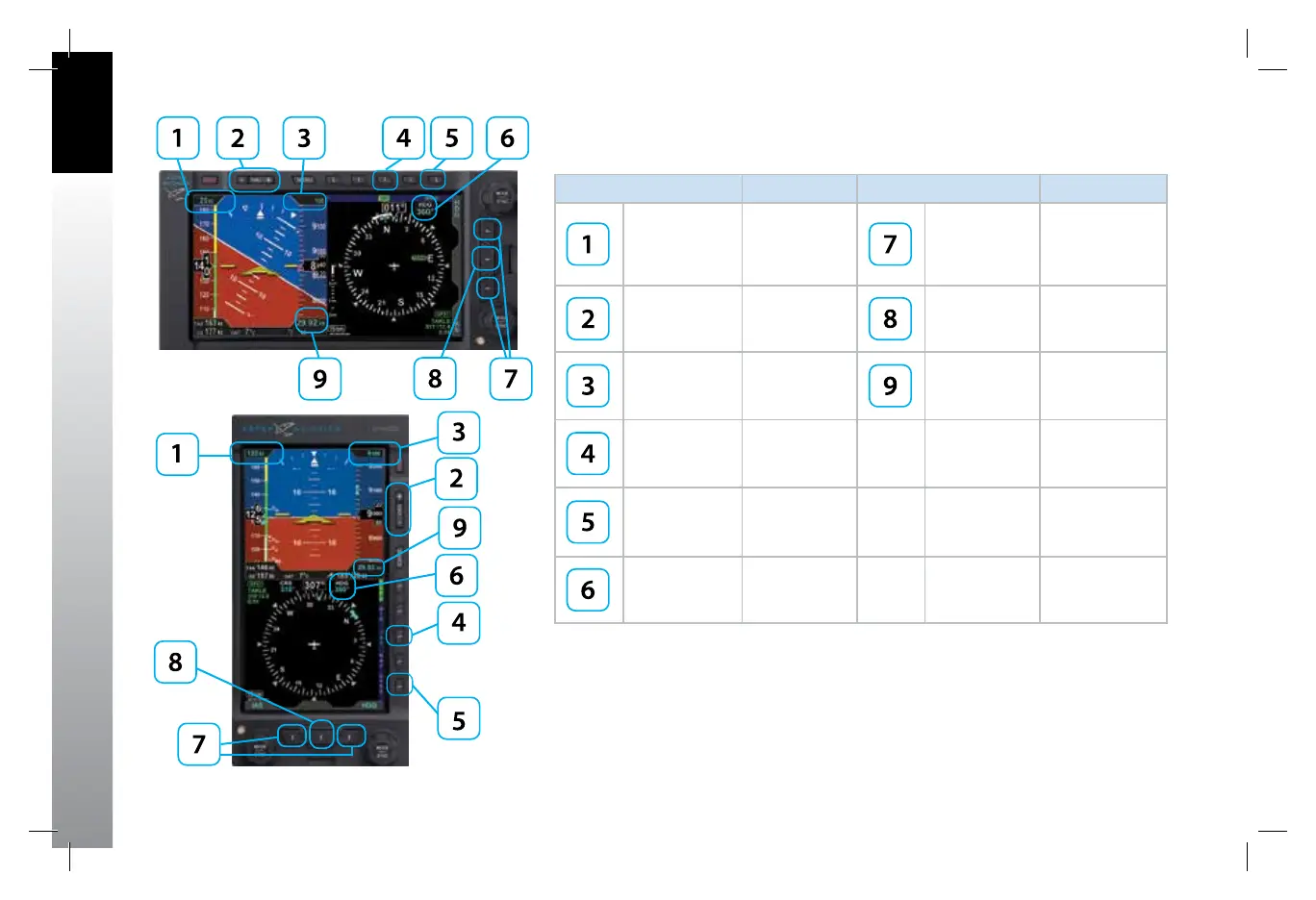
Table 3-1 Primary EBD Settings
Figure 3-1
Primary EBD Settings
Figure 3-1 a
Evolution Back up Display
Basic, Portrait + call outs
091-00027-001 Rev A EBD Pilots Guide V&H .indb 2 8/27/14 8:51 AM



 To Next Page