CHAPTER 4 REFERENCE GUIDE
Page 4-14
091-00027-001 REV A Evolution Backup Display Pilot’s Guide
Page 4-15
091-00027-001 REV A
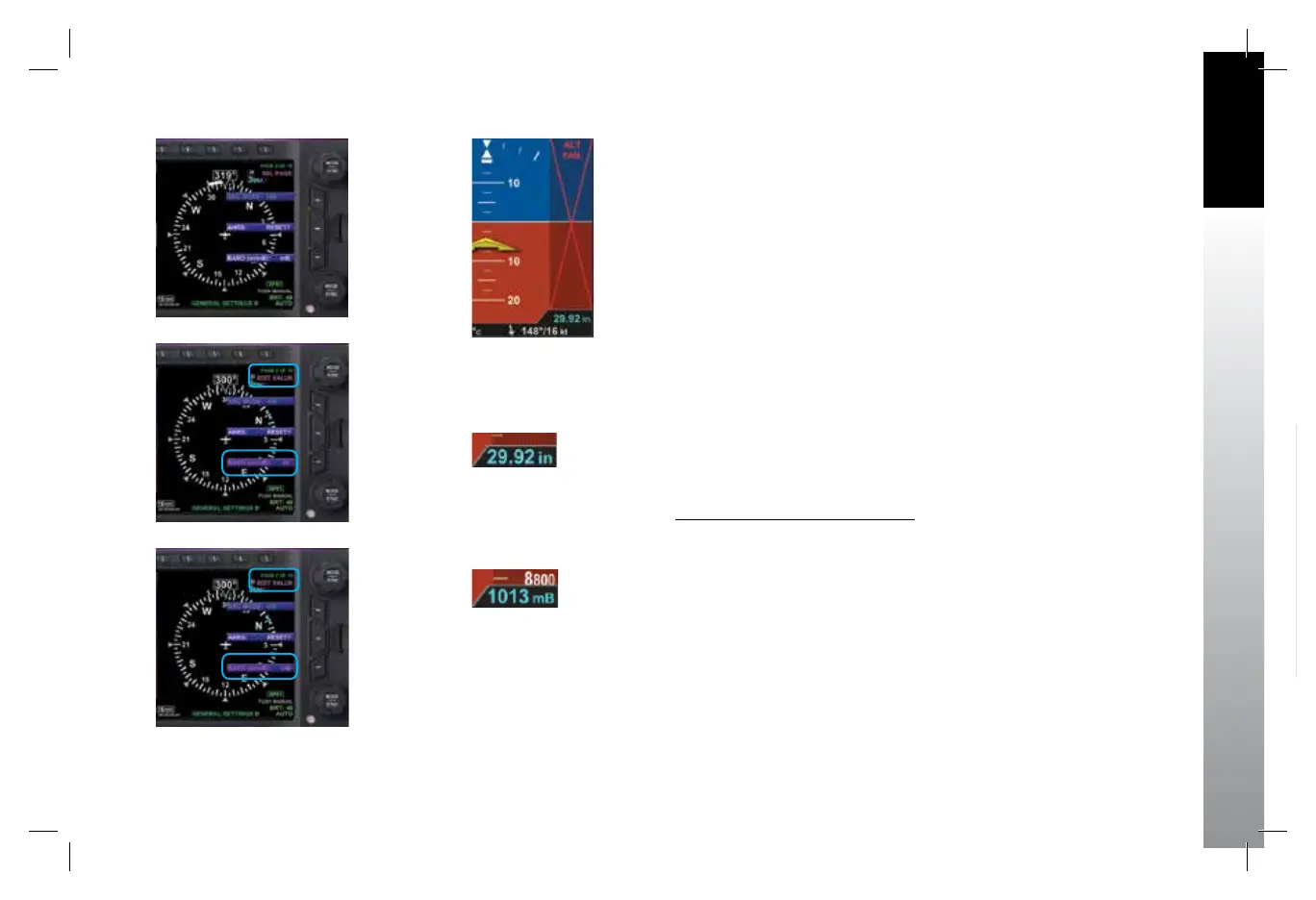
Figure 4-16
Baro Shown in
Inches of Mercury
Figure 4-17
Baro Shown in Millibars
Figure 4-15
Altitude Failure
An adjacent, magenta Altitude Trend Vector predicts the anticipated
altitude, in the next six seconds, if the current rate of climb or decent is
maintained. Like the VSI, there is a slight lag in the indication. If the ribbon
meets or exceeds the display limit, the vertical trend is large. The Altitude
Trend Vector does not display when the altitude remains constant.
If the altitude exceeds 51,000 feet, the Numerical Altitude Value is dashed,
and the tape is frozen at this limit. All altitude information is removed and
replaced with a red X with the textual annunciation of ALT FAIL when
altitude data is invalid (Figure 4-15).
4.2.3.1. Barometric Units of Measure
Barometric units of measure adjustment may be made in either inches of
mercury (in) (Figure 4-16) or millibars (mB) (Figure 4-17), as congured
by the pilot in the Menu. The adjustment range is 28.10 – 30.99 inches
Hg or 946 – 1049 mB. The barometric pressure default value is 29.92
inches, or as previously set.
Set Barometric Units of Measure
1. Press the MENU Button.
2. Rotate the Top Knob to select the GENERAL SETTINGS B page
(Figure4-18).
3. Press the BARO Menu Key.
The Menu label turns magenta, and the EDIT VALUE label displays above
the Top Knob (Figure 4-19).
4. Rotate the Top Knob to select either in or mB (Figure 4-20).
5. Press the MENU Button to exit.
Figure 4-18
Editing BARO
Units of Measure
GENERAL SETTINGS B
Figure 4-19
Editing BARO
from in to mB
Figure 4-20
BARO Set to mB
(millibars)
091-00027-001 Rev A EBD Pilots Guide V&H .indb 15 8/27/14 8:51 AM



 To Next Page