TECHNICIANS' manual34 of 104
6.6.3 AEP version
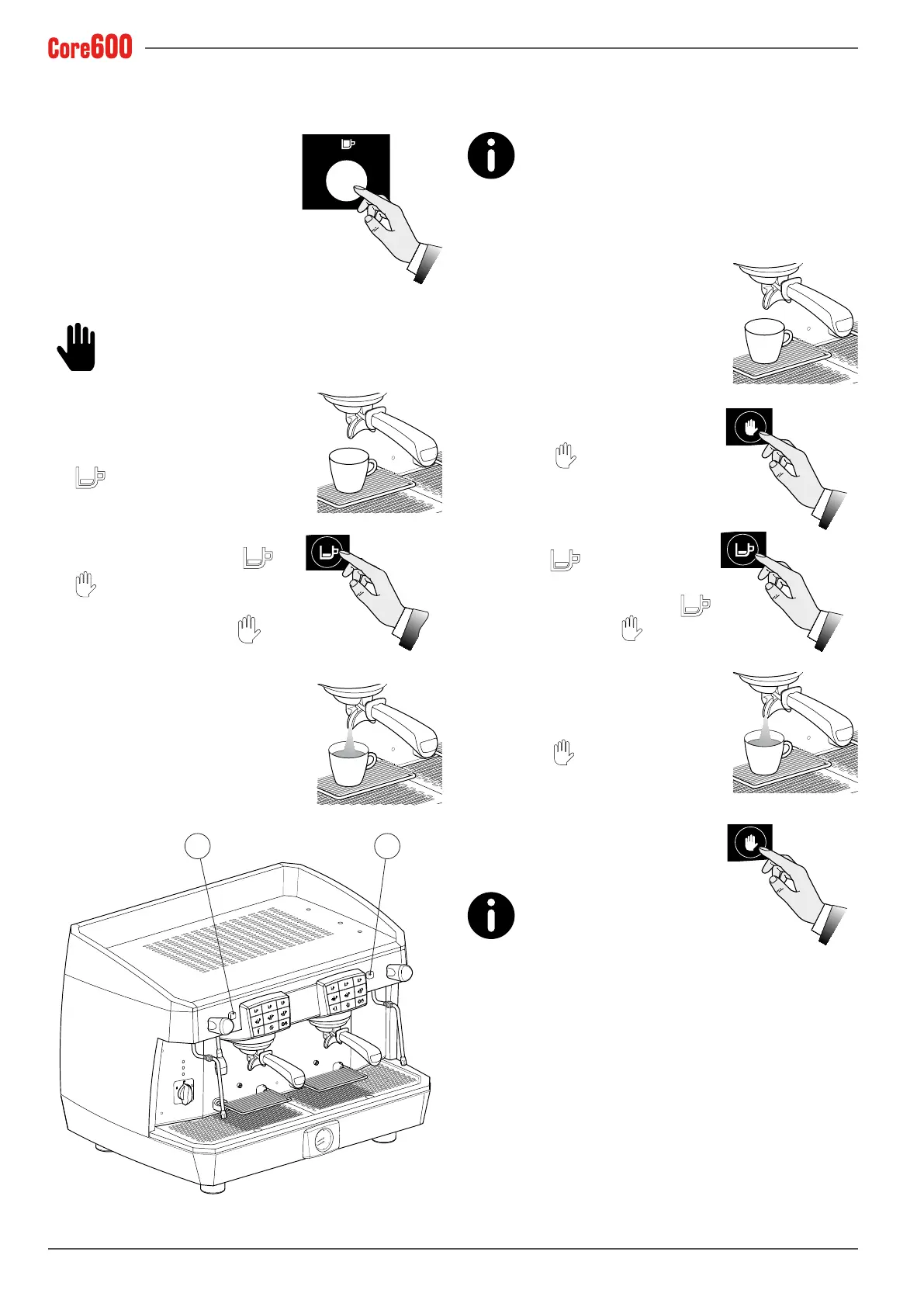
• Place the coffee cup under the dispensing spout.
• Press the desired dispensing
switch; the coffee will begin being
dispensed, and it can be stopped
via the same switch once the de-
sired amount of coffee has been
dispensed into the cup.
6.6.4 SAE and DISPLAY versions
Do not remove the lter holder from the dispens-
ing group when coffee is being dispensed.
• Place the coffee cup under the dis-
pensing spout.
• Press the desired dose button, e.g.
and wait until the coffee is
dispensed (LED will light up).
• To stop the coffee dispensing
ahead of time, press the
or
button.
• When enabled, use the
but-
ton to continuously dispense cof-
fee.
• Should an anomaly occur or the
pushbutton panel freeze, use the
manual switch (17).
17 17
6.6.5 Programming the coffee dispenses
on the SAE and DISPLAY versions
Each dose must be programmed with freshly
ground coffee and not with previously-used coffee
grounds.
The machine is programmed by default. Should the coffee
dosesneedtobemodied,proceedasfollows:
• Always programme the right push-
button panel rst. This way, all the
pushbutton panels will be automati-
cally programmed. If necessary, sub-
sequently programme the others.
• Place the cup under the dispensing
spout.
• Press the
button for at least 5
seconds, until all the dose button
LEDs are lit.
• Press the desired dose button, for
example
.
• Toconrmthedose,pressthe
button again or the
button.
• Repeat this operation for the other
dose buttons.
• When the programming is complete,
press the
button until all of the
LEDs on the pushbutton panel go
off.
All the groups will now be pro-
grammed this way. Should
you wish to programme them
differently, proceed to singularly pro-
gramme the left-hand groups one by one as illustrated
above.


 To Next Page
 Loading...