TECHNICIANS' manual 97 of 104
16.2 Till connection via interface (DEBIT-
CREDIT system only)
16.2.1 Installation
• Turn the machine off.
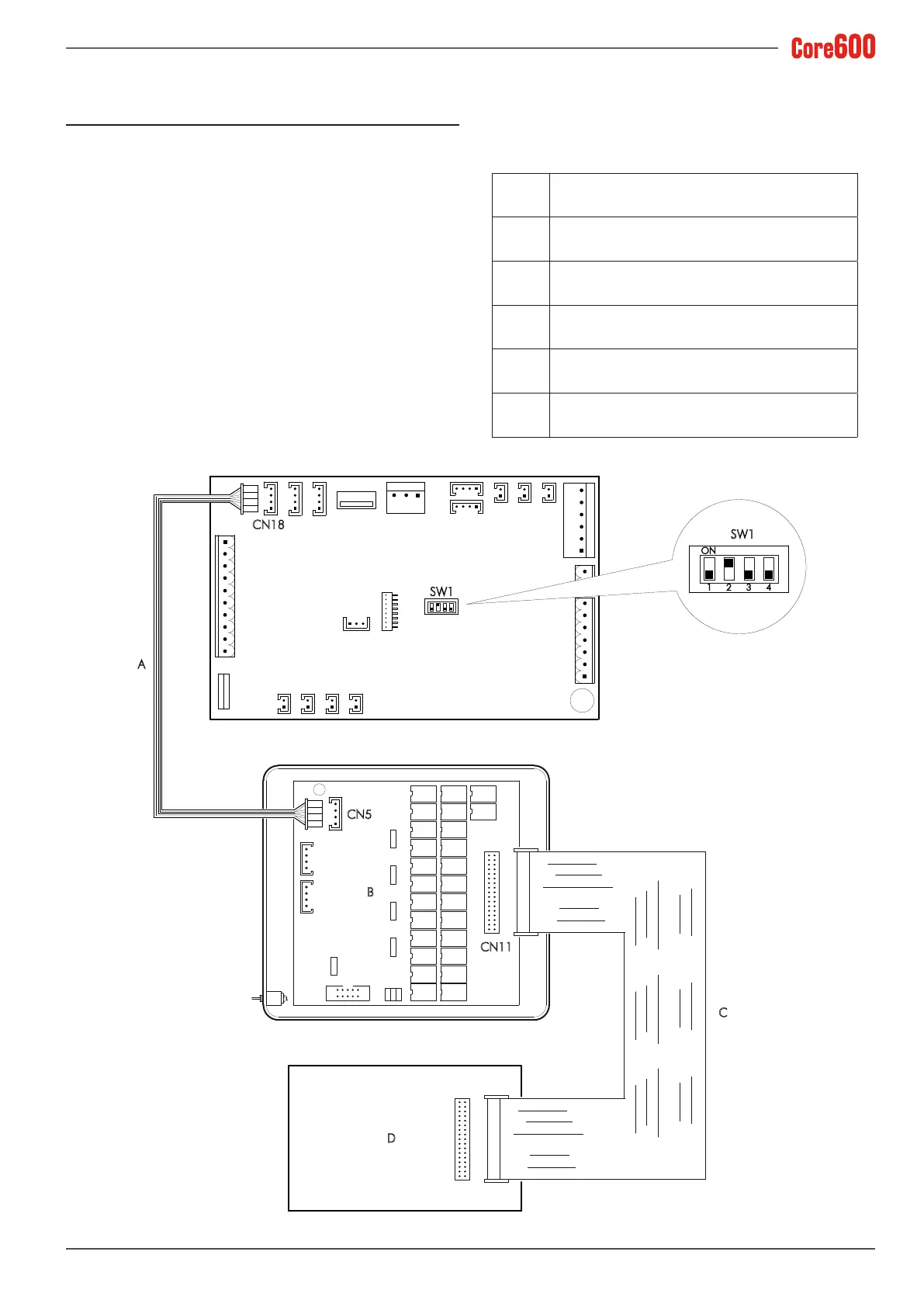
• Congure the SW1 jumpers of the machine’s electronic
control unit as indicated in the wiring diagram.
• Connect the supplied cable (A) to the CN18 connector of
the machine’s electronic control unit and the interface (B).
• Useaatribboncable(C) to connect the interface (B) to
the till (D). By means of a software implementation at the
till, the commands from the interface (B) must be associ-
ated with the selections in the table.
• Turn the machine back on.
SW1
CN18
A
1
ON
SW1
2 3 4
B
D
C
CN5
CN11
A Serial connection cable supplied, code: 22558
B I/O Interface - Code: 26011
C 4-poleatribboncable-Code:22550
D Till
CN18 RS232 electronic control unit connector
SW1 Electronic control unit dip switch










 To Next Page