TECHNICIANS' manual38 of 104
6.11.3 Programming the cup warmer on
the SAE version
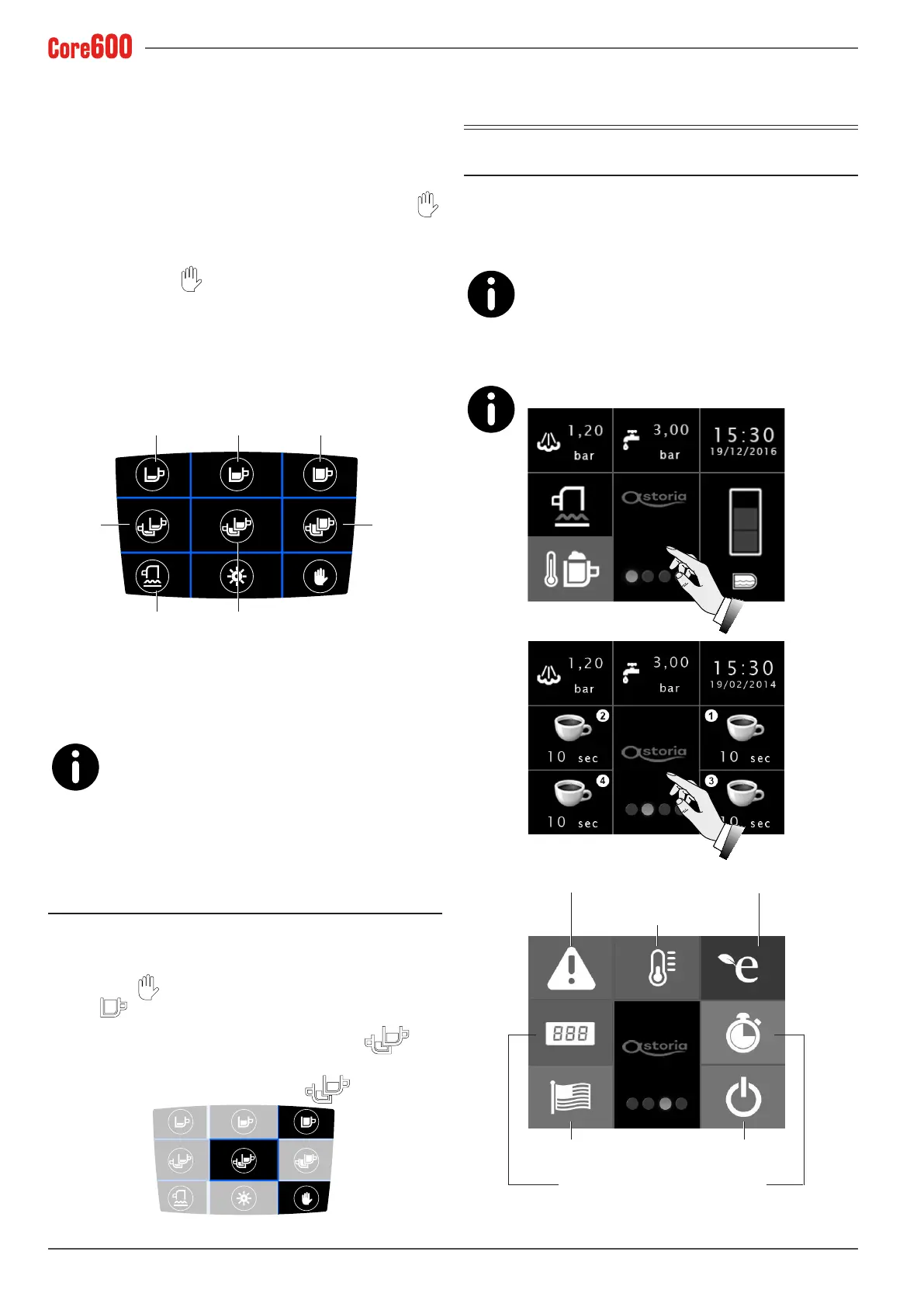
To adjust the cup warmer temperature, proceed as follows us-
ing the right pushbutton panel:
• When the machine is switched on, wait for all of the but-
ton LEDs to light up and then immediately press the
button:theashingLEDwillindicatethecurrentcongu-
ration of the cup warmer, as shown in the diagrams below.
• Hold down the
button until the LED on the panel
goesfromaashingtoasteadylight.
• Pressthe keythat corresponds to the desired congura-
tion.
• Conrmtheoperationbyswitchingthemachineoffand
back on.
70°C
100°C
Cup warmer
60°C
90°C
80°C
110°C
6.11.4 Programming the cup warmer on
the DISPLAY version
To adjust the temperature of the cup warmer on
the Display model, see chapter 6.13.4.
6.12 Programming the standby mode
(SAE version)
To put the machine in standby mode, i.e. switch it off whilst
keeping the pushbutton panel active, proceed as follows:
• Press the
button on the right pushbutton panel and
the
button immediately afterwards.
• The machine is in standby mode when the
but-
ton'sLEDashes.
• To exit the standby mode, press the
button.
.
7. Programming the “DISPLAY”
version machine parameters
7.1 Accessing the menu
To access the machine's programming modes and where the
data can be viewed, touch the display twice.
Select the various buttons to access the sections indicated in
the following paragraphs.
The system automatically exits the programming
mode 20 seconds after the last operation was car-
ried out.
Always use the right pushbutton panel for the programming
modes.
To update the machine's software, see para. 8.6.
Machine
alarms
Language
settings
Work count
Automatic steam wand/
cup warmer
temperature
Heating unit pressure
Energy saving
mode
Standby and
programming
Machine
working hours
45°C



 To Next Page