TECHNICIANS' manual44 of 104
7.8 Work schedule
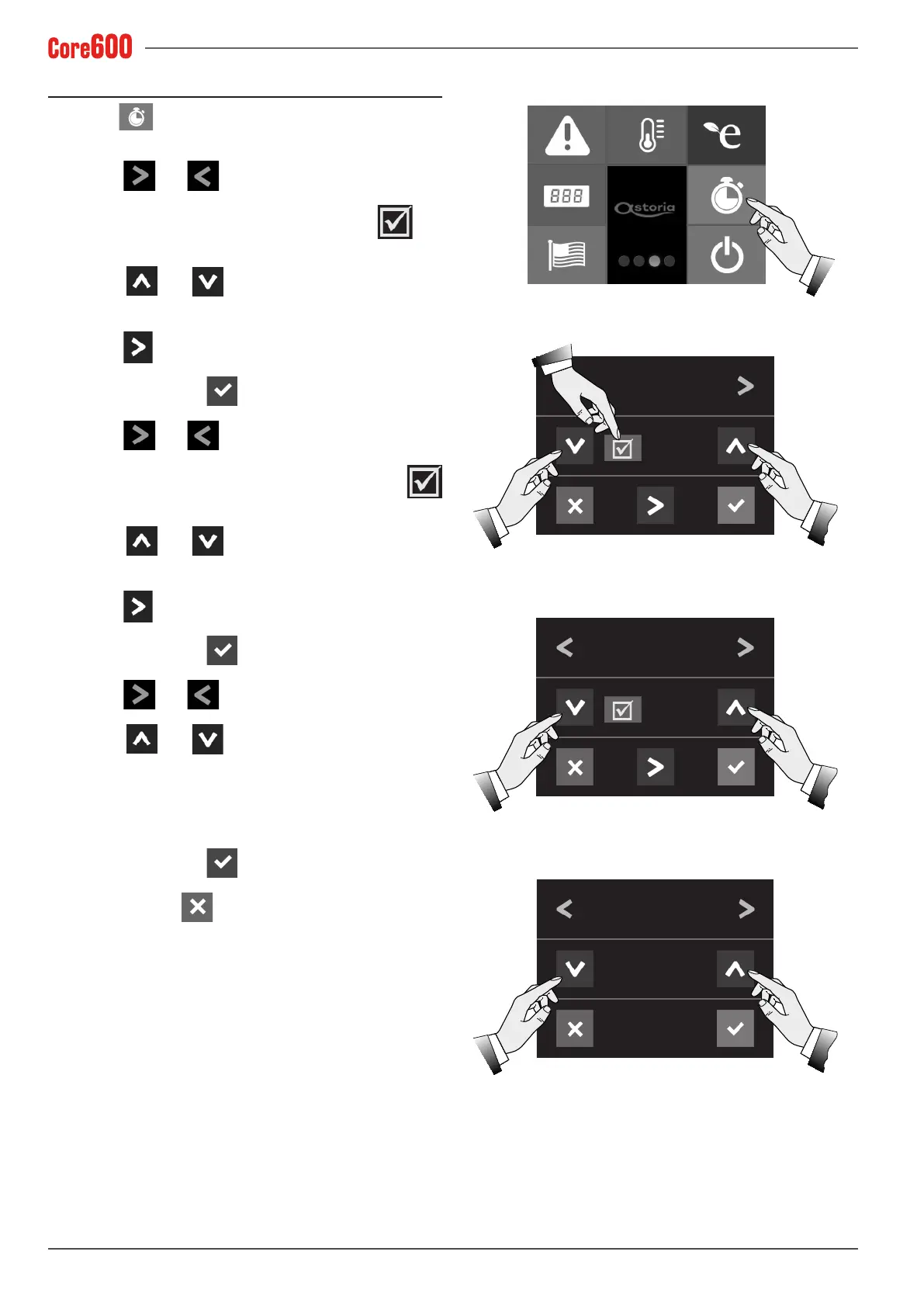
Select the button in order to programme the ON and
OFF times of the machine, and its non-operating days:
• Use the
and arrows to set the “ON” time;
• To enable the machine's ON function, press the
but-
ton.
• Use the
and arrows to set the time when the
machine switches on;
• Use the
arrow to move the cursor to the value.
• Toconrm,pressthe
button.
• Use the
and arrows to set the “OFF” time;
• To enable the machine's OFF function, press the
button.
• Use the
and arrows to set the time when the
machine switches off;
• Use the
arrow to move the cursor to the value.
• Toconrm,pressthe
button.
• Use the
and arrows to set the “CLOSED ON 1”;
• Use the
and arrowstosetthemachine'srst
non-operating day;
• Follow the same procedure for the second non-operating
day;
• Toconrm,pressthe
button.
• To exit, press the
button.
10: 25
ON TIME
06: 30
OFF TIME
22: 30
CLOSED ON NO.1
MONDAY









 To Next Page