TECHNICIANS' manual94 of 104
16. DEBIT-CREDIT SYSTEM
16.1 Direct connection to the till
16.1.1 Installation
• Turn the machine off.
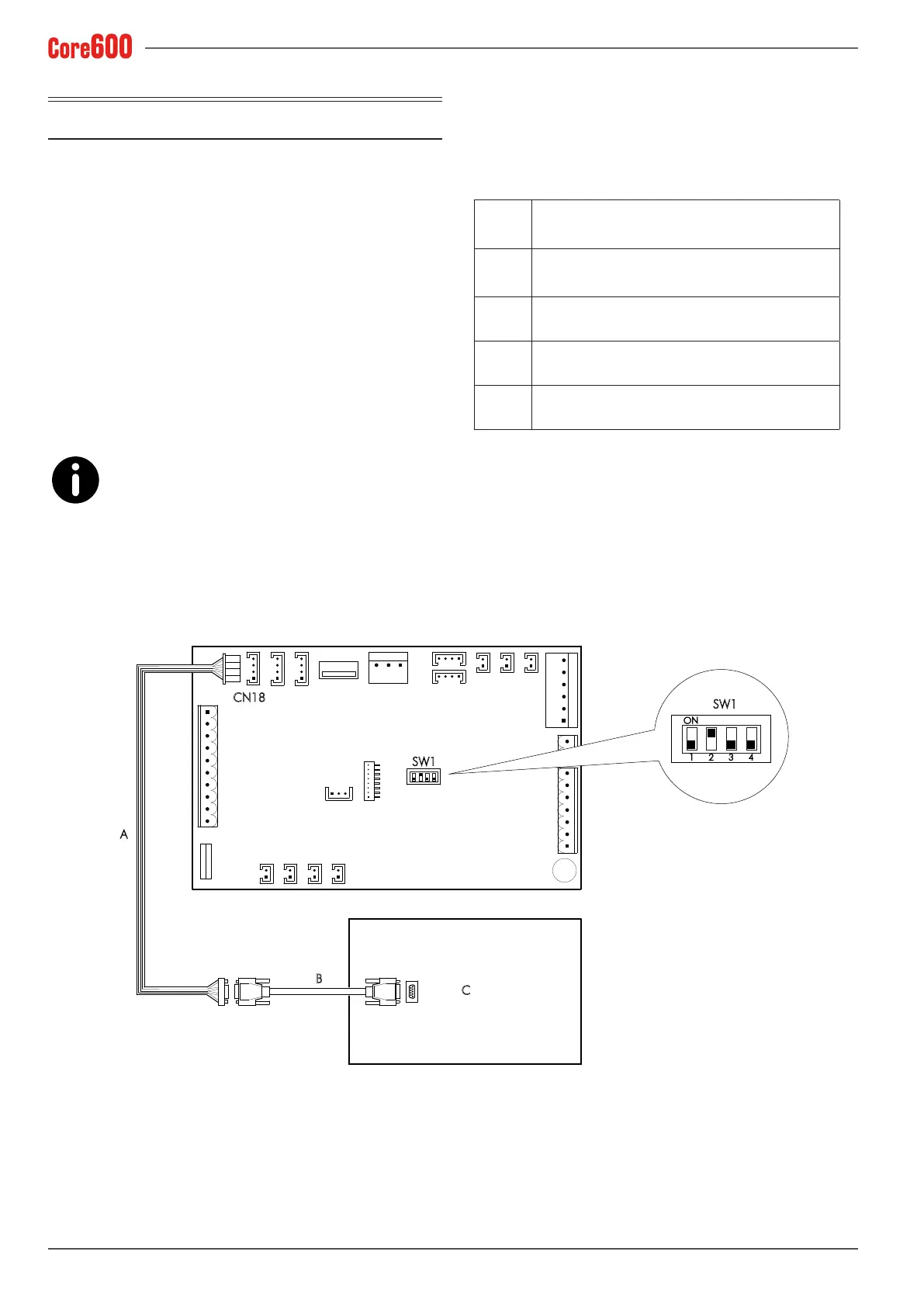
• Congure the SW1 jumpers of the machine’s electronic
control unit as indicated in the wiring diagram.
• Connect the supplied cable (A) to the CN18 connector of
the machine’s electronic control unit.
• Use a standard serial cable (B) to connect the cable (A) to
the till (C).
• Turn the machine back on.
The till management software and the standard
serial cable (B) are not the responsibility of the
manufacturer. Till response timeout: 1 second. Doses can be
programmed without having to disconnect the Credit-Debit
device.
A
Serial connection cable supplied, code:
22554012
B
Standard serial cable not supplied (max. 15
metres long) - Code: 22556004
C Till
CN18 Electronic control unit connector
SW1 Electronic control unit jumpers
SW1
CN18
A
B
C
1
ON
SW1
2 3 4







 To Next Page