TECHNICIANS' manual68 of 104
8.6.2 Circuit Board software update
• Turn the machine off.
• Remove the machine's right side panel;
• Remove the circuit board cover;
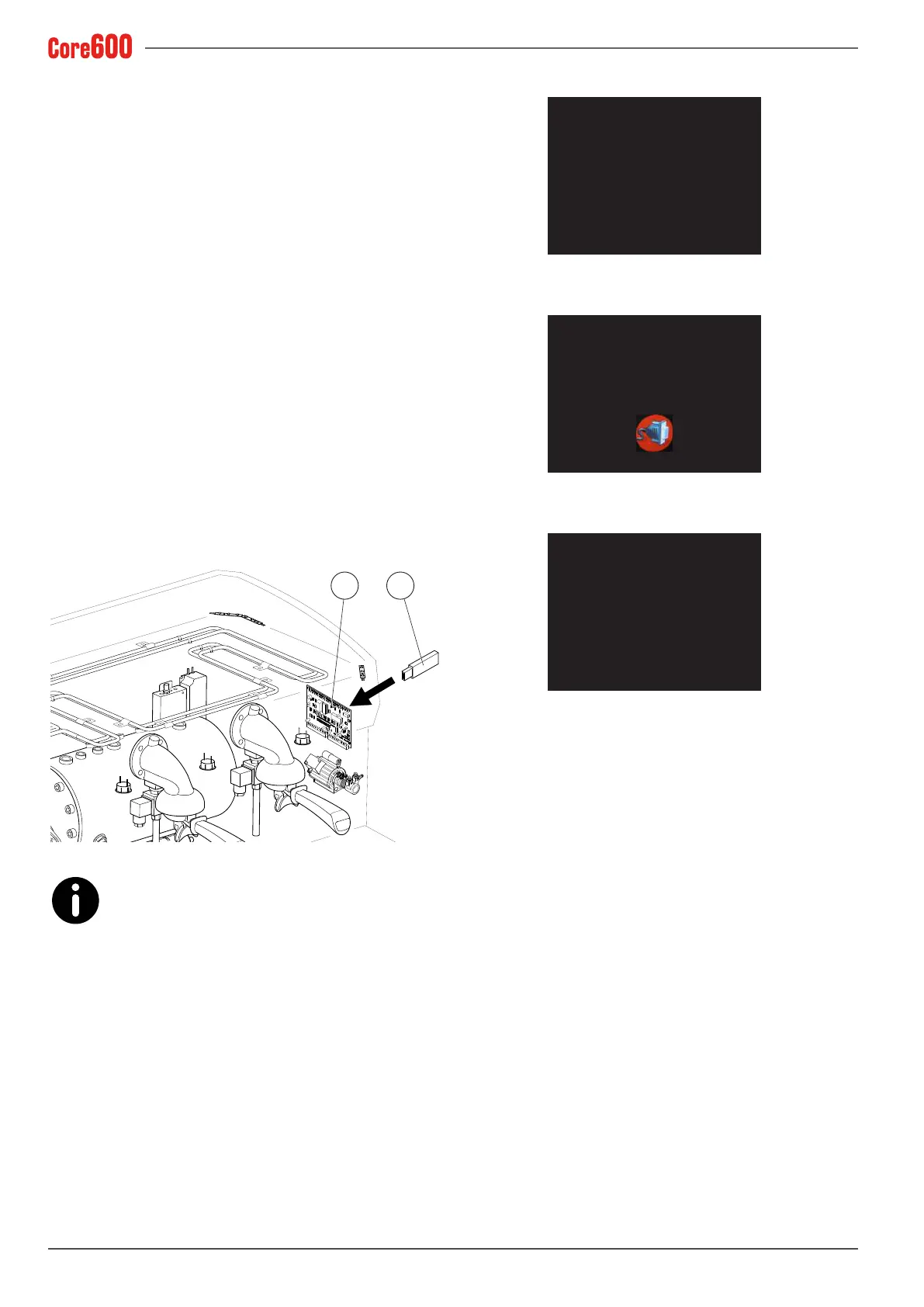
• Insert the memory stick (1) into the special port on the
electronic control unit (2);
• Turn the machine on again;
• Waitfortheupdatetonishinstalling;
• Turn the machine off;
• Remove the memory stick (1) from the electronic control
unit;
• Reposition the circuit board cover;
• Reposition the machine's side panel and turn the machine
back on.
2 1
The only stick that can be used in the USB port is
the USB stick provided exclusively to the Mainte-
nance Technician. Do not connect external devices
(iPhones, iPads, PCs, etc.) to the USB port because it could
create serious machine software problems.
XPV35 PERLA
Controller Board
FW ver. 01.09
FW ver.
XPV35 PERLA
Controller Board
FW ver. 01.09
FW ver. 1.16
XPV35 PERLA
Controller Board
FW ver. 01.09
FW ver. ??.??









 To Next Page