8
Part names and functions
ATW-R1440
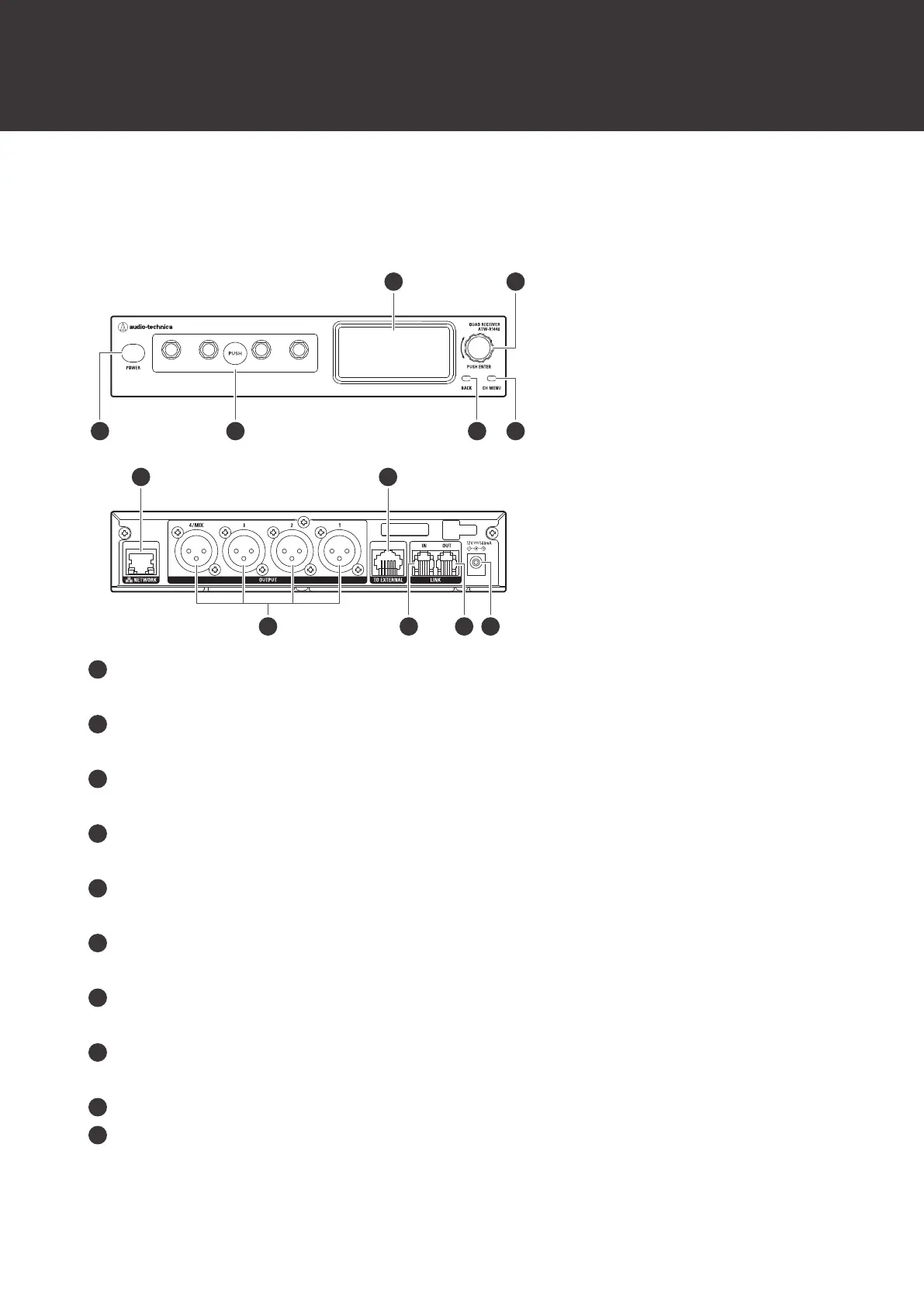
This receiver is a combination of a receiver chassis (ATW-RC14) and receiver unit (ATW-RU14).
Display
Displays the receiver state and settings menus.
Control dial
Turn the dial to select a setting item and press to confirm.
Power button
Turns the power on or off.
Receiver unit
You can remove this unit to install it externally.
BACK button
Press to take the display back one screen. Press and hold to return to the main screen.
CH MENU button
Press to display the channel settings menu. Each press of this button switches the channel to set.
NETWORK port
Connecting this port to a PC via Ethernet allows you to configure settings and monitor from the PC.
External receiver unit port
When externally installing the receiver unit, connect a LAN cable (Cat.5e or higher) to this port.
AF balanced output connector (XLR 3-pin male)
LINK IN port
When linking multiple receivers, connect the included link cable to this port.













 To Next Page