User's Manual 6. Customizing the Phone
Version 3.0.1 41 405HD IP Phone for Microsoft Skype for Business
6.11 Defining an Outbound Proxy
Skype for Windows Server Multitenant Hosting Pack is a Microsoft® Unified Communications
(UC) hosting solution for telecommunications and hosting providers. The solution enables
Microsoft hosting partners to deploy a single instance of the Skype for Windows Server software
to securely and economically host multiple tenants with a rich, fully integrated UC solution.
To connect the AudioCodes' Skype for Windows-compatible phone to a hosted Lync environment
(LHP), a dedicated 'Outbound Proxy' parameter is available which is used to configure the hosted
service provider's domain name (FQDN).
Note:
• In hosted environments, it's common practice that this hosted domain name is different to
the enterprise's domain name.
• Refer also to the 400HD Series IP Phones for Lync Hosting Partner (LHPv2) Environment
Configuration Note.
To configure a phone for an LHP environment, configure the address of the Outbound Proxy as
the hosted service provider's domain name (FQDN).
To configure the address of the Outbound Proxy:
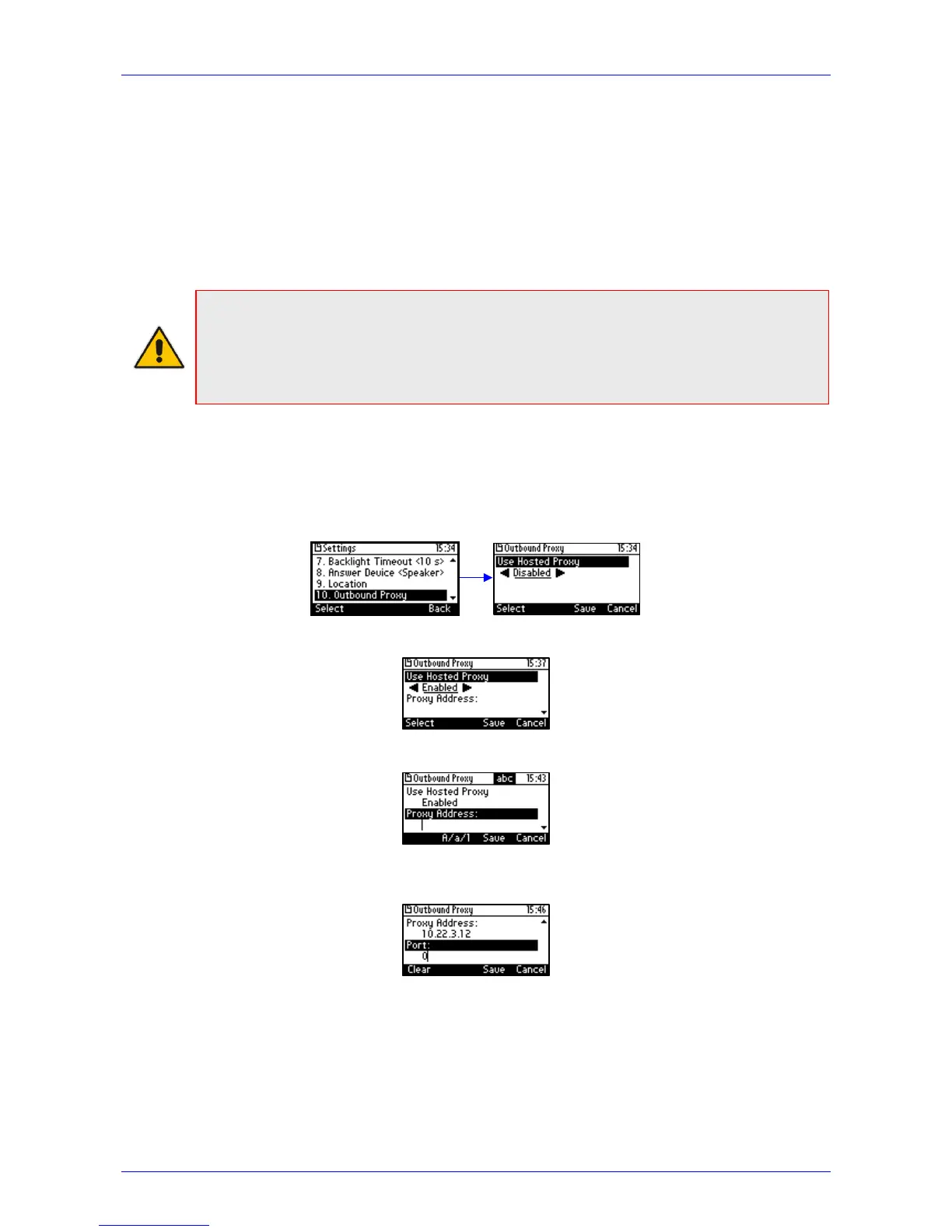
1. In the phone's screen, access the Outbound Proxy screen (MENU key > Settings >
Outbound Proxy):
2. Press the right rim of the navigation control to set the 'Use Hosted Proxy' field to Enabled:
3. Press the lower rim of the navigation control to navigate down to the 'Proxy Address' field:
4. In the 'Proxy Address' field enter the hosted service provider's domain name (FQDN) and
then navigate down to the 'Port' field:
5. Configure the Port (default = 0).
6. Press the Save softkey.








 To Next Page