User's Manual 8. Performing Advanced Operations
Version 3.0.1 71 405HD IP Phone for Microsoft Skype for Business
8.7 Parking a Call
You can park a call, i.e., you can transfer a call to a "parking lot" for it to be picked up on any
other phone in the enterprise by a party who must dial a retrieval number in order to retrieve it on
that phone. The retrieval number is configured in the Skype for Windows server's parking lot
parameter. Your system administrator can change the retrieval number if required.
Tip: Don't park a call unless you know precisely who you want to answer it. If you park a call,
it can be answered by anyone in the enterprise listed in the Skype for Windows server's
parking lot parameter.
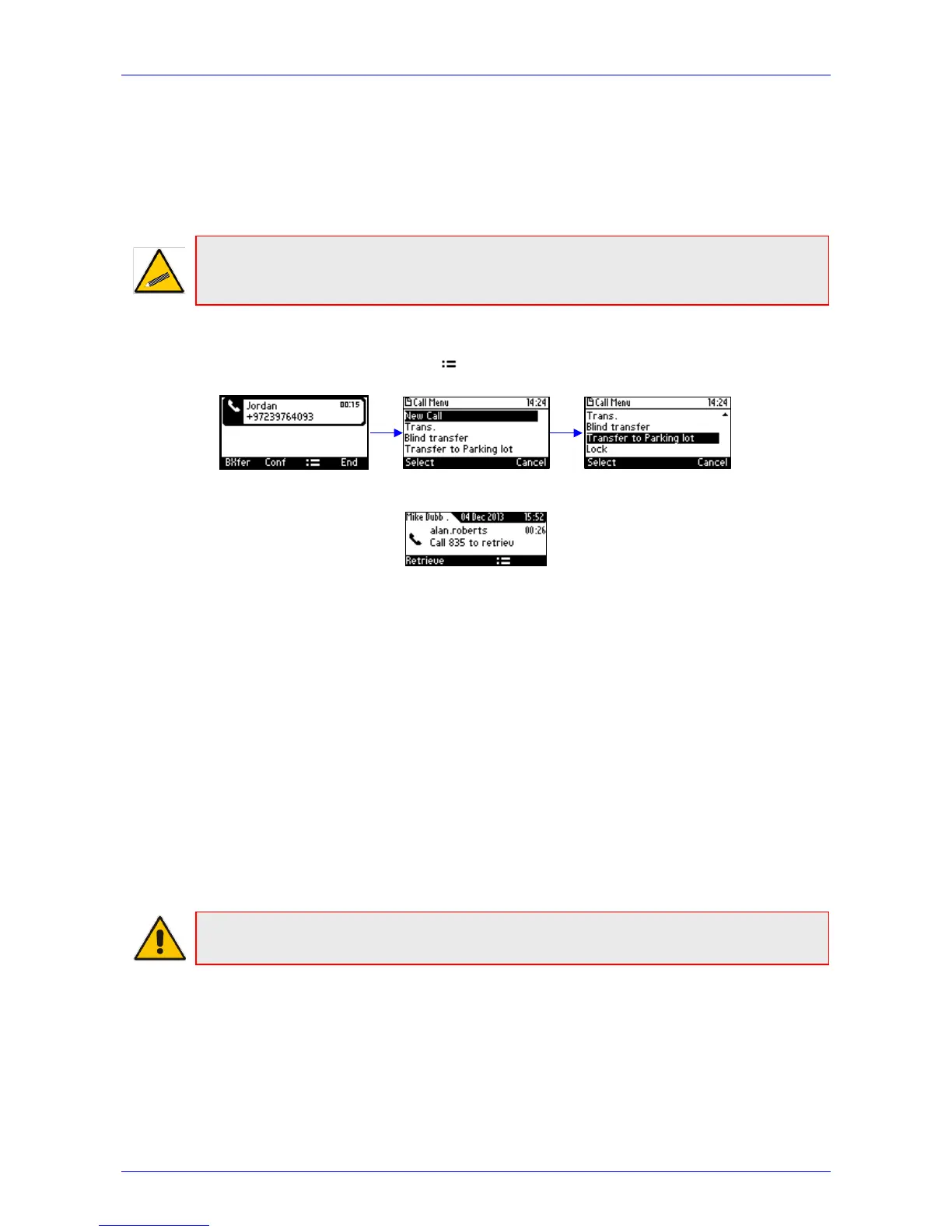
To park a call:
1. When you're in a call, press the softkey and then navigate to and select the Transfer to
Parking Lot option:
The screen notifies you of the retrieval number to dial to retrieve the call on another phone:
2. On another phone, dial the retrieval number (835 in the example above); the call is pulled to
that phone.
3. You can pull the call back to the phone which it was originally on by pressing the Retrieve
softkey.
8.8 Configuring Group Call Pickup (GCP)
The GCP feature enables enterprise employees to pick up calls that are ringing for another user,
by dialing a call pickup group number. Only employees configured in the Skype for Windows
server's GCP parameter can pick up the call. Consult your system administrator if required.
8.9 Initiating a Multi-Party Skype for Business Remote
Conference
A multi-party call conference based on the Skype for Business server (remote conference) can be
initiated from the phone.
Note: This section describes conferencing when Better Together over Ethernet (BToE) is not
installed. See Section 8.13.3 for information about conferencing when BToE is installed.
In versions preceding 3.0, supported conference capability was locally based (phone based). As
of version 3.0, the phone of the conference initiator uses CCCP (Centralized Conference Control
Protocol) to establish the conference. The feature is integrated with Microsoft Exchange, so in an
email invitation to join a Skype for Business meeting, you can click a Join link.








 To Next Page