59
Do not apply high-pressure water jets and avoid water leaking into the MaxiCharger.
Make sure that the inside of the MaxiCharger is dry during cleaning.
Do not use caustic solvents, sprays, solvents or abrasives.
The MaxiCharger is equipped with an air inlet filter and an air outlet filter with a large
mesh area to prevent the electronic components from being damaged by dust. Clean the
air filters every 3 months (not to exceed 6 months). Replace the air filters annually.
To clean or replace the air inlet filter
Before cleaning and replacing, be sure to stop all charging processes,
disconnect the external power supply, and perform the power-off protection.
Open the right-side door of the MaxiCharger. When the cabinet door is opened,
the MaxiCharger should not be directly exposed to wind and rain.
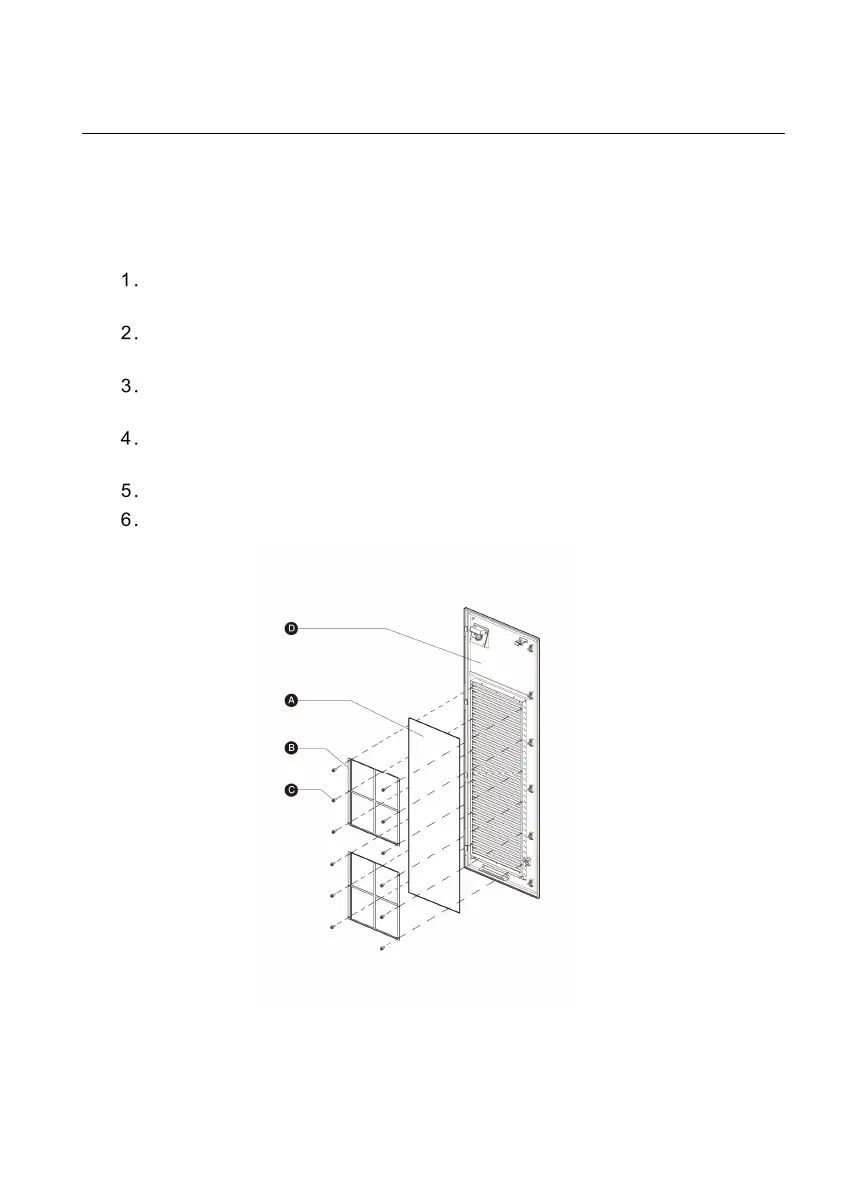
Remove the bezel (D) after removing the screws (C) using a screwdriver and
take out the fixing board (B) and air inlet filter (A).
Clean the air inlet filter of debris or dust and reinstall the cleaned filter.
Alternatively install a new air inlet filter.
Reinstall the bezel and screws.
Close the right-side door of the MaxiCharger.
Figure 7-1 Air Inlet Filter View



 To Next Page