60
To clean or replace the air outlet filter
Before cleaning and replacing, be sure to stop all charging processes,
disconnect the external power supply, and perform the power-off protection.
Open the left-side door of the MaxiCharger. When the cabinet door is open, the
MaxiCharger should not be directly exposed to wind and rain.
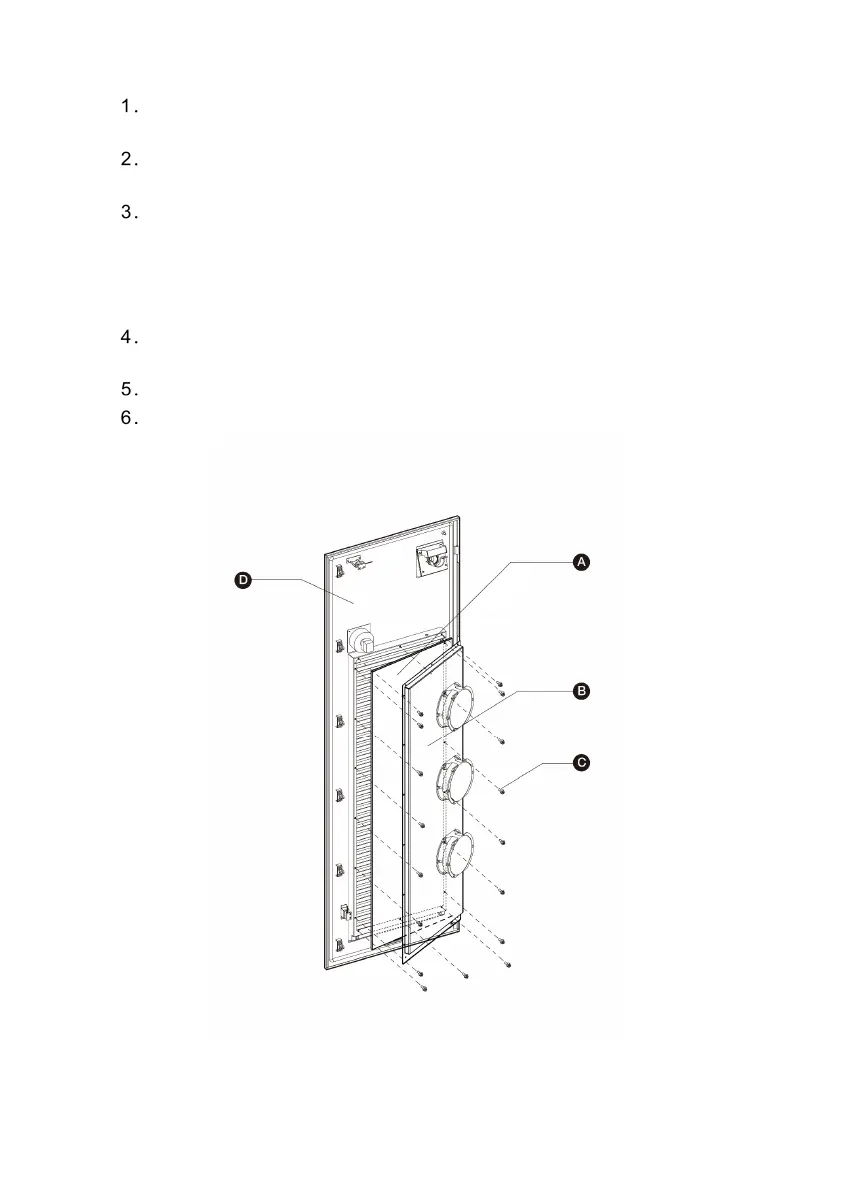
Remove the bezel (with fans) (D) after removing the screws (C) using a
screwdriver and take out the fixing board (B) and air outlet filter (A). Be sure
that the bezel cannot be placed on the floor after taking out the air outlet filter.
It should be hung on the left-side door or held in the hand to prevent the cables
of the fans from being pulled off.
Clean the air outlet filter of debris or dust and reinstall the cleaned filter.
Alternatively install a new air outlet filter.
Reinstall the bezel and screws.
Close the left-side door of the MaxiCharger.
Figure 7-2 Air Outlet Filter View



 To Next Page