Related topics:
VRRP configuration example on page 475
Summary of VRRP commands on page 476
VRRP configuration example
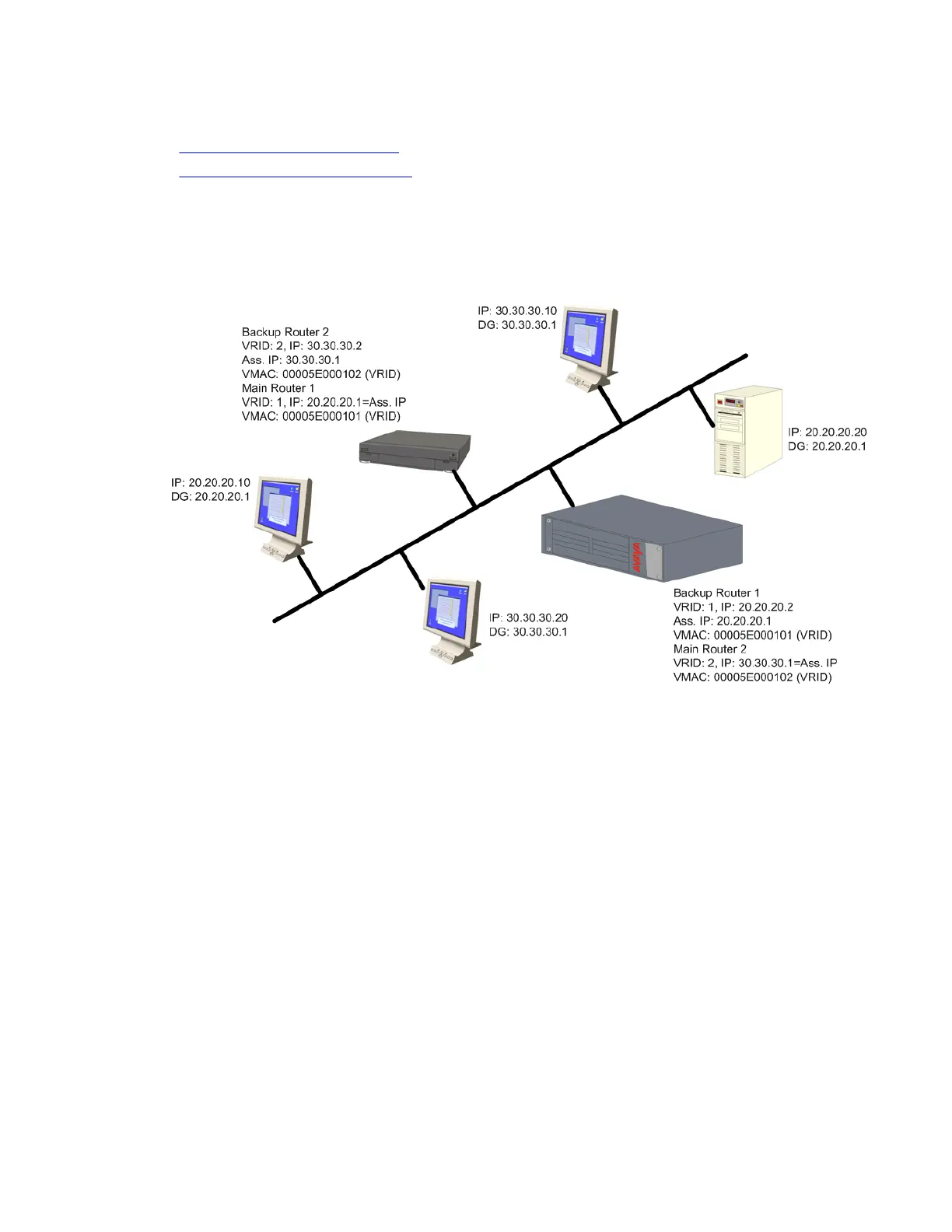
The following diagram illustrates an example of a VRRP configuration:
There is one main router on IP subnet 20.20.20.0, such as a Branch Gateway, switch, or any
router that supports VRRP, and a backup router. You can configure more backup routers.
• The Branch Gateway itself must have an interface on the IP subnetwork, for example,
20.20.20.2
• Configure all the routers under the same VRID, for example,1. You must configure the
routers per VLAN.
• An assigned VRID must not be used in the network, even in a different VLAN
• When router configuration is complete and the network is up, the main router for each
virtual router is selected according to the following order of preference:
- The virtual router IP address is also the router’s interface IP address
- It has the highest priority (you can configure this parameter)
- It has the highest IP address if the previous conditions do not apply
• The virtual router IP address needs to be configured as the default gateway on the stations
The router
Administering Avaya G430 Branch Gateway October 2013 475



 To Next Page