IFD500 Series Pilot Guide
3-32 FMS Subsystem
approach. If the pilot has confirmed that a direct path is indeed
safe (and desired), then the right course of action is to manually
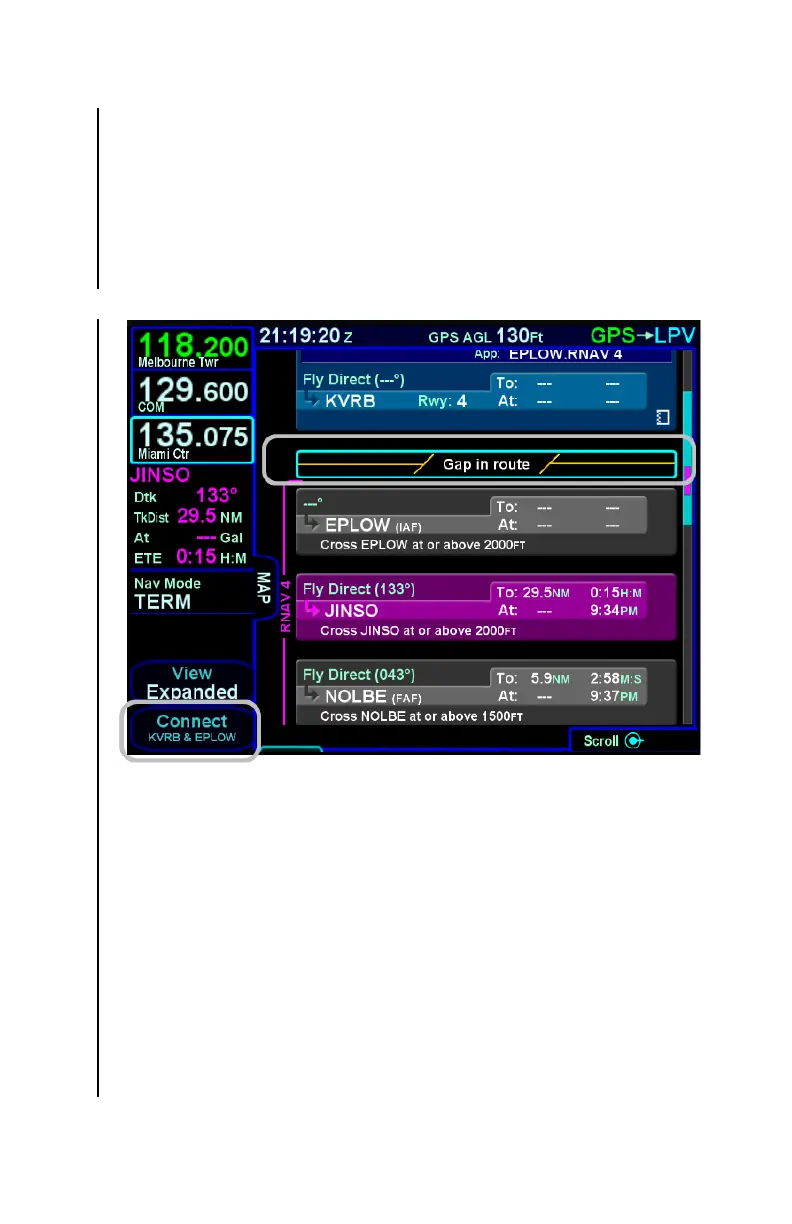
close the gap. This can be accomplished by moving the cursor to
the gap and pressing CLR or the bottom LSK, which will be
labeled as "Connect" with the two waypoint identifiers. In this
case, closing the gap will insert a direct leg from the last enroute
waypoint to the first approach waypoint.
Connecting Gap in Route
There are, however, other conditions which will cause "Gap In
Route" discontinuities. If a route modification results in two
consecutive waypoints with the same identifier, but the two
waypoints have incompatible altitude constraints, then a gap will
be inserted. In this case, one of the two altitude constraints must
be removed. At that point, the FMS will remove the gap. In some
cases, the two waypoints with the same identifier will be
combined, leaving a single instance in the flight plan. However,
at the start of an arrival or an approach, the FMS will not combine
the two waypoints. This allows flexibility in flight planning
because additional legs can then be inserted prior to the
arrival/approach if necessary. If no other waypoints are inserted
and the aircraft arrives at the common waypoint (with the gap



 To Next Page