IFD500 Series Pilot Guide
2-2 SVS Subsystem
SYNTHETIC VISION PAGE
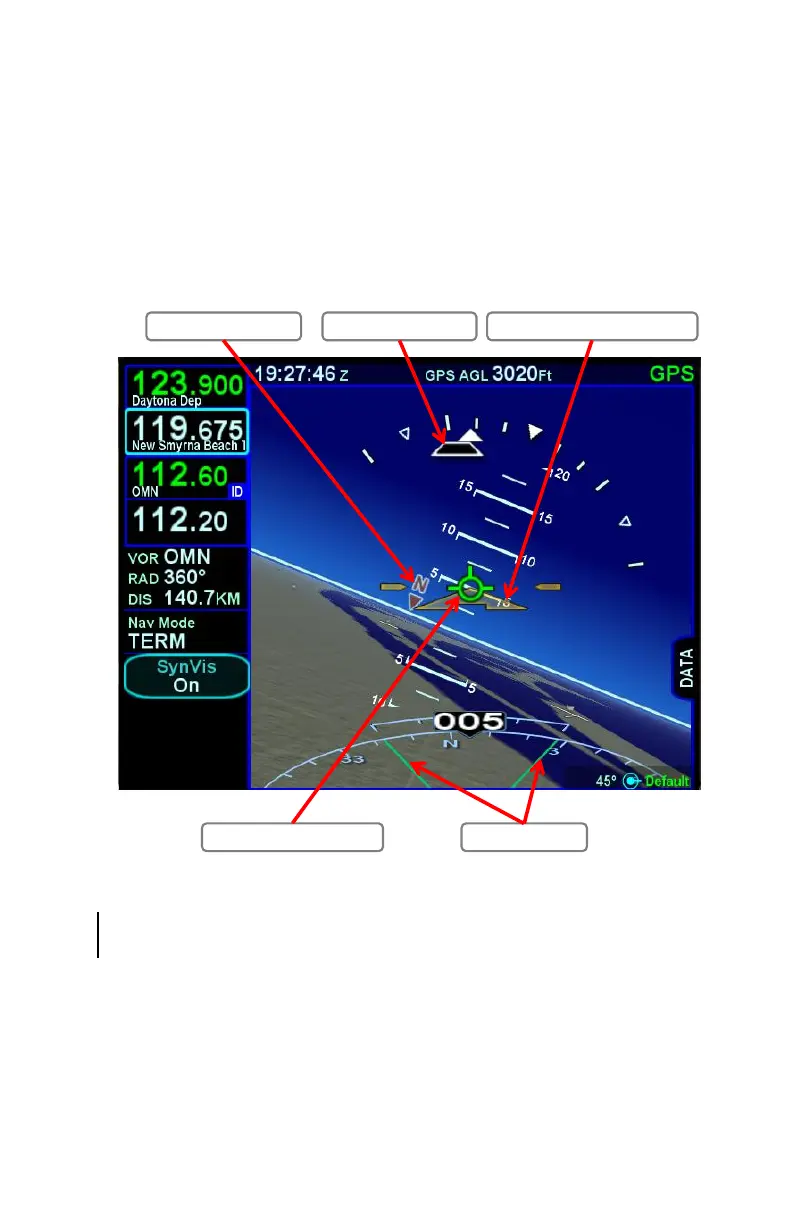
If the IFD is receiving valid heading data, the circular green Total
Velocity Vector (TVV)/Flight Path Marker (FPM) will be present in
the display. The TVV/FPM indicates where the aircraft is actually
going as compared to the yellow triangular Aircraft Reference
Symbol (ARS) which indicates where the aircraft is pointing.
Synthetic Vision Page
The SynVis field of view adjustment can be made by either pinch
zoom gestures on the touchscreen display or by turning either of
the bottom right knobs. Pushing the knob will restore the 45° field
of view default value.
The zero pitch line or horizon line is a full-width indication of the
horizon. Placing the TVV/FPM on that line will result in level (no
altitude change) flight. Terrain above the aircraft’s altitude will
appear above that line, and conversely, terrain below the
aircraft’s altitude will appear below that line.
Heading Horizon Labels Skid/Slip Trapezoid Aircraft Reference Symbol (ARS)
Total Velocity Vector (TVV) SynVis Field of View



 To Next Page