43R5912128 /03 SP4K-B
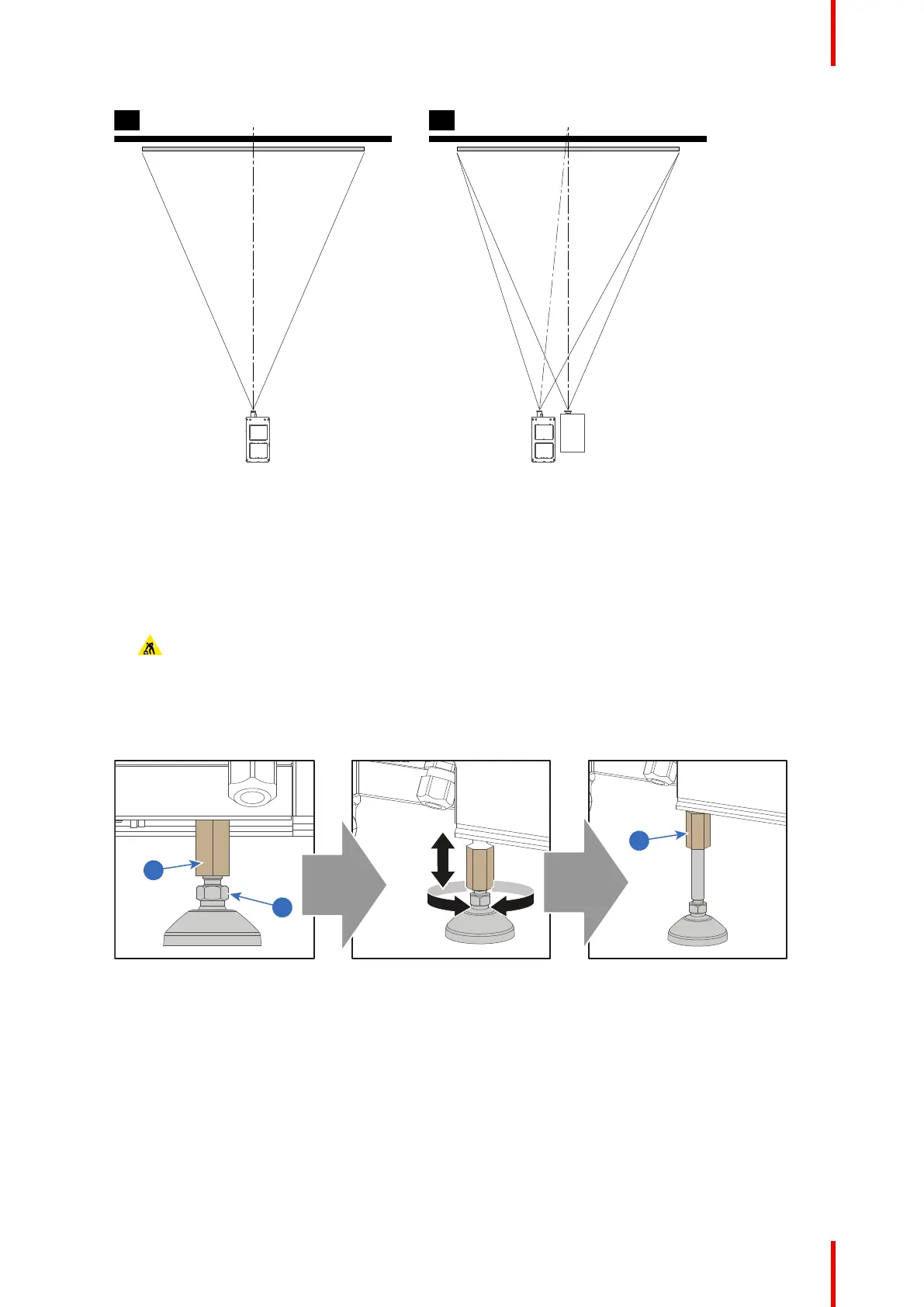
SC R EEN CEN TER SC R EEN CEN TER
O FF-C EN TER
A B
Image 4–2
3. Proceed to level the projector by adjusting the feet of the projector as follows:
• Loosen the nut (reference 1 Image 4–3) on the threaded rod of either both front or both rear projector
feet. Use a 24 mm open-end wrench.
• Adjust the height of both front or real legs to level the projector. Use a 17 mm wrench to adjust the
height as illustrated (reference 2 Image 4–3). Take into account the projector weight when
manipulating the projector feet.
• Secure the leg height by tightening the nuts (reference 1 Image 4–3) of each projector foot.
Caution: Take into account the weight of the projector when adjusting the projector feet. For this
reason, Make sure of the following:
Make sure to use a hoisting or lifting tool to lift up the projector while adjusting the feet.
Make sure to adjust both front or both rear feet at the same time. Make sure both feet are
adjusted in a similar manner.
Make sure the nuts of the projector feet are sufficiently tightened after the adjustment is done.
Image 4–3 Adjusting the projector feet
4. Later, when the projector is up-and-running, adjust precise image geometry and placement.
Projector tilting
In an ideal installation, the SP4K-B lens surface is centered with and parallel to the screen. This orientation
helps to ensure optimized lens performances with minimal offset. If this position is not possible (such as when
the projector is significantly higher than the center of the screen), it is better to rely on offset rather than extra
tilt.
1. Before adjusting tilt, make sure the projector is as well-centered with the theatre screen as possible for
your installation area.
Physical installation projector



 To Next Page