K5B - 16
four-side trim with
labels and trim cuts
right-hand
lay side
Block Programming
5.0 Automatic Operation
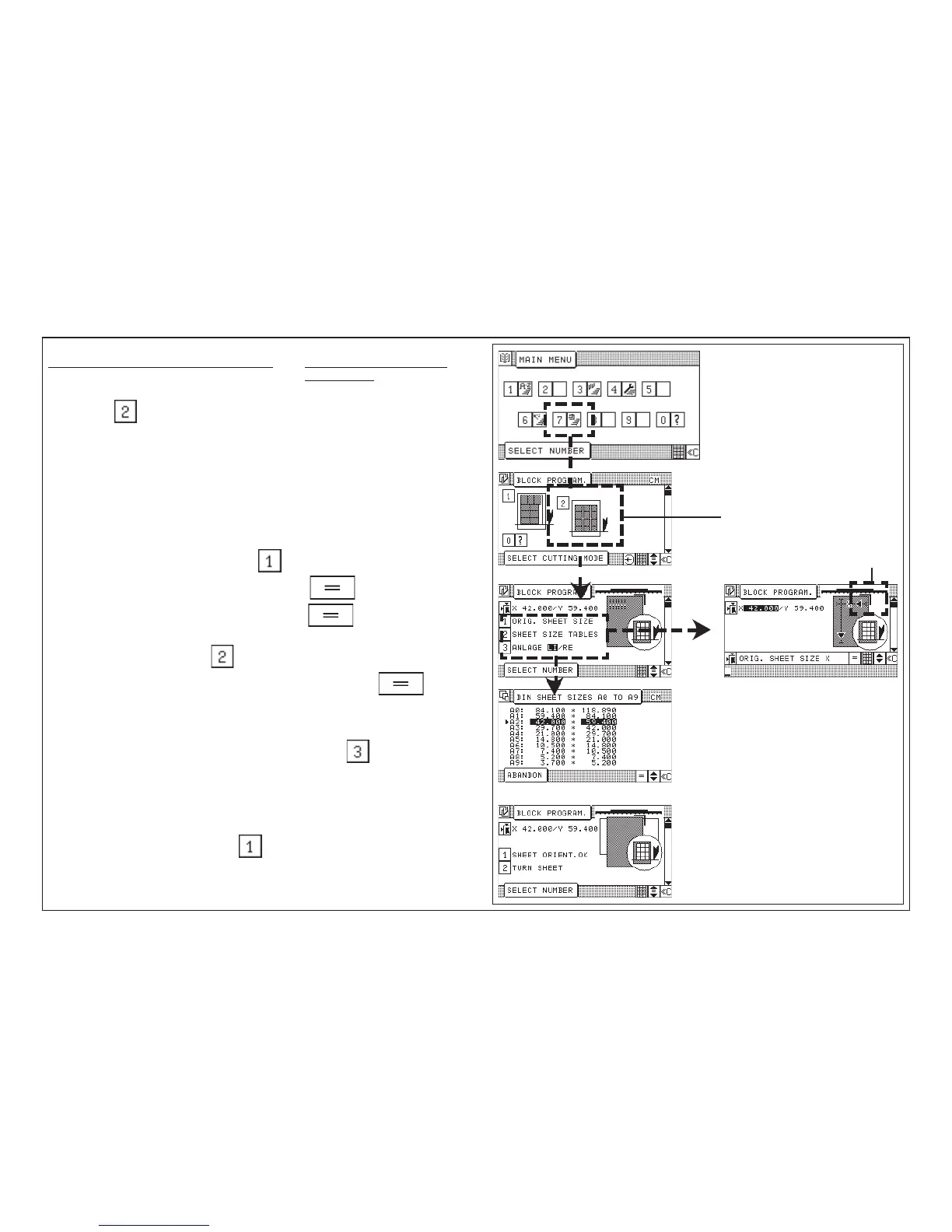
Example: Concerning variant 3, selection: 2 four-side trim with labels
and trim cuts
1. Select "four-side trim with labels and trim cuts"
2. Selection menu: 1 initial sheet size
2 Table of sizes
3 Lay guide lft / ri
In this menu, a selection can be made between:
- the manual input of the initial sheet size and label size
- the selection of an initial sheet size and label size from a table of sizes
with trimouts upon label cutting.
3. Example: "Enter initial sheet size":
4. Enter initial sheet size "X" confitm with button
5. Enter initial sheet size "Y" confirm with button
or
6. Example: "Table of size":
Select desired size with cursor keys and confirm with button
(format measurements are transferred block program)
7. Select left-hand lay side (=default) or right-hand lay side:
Example: Select right-hand lay side by means of key
Confirm or change the sheet position (observe feeding direction of paper)
Selection menu: 1 Sheet positionOK
2 Turn the sheet
8. Example: "Sheet position OK":
To be continued with next page!



 To Next Page