Code: IU.01.09.0007
Version / Revision: 6.001
Page: 71 de 143
Ultrasonic washer
Model: E0201
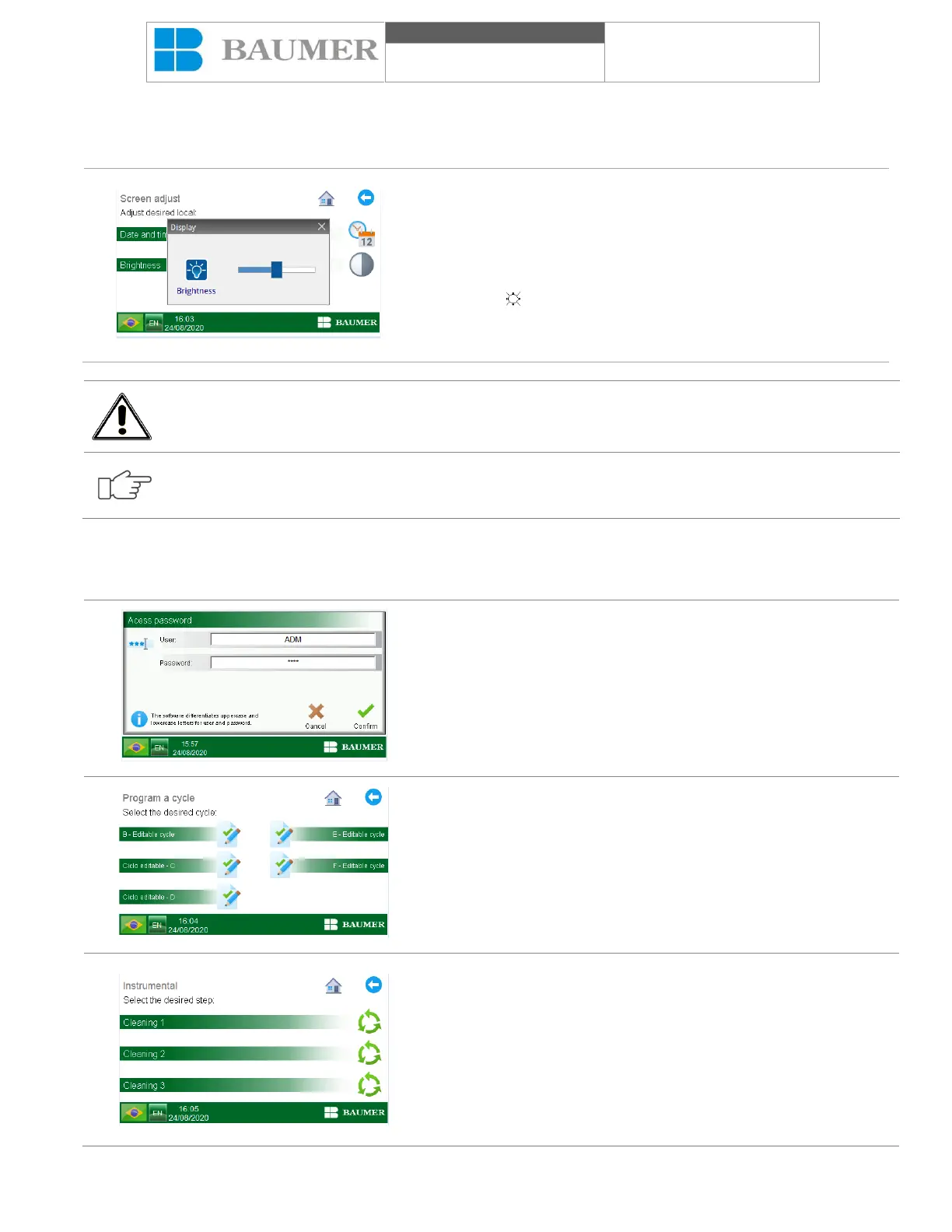
11.6 Adjustment of the HMI brightness
To adjust the HMI lamp, start the Ultrasonic washer and proceed as follows:
In the "Home Screen", press the button "Screen options".
On the "Calibration adjustment" screen, by pressing the
"Brightness" icon, the caliper adjustment will be shown.
In contrast, gamma and contrast functions are blocked, which does
not allow adjustments. To adjust the "Brightness" function, change
the symbol ( ) on the central drawing bar to the desired position.
The close window icon "represented by one (" X ") confirms the
actions or changes made.
The adjustment of the button can directly influence the visual comfort of the operator. It is recommended
to adjust it to a comfortable level.
For this HMI model, the value of the lamp is the only one that can be adjusted, and the other configurations
are blocked.
11.7 Programming Parameters
To change cycle parameters, proceed as follows:
In the "Home Screen", if it is necessary to change the values of the
parameters of the cycle, press the "Program a cycle" key, the
command requests the programming password;
For more information, see the topic "User management".
In the "Program cycle" screen, select the cycle you want to
program.
In the "SELECTED CYCLE PHASES" screen, select the step you
want to program.


 To Next Page