Code: IU.01.09.0007
Version / Revision: 6.001
Page: 72 de 143
Ultrasonic washer
Model: E0201
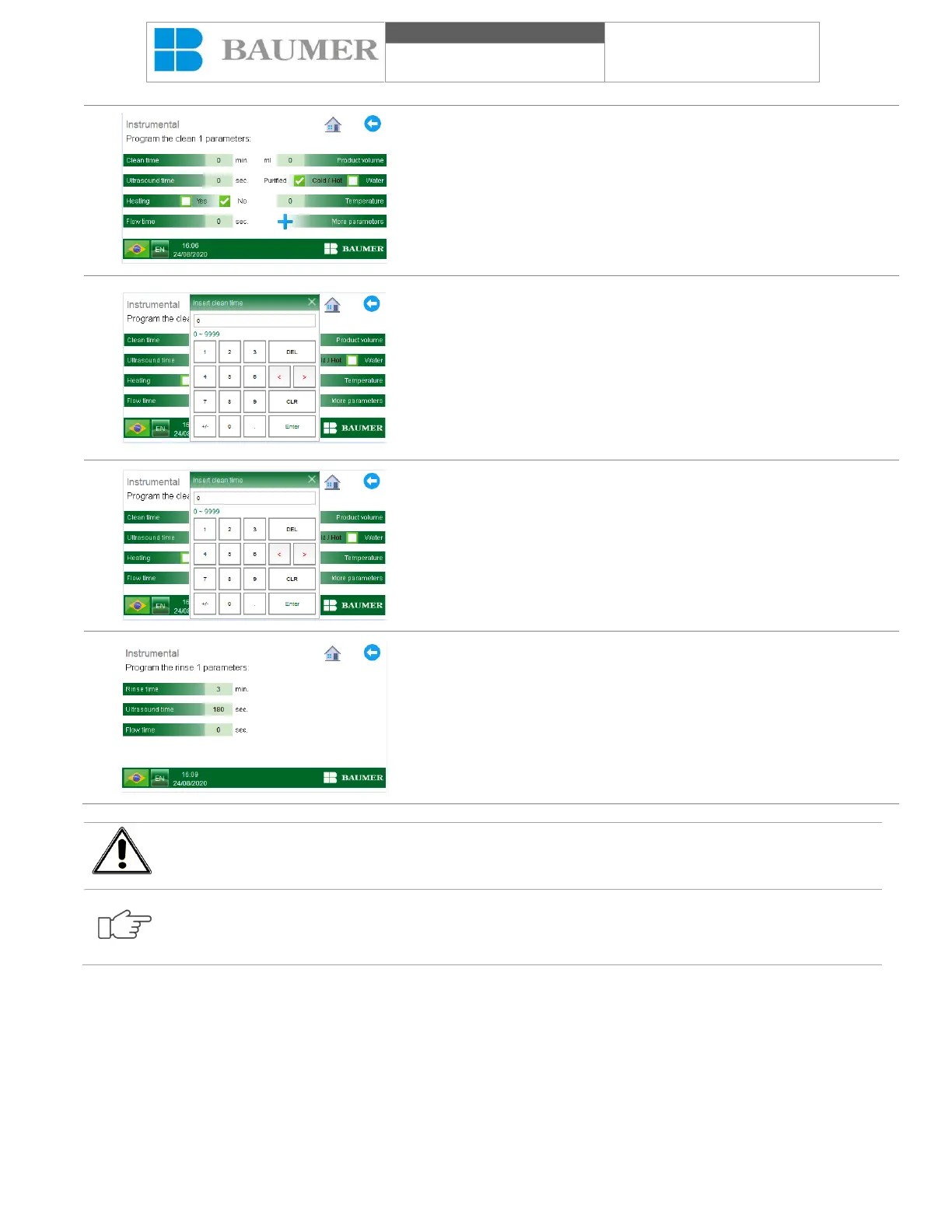
To edit a parameter, simply click on it and enter the desired value,
a numeric keypad will open that will give you the conditions to enter
a desired value that is between the allowed value.
Enter the new parameter using the numeric keypad and confirm by
pressing the "Enter" key.
If any value is entered outside this range, the system will inform you
that the programming exceeds the possible values for the
programming and does not confirm the insertion of the value.
After all phases have been programmed, press the "Save
parameters" key, the data entered will be stored in the memory of
the chosen program.
Note: If you want to restore the factory configuration, see the
chapter "Default load".
The return icon returns to the previous menus or presses the "start"
icon, the start button.
Changing factory parameters will result in the need to validate the process.
If an attempt is made to program the permitted range, the controller will inform the programmer that the
entered value is at the maximum limit the minimum acceptable.
11.8 Cycle canceled
The Ultrasonic washer has a monitoring system that continuously checks the necessary supplies for the correct
functioning of the equipment and that the parameters of the process are within the acceptable limits during the
execution of the automatic cycle. The fall of the supplies, the verification of the parameters of the process was beyond
the limits acceptable to the fall of the hardware of the equipment that could lead to the cancellation of the cycle. The
user can also cancel the cycle throughout the cleaning process, as follows:


 To Next Page