Code: IU.01.09.0007
Version / Revision: 6.001
Page: 73 de 143
Ultrasonic washer
Model: E0201
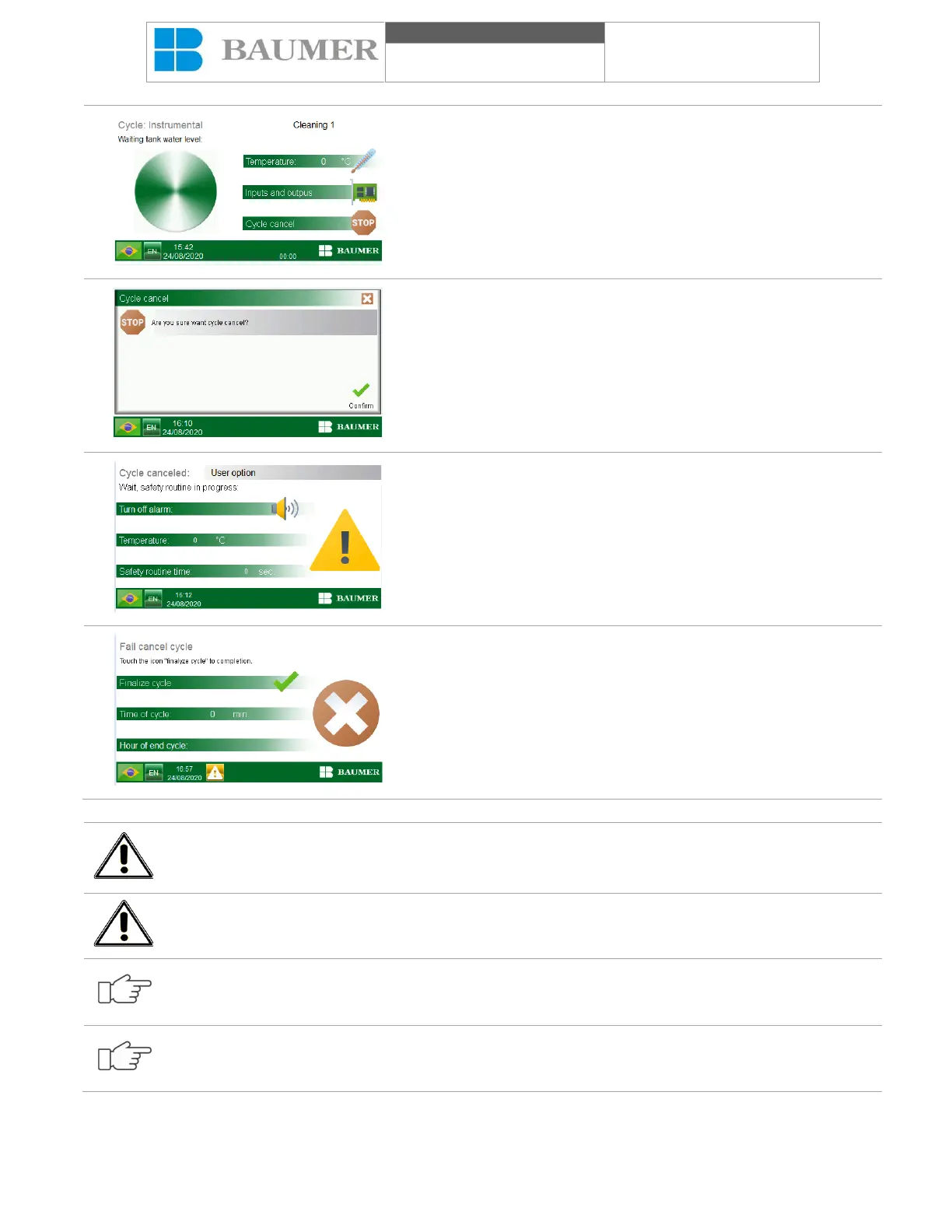
After starting the cycle and at any stage, press the “CANCEL
CYCLE” button. The cycle cancellation confirmation screen will
appear.
The "confirmation of cycle cancellation" will appear.
Press the "Confirm" button to confirm the cancellation of the cycle,
the "Close window" (represented by an "X") to return to the normal
process.
If the cancellation of the cycle is confirmed, the team will carry out
a safety routine, suitable for the process, which will ensure that, at
the end of the cycle, the operator can open the cover safely.
The reason for the cycle canceled, the temperature, the time for
the end of the security routine to end, if it changes in the security
routine's wake and the audible alarm will activate and deactivate at
any time by touching the "Delete" alarm icon".
After carrying out the safety routine, the cycle ends with the cycle
canceled. The reason for canceling the cycle is indicated on the
display and printed on the printing belt when the printer is activated.
The "Cycle time" indicates the total time and the "Cancellation time"
indicates the exact time at which the cycle was canceled. At the
end of the cycle, a bell will activate to inform the operator about the
end of the cycle. After pressing the "FINISH CYCLE" button, you
can open the cover.
Do not cancel the cycle by erasing the "on / off" button or the "emergency button", as the security routine
will not be carried out and could expose the user to process waste.
Do not delete the equipment until the safety routine ends.
The security routine performed after canceling a cycle is different for each type of process, so it can be
faster or longer.
The reason for canceling the cycle is informed on the cycle Canceled cycle and if it prints on the printing
belt, if the printer is enabled.


 To Next Page