Code: IU.01.09.0007
Version / Revision: 6.001
Page: 74 de 143
Ultrasonic washer
Model: E0201
11.9 User configuration routine and password
The Ultrasonic washer E0201 allows the creation and definition of access levels for users of the system, it is also
possible to choose standard users who are already registered, in addition to allowing the option to use the at the
beginning of the session.
11.9.1 User management
The E0201 Ultrasonic washers have an access system to functions related to their operation protected by user and
password. It is possible to register up to 20 users with different access levels. When accessing the user management
system, registered users will be numbered sequentially from 01 to 20. Some users with an abbreviated description
are preconfigured in the factory, to allow immediate use of the equipment.
The "ADM" user is a user with access to all functions and who can be elected to the "Administer users"
function in the first access to the function.
To change or add new users, proceed according to the instructions:
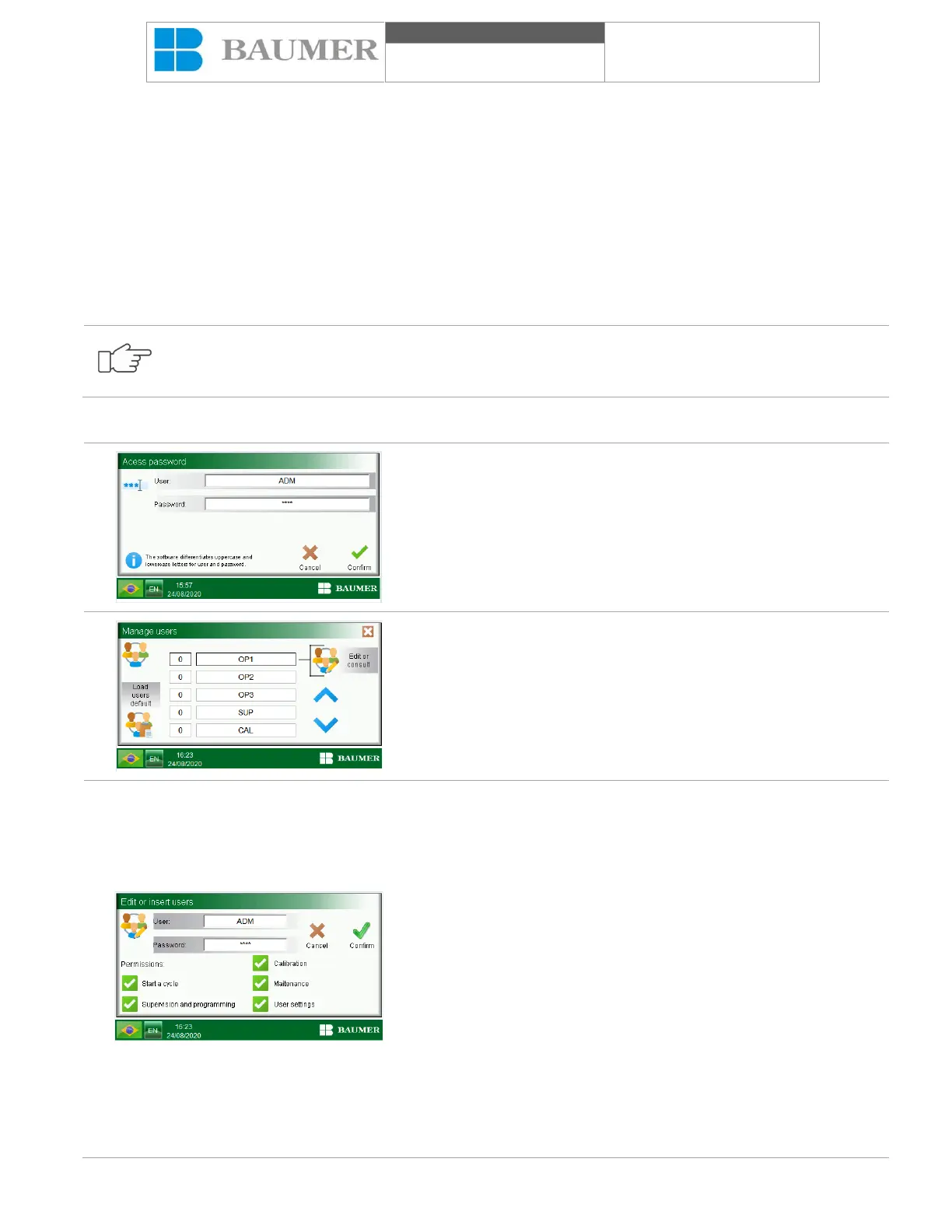
In the "Home Screen", press the button "Go into settings".
In the "Users and Supervision Area", press "Administer Users", a
screen will open asking for the inclusion of a user and a password
that I have allowed at the "User Administration" level.
After entering the user and password, the " Administer Users "
window will open.
To select a user the field in white, use the arrows to move between
fields.
With a user in the selected white field, click on the "EDIT OR
INSERT USERS" button to open the user's edit window.
The "Close window" button (represented by an icon with the letter
"x") comes from the previous menu.
Clicking on the "User" field opens an alphanumeric keypad that allows
the inclusion of user identification with up to 14 characters.
When clicking on the "Password" field, the alphanumeric keyboard
opens again, which allows you to enter a password with up to 10
characters.
The display also changes the permissions that can be assigned to each
user. The permits are cumulative and allow you to define the
appropriate access level for each user, as follows:
• Start a cycle: allows the user to start a cycle when the option
"Start cycle with password" is activated;
• Supervision and programming: allows access to cycle
programming, closes and time and options in the "User area and
supervision", except the option "Manage users";
• Calibration: allows access to the functions of calibration of
temperature and pressure in the "Area of calibration and maintenance";
• Maintenance: allows access to the functions of "Calibration
and maintenance area", with the exception of "Temperature
calibration" and "Pressure calibration";
• User configuration: allows access to the "Administer users"
function as referred to in this chapter;


 To Next Page