Code: IU.01.09.0007
Version / Revision: 6.001
Page: 78 de 143
Ultrasonic washer
Model: E0201
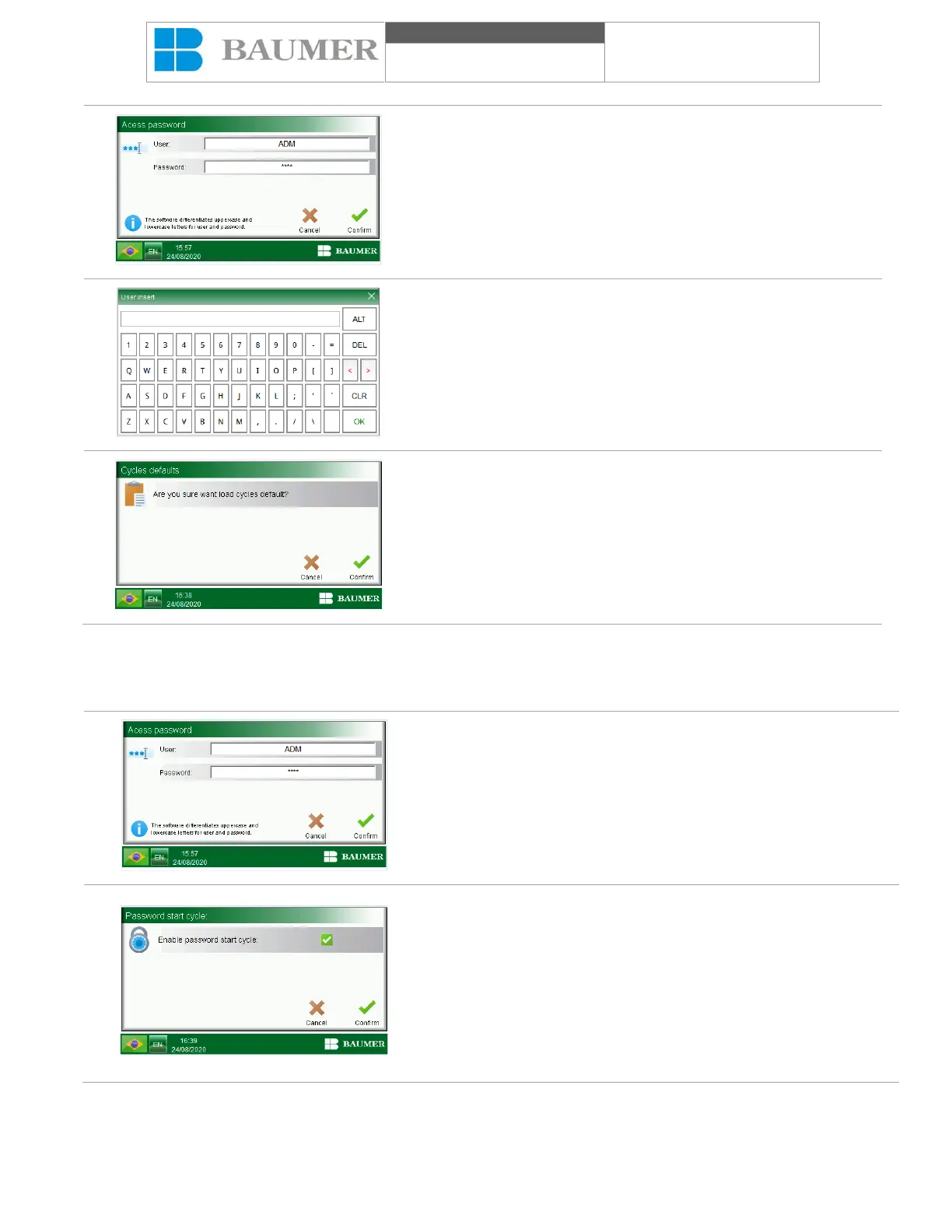
When you click on the field to be inserted, the alphanumeric
keyboard will appear.
Enter the user name and password with the alphanumeric
keyboard and confirm by pressing the "confirm" key, the "CYCLES
DEFAULT " screen will appear.
An operation confirmation window will appear, predetermined load.
The "Cancel" button cancels the operation and the "Confirm" button
confirms the operation and loads the predetermined parameters of
the cycles.
11.9.5 Start cycles with password
The Ultrasonic washer allows you to start cycles with a password. To access this function, follow the instructions
below:
In the "User area and supervision", by pressing "Start cycle with
password", a screen will open asking for the inclusion of a user and
password that will allow the "Supervision and program" level.
Open the window "Start cycle with password".
• The "Activate start cycle with password" field allows you to activate
this function by inserting a checkmark into the "verification box" on
the side of the field. Activating this function will require the user to
enter a password with a permission level to start the cycle.
• The icon "Confirm" confirms actions and changes made and
returns to the previous display.
The text "Cancel" cancels the actions or changes made and returns
to the previous display.


 To Next Page