Code: IU.01.09.0007
Version / Revision: 6.001
Page: 79 de 143
Ultrasonic washer
Model: E0201
If the option "Start cycle with password" is enabled, each time the icon is tapped to start a cycle, a user
and password will be requested to start the cycle. At the end of the cycle, after opening the door, the initial
display will be shown, ensuring that the user and the password must enter again to start a new cycle,
which provides greater control and security.
11.9.6 Enable tips
The ultrasonic washer allows the implementation of "tips" to assist the user in the daily actions of the use of the
interface. If you can access them at any time through a direct access icon, it will not affect the normal operating cycle
of the equipment. Another important factor to highlight is that they can be disabled, the user option, if the user believes
that it is not necessary due to the level of knowledge acquired. To access this function, follow the instructions below:
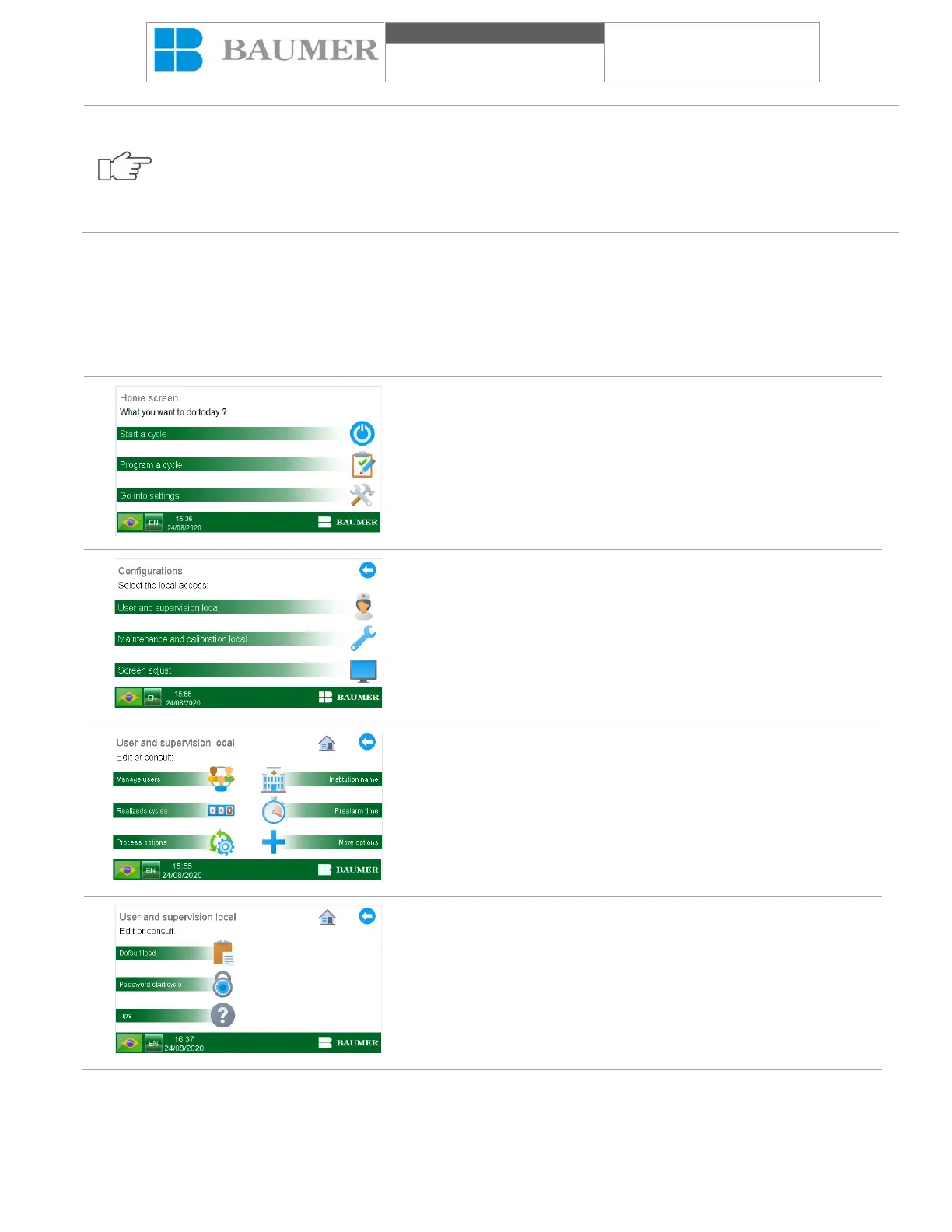
In the "Home screen" press the "Enter configuration" key, the
"Settings" screen will appear.
In the "SETTINGS" screen, press the "User area and supervision"
button.
In the "USER AND SUPERVISION" area, press the "More options"
button.
In the "more options" box, press the "Tips" key, if you ask that it
include a user and password.
For more information, see the topic "User management".


 To Next Page