Code: IU.01.09.0007
Version / Revision: 6.001
Page: 60 de 143
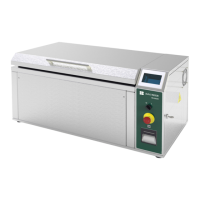
Ultrasonic washer
Model: E0201
The messages of fall if indicated in the pantalla and impress. An excessive delay in reaching a certain
parameter causes the cycle to be canceled and the error message prints. The solo cycle starts a new
phase after reaching the parameters of the previous phase. The occurrence of a fall in the process
could start a routine of security. The cause of the fall is indicated on the wall and printed.
7. Configuration
All items with constructive alternatives or optional items, as indicated in the previous chapter, can be configured at
the time of ordering.
Some configurations are indicated as preferred by Baumer S/A sales department, aiming for the best cost/benefit
ratio. The possibility of configuration remains available to meet each user specification and needs.
The following table presents a summary of the configuration possibilities for the E0201 Ultrasonic washers line.
Machine enclosures / cover
Stainless Steel AISI 444 (nickel-free)
Other capacities must be consulted with the manufacturer.
8. Labeling
Symbolism used in the E0201 Ultrasonic washer:


 To Next Page