MX680RD User’s Manual
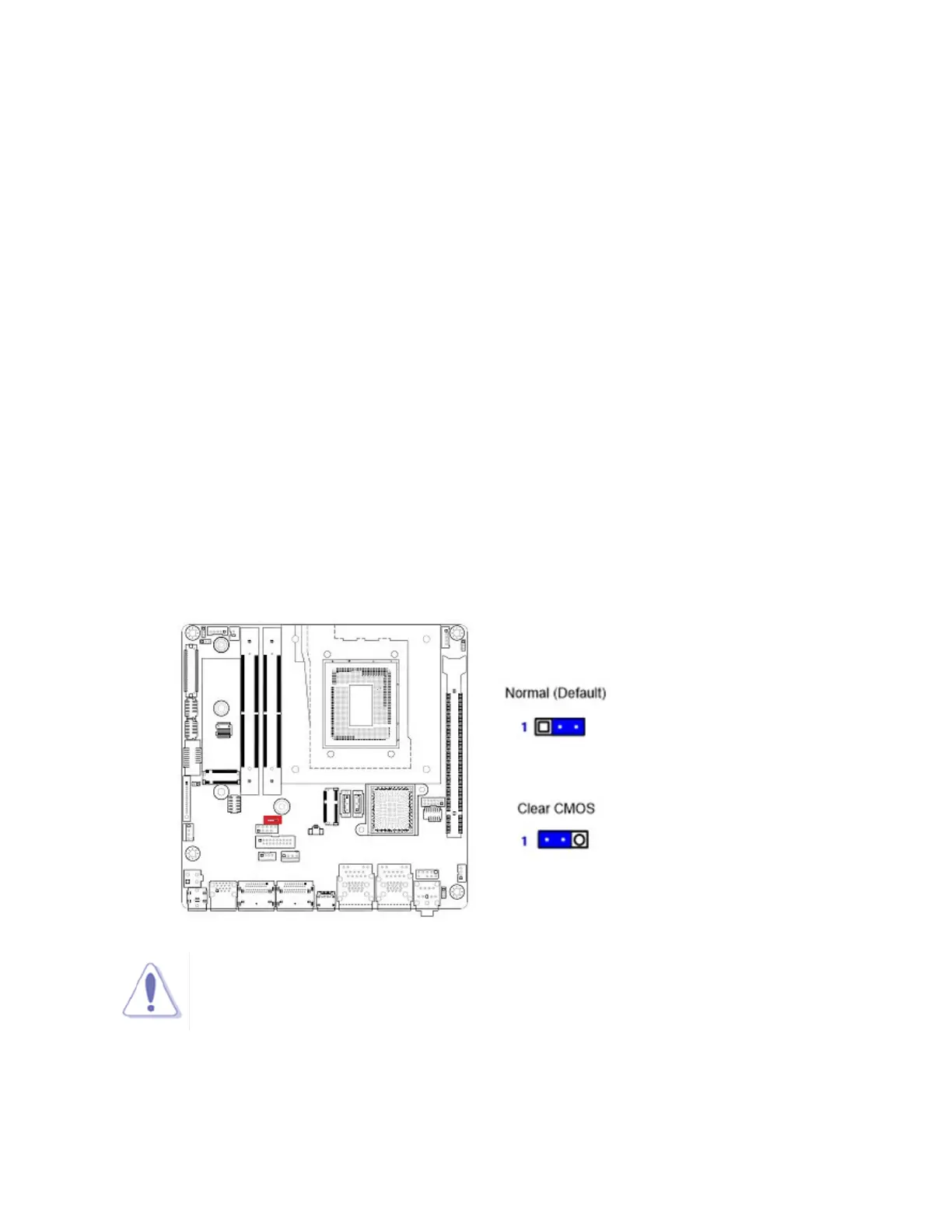
1.10.5 Clear CMOS Header: CLCMOS1
This jumper allows you to clear the Real Time Clock (RTC) RAM in CMOS. You can clear the
CMOS memory of date, time, and system setup parameters by erasing the CMOS RTC RAM
data. The onboard button cell battery powers the RAM data in CMOS, which includes system
setup information.
Here is the procedure for clear CMOS:
1. Turn off the system and unplug all power connections to MX680RD mainboard.
2. Disconnect the onboard battery from mainboard.
3. Relocate the jumper connector on “CLCMOS1” from pin 2-3 to pin 1-2 for at least 30
seconds. Then move the jumper connector back to pin 2-3.
4. Re-connect the onboard battery back to the mainboard.
5. Re-connect all power connections back to the mainboard.
6. Turn-on system, enter BIOS menu by pressing <DEL> key during system post.
7. Under BIOS menu, enter “Save & Exit” menu, load the option “Load Optimized Default”, and
then load the option “Save Changes and Exit”.
NOTE:
1. Avoid clearing the CMOS while the system is ON; this may damage the mainboard.
2. Except when clear CMOS, never remove the jumper connector on “CLCMOS1”
from its default position (pin 2-3). Removing the jumper connector may cause
system boot failure.



 To Next Page