MX680RD User’s Manual
1.5.2 Installing the CPU Heatsink and Fan
The Intel LGA1700 processor requires a specially designed CPU heatsink and fan assembly to
ensure optimum thermal condition and performance.
• When you purchase a boxed Intel® processor, the package includes the CPU fan and
heatsink assembly. If you buy a CPU separately, make sure that you use only
Intel®-certified multi-directional heatsink and fan.
• If you purchased a separate CPU heatsink and fan assembly, make sure that:
a. The CPU heatsink and fan assembly is designed to withstand the “TDP” (Thermal
Dissipation Power) specified by Intel specification of corresponding CPU that you are
going to install.
b. You have properly applied an even layer of “Thermal Interface Material” (thermal
compound) to between the CPU heatsink and the top of CPU before you install the
heatsink and fan assembly (please check with your CPU fan/heatsink vendor for details).
1.5.3 To Install the CPU Heatsink and Fan
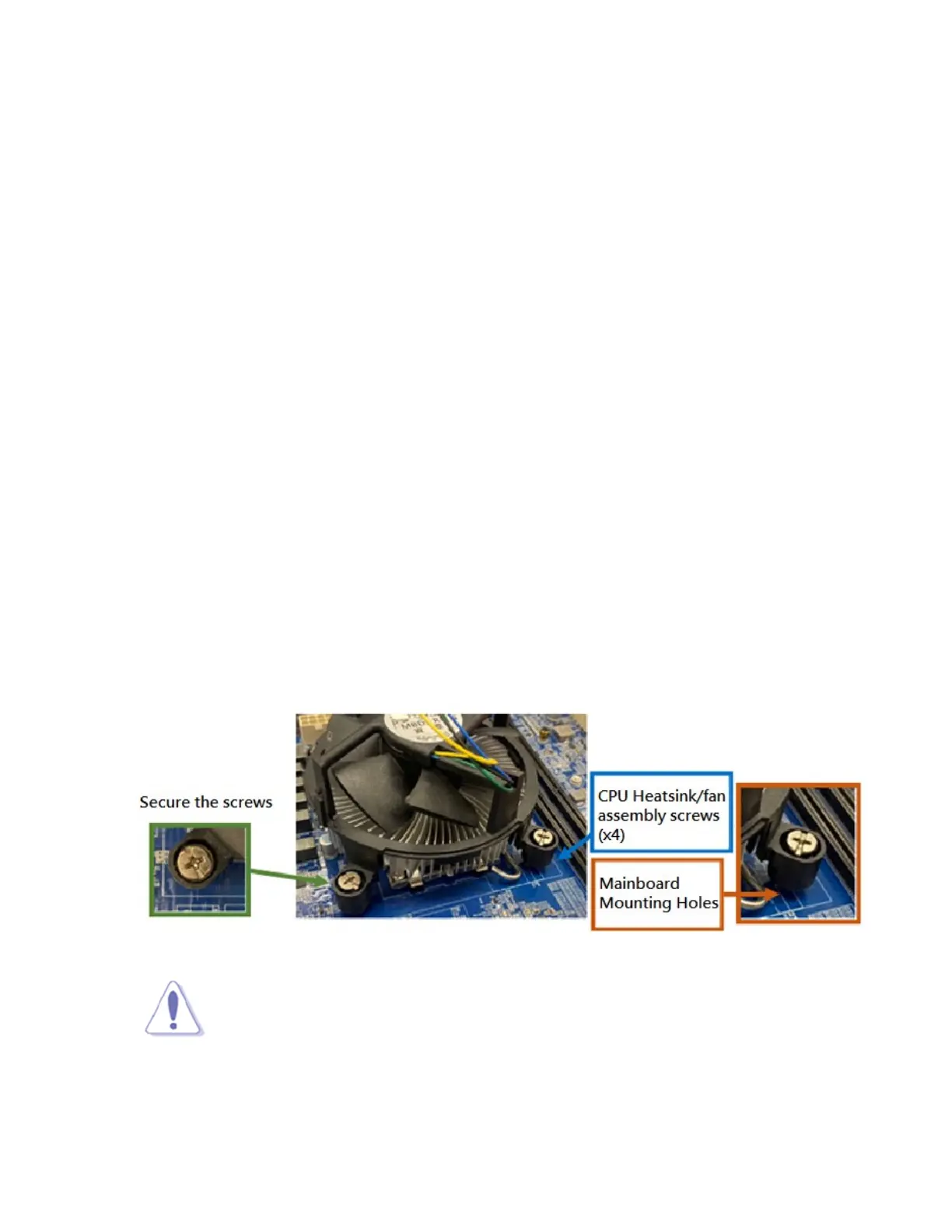
1. Place the CPU heatsink on top of the installed CPU and heatsink mounting plate (if needed). Make
sure that the four fasteners or screws match the mounting holes around the CPU socket.
secured with 4 CPU heatsink/fan assembly screws.
NOTE:
Orient the heatsink and fan assembly such that the CPU fan cable is closest to the
CPU fan connector (“CPU_FAN1”).



 To Next Page