BeagleBone Black System
Reference Manual
Page 27 of 108
4.3 Board Component Locations
This section describes the key components on the board. It provides information on their
location and function. Familiarize yourself with the various components on the board.
4.3.1 Connectors, LEDs, and Switches
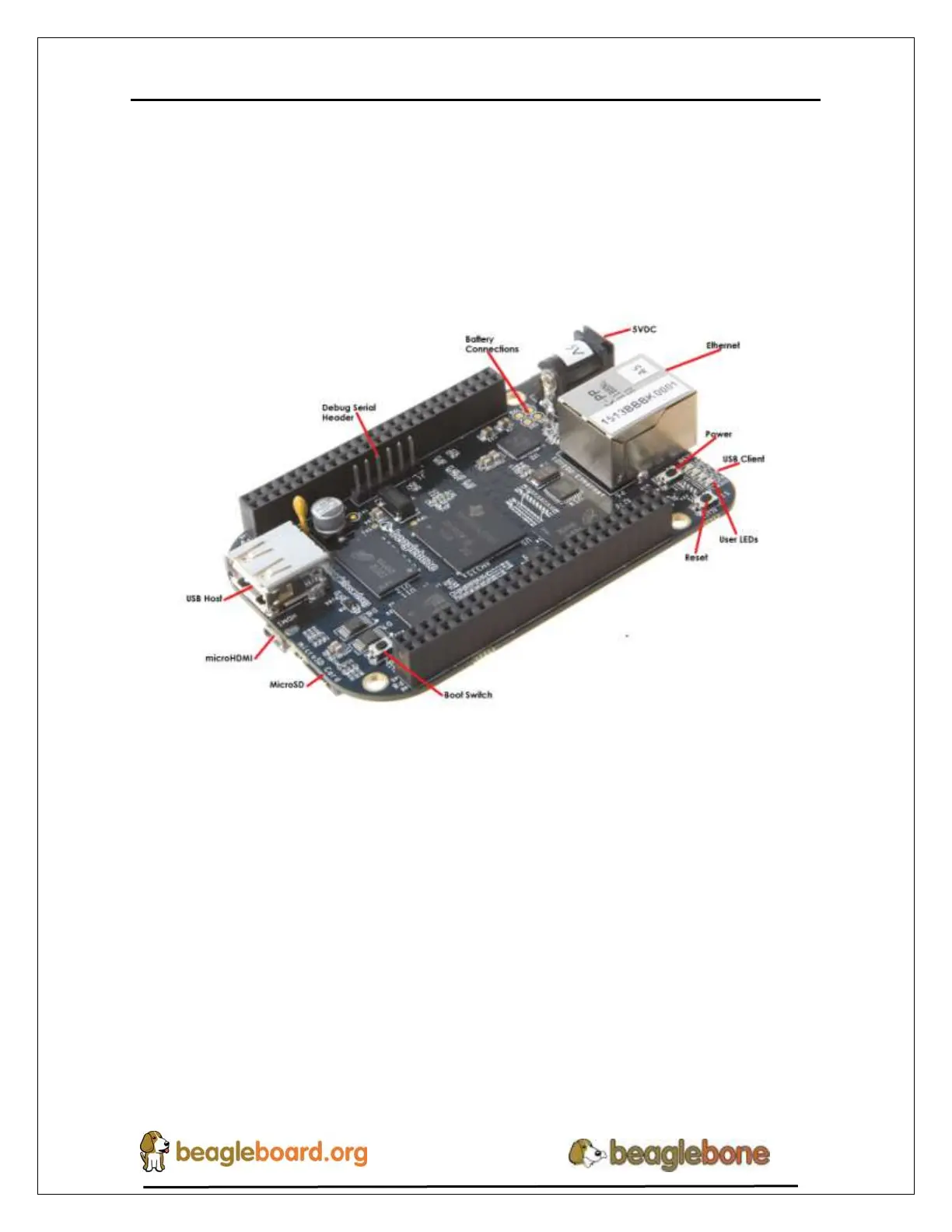
Figure 17 below shows the locations of the connectors, LEDs, and switches on the PCB
layout of the board.
Figure 17. Connectors, LEDs and Switches
DC Power is the main DC input that accepts 5V power.
Power Button alerts the processor to initiate the power down sequence.
10/100 Ethernet is the connection to the LAN.
Serial Debug is the serial debug port.
USB Client is a miniUSB connection to a PC that can also power the board.
BOOT switch can be used to force a boot from the SD card.
There are four blue LEDS that can be used by the user.
Reset Button allows the user to reset the processor.
uSD slot is where a uSD card can be installed.
microHDMI connector is where the display is connected to.
USB Host can be connected different USB interfaces such as Wi-Fi, BT,
Keyboard, etc.


 To Next Page