PN A51387AB
3-20
Installing and Calibrating an Aperture Tube
Verifying the Calibration
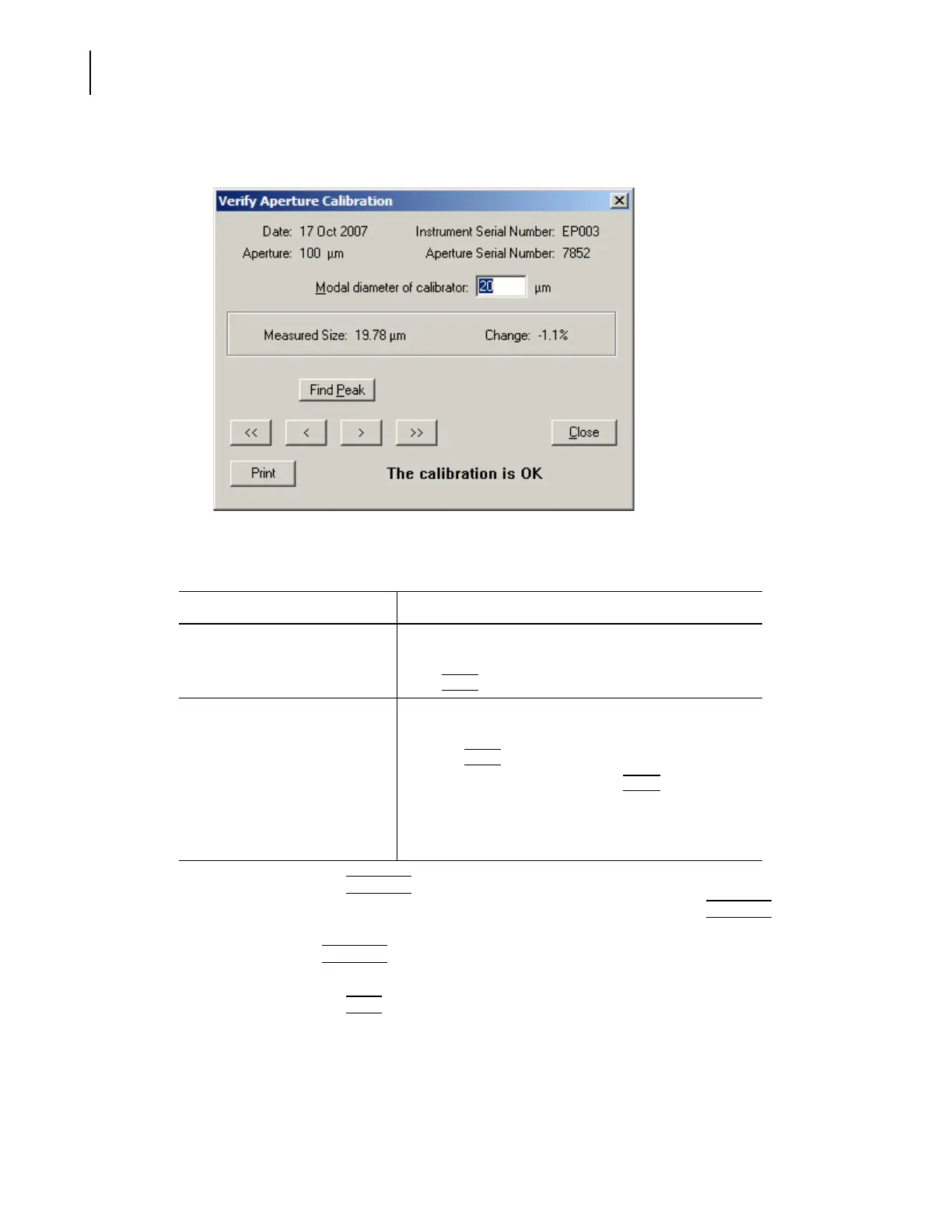
5. When the run is complete, the Verify Aperture Calibration window opens.
6. In the Verify Aperture Calibration window:
• If desired, click
(
Find Peak
)
to place cursors at or on either side of the peak of the
calibration graph. If you are performing a modal calibration, clicking
(
Find Peak
)
automatically places a cursor on the modal channel. If you are performing a mean
calibration,
(
Find Peak
)
automatically places two cursors on the graph, one on either side
of the peak. The cursor(s) define the mode or median used to calculate the new Kd.
• If desired, click
(
Print
)
to print the window. This button does not display a dialog box or
allow you to change print settings.
Table 3.5 Verifying Aperture Calibration
If the window displays... Then...
The Calibration is OK The measured particle size is within 3% of the actual
calibrator size, and the calibration was successful.
Click
(
Close
)
to exit the window.
The instrument needs to be
recalibrated
The measured variation is too great, and the calibration
was not successful.
1. Click
(
Close
)
to exit the window.
2. In the Instrument Toolbar, click
(
Reset
)
.
3. If necessary, adjust the amount of calibrator in the
electrolyte solution.
4. Restart the calibration procedure.



 To Next Page