125
No
Yes
No
Yes
No
No
No
Yes
Yes
Yes
Yes
Level 2 Circuit Board and Standard Parts Replacement
Troubleshooting
Chapter 1 System Analysis
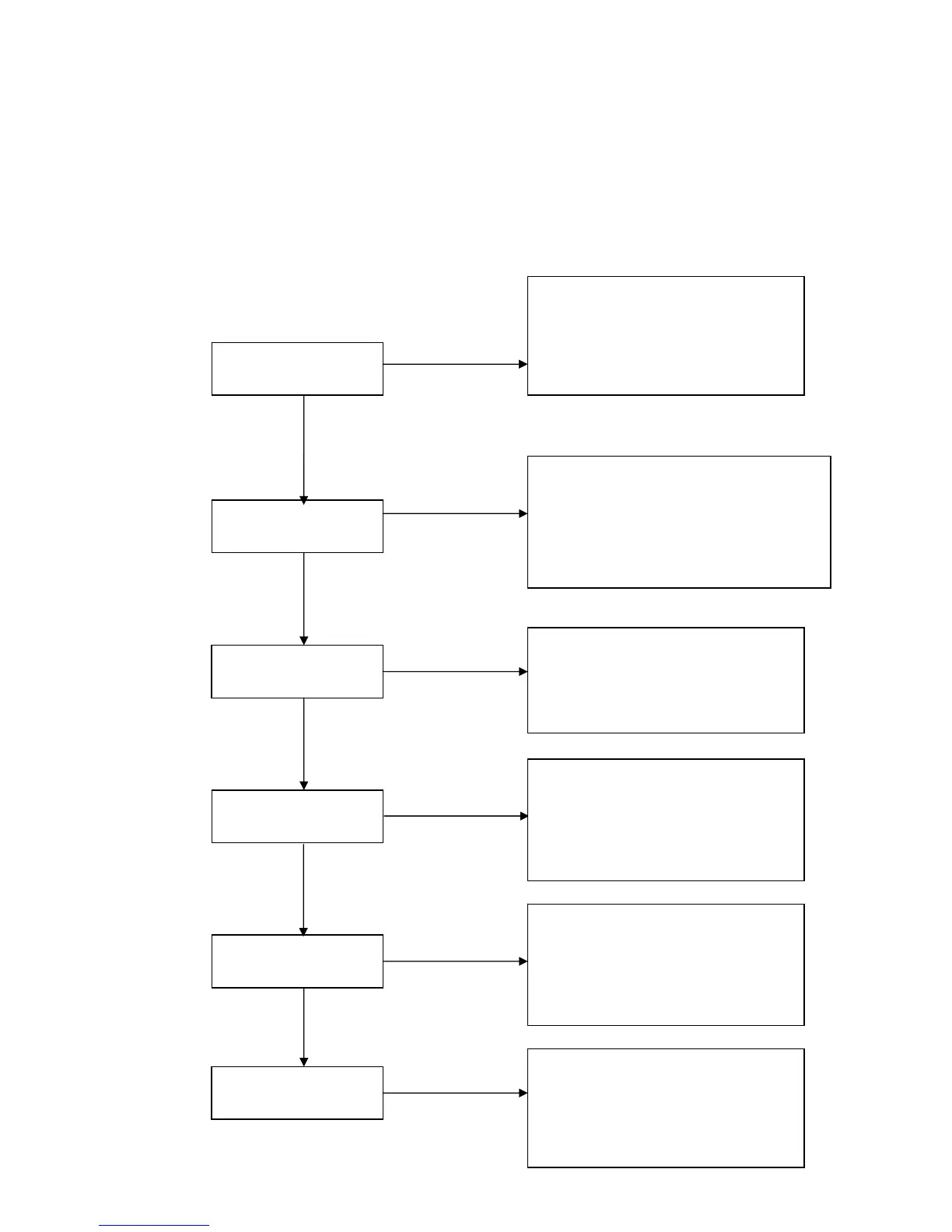
Keypad LED OK
If Power On, Lamp On?
No Signal?
Power Auto Turn Off
IR Remote Control NG?
Pixel Fail?
Step:
1. Check Lamp Door
2. Check Power Board and Interlock
3. Check Connection between PWR BD
and Main BD
4. Check Main Board
1. Check Lampen wire , Lamp wire and
Ballast wire
2. Check C/W and wire connection
3. Check Main board
4. Check Lamp
5. Check Ballast
1. Check Input Cable
2. Check OSD Source set up
3. Check Main board
1. Check OSD Lamp Hours
2. Check Lamp Door
3. Check Lamp still light or not?
4. Check Fan still spin or not?
5. Check Thermal status
1. Check Remote module battery
2. Check Remote module
3. Check IR Reciver on Main board
4. Check IR Reciver on IR board
1. Check the connection between Main
BD and Chip BD
2. Check the connection between OP
engine and DMD Chip
3. Check Chip board
4. Check Main board



 To Next Page