7 Main Menu Device Setup LB 470 Level
56925BA2 Rev. 03, 11/2017
Set Date and Time
Device Setup | Setup | System | Date / Time
The date and time must always be set correctly so that all records (log files)
have the correct metadata.
The correct date is also indispensable for the decay compensation.
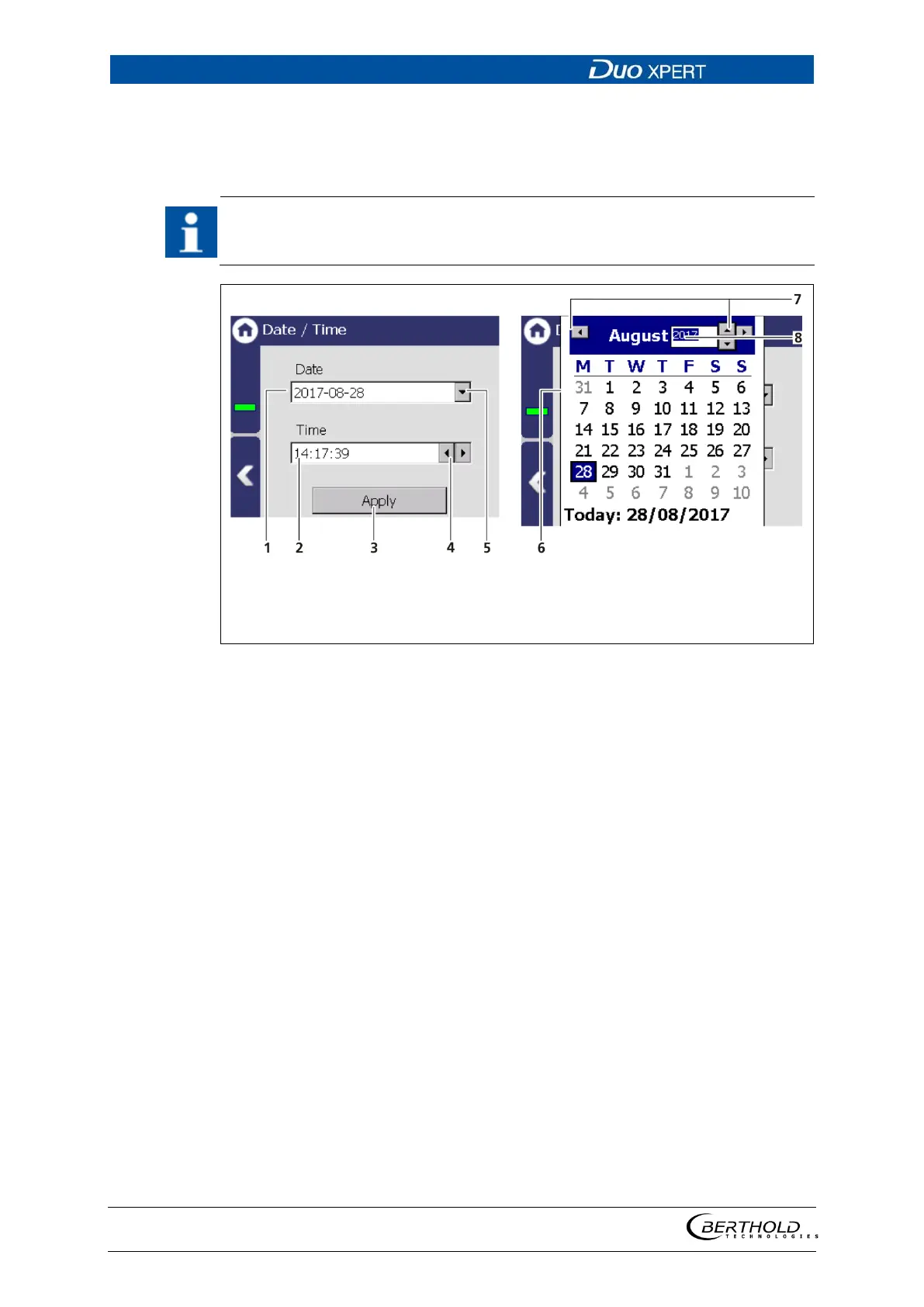
Display date
Display time
Button <Apply>
Arrow key Time
Selection arrow Date
Calendar
Arrow keys Month
Input box Year
46 Date / Time, calendar
1. Click on the arrow key (Fig. 46, item 5) in order to set the date.
The calendar is opened (Fig. 46, item 6).
2. Click on the year number (Fig. 46, item 8) in order to enter the year.
3. Set the month (Fig. 46, item 7) by clicking on the arrow keys.
4. Set the day by clicking on a number in the calendar.
5. Change the time by clicking on the arrow keys (Fig. 46, item 4).
6. Click on <Apply> (Fig. 46, item 3), to accept the date and time settings.



 To Next Page