BD / BF / ED / FD / FED (E3.1) 02/2022 page 30/116
6.5 Selecting the temperature unit
You can chose between degrees Celsius °C and degrees Fahrenheit °F.
If the unit is changed, the temperature set-point and limits are converted accordingly.
Also when specifying the ramp function (see chap. 9) this setting is accordingly taken as the basis.
C = degrees Celsius
F= degrees Fahrenheit
0 °C = 31°F
100 °C = 212°F
Conversion:
[Value in °F] = [Value in °C] ∗ 1.8 + 32
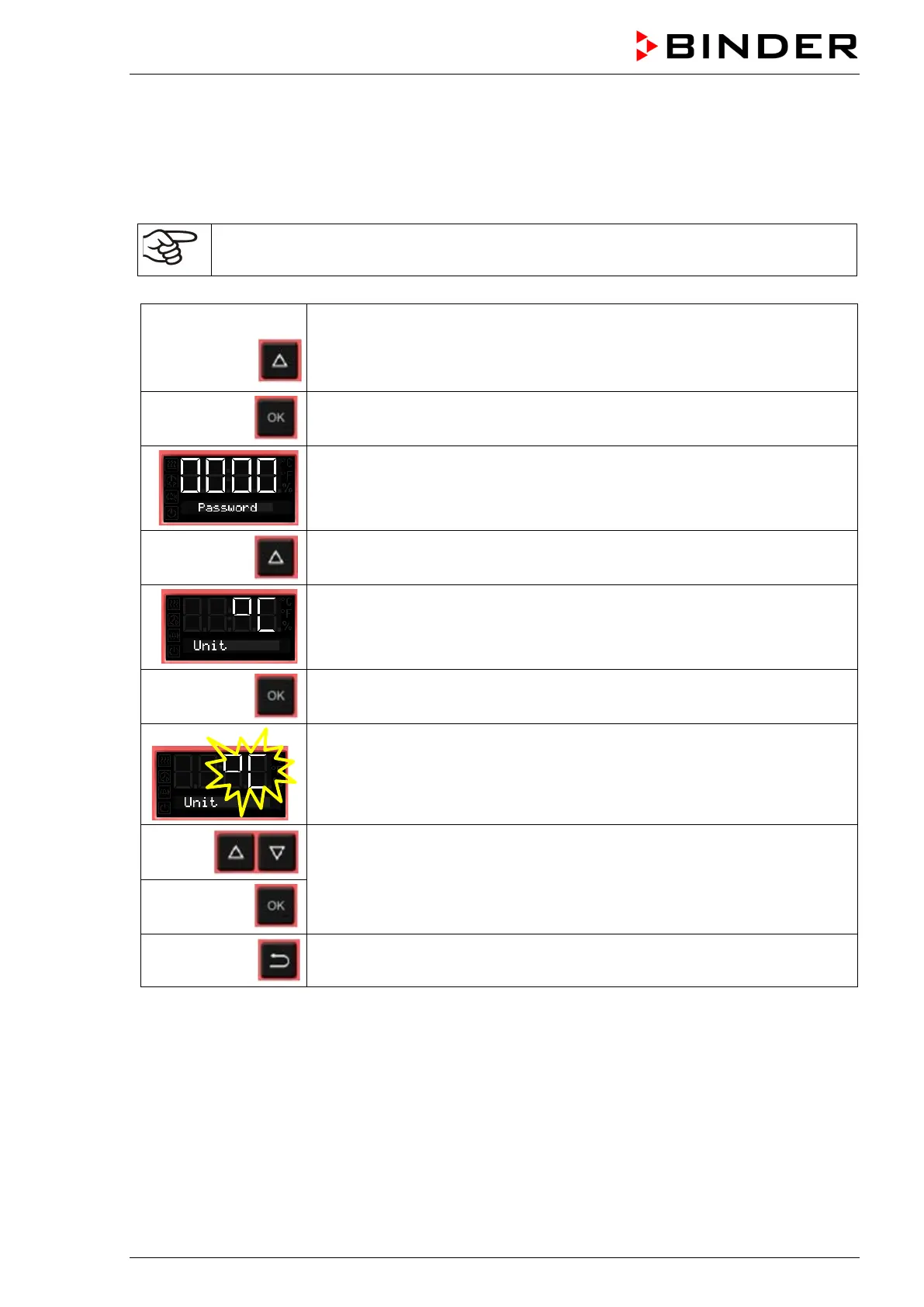
From Normal display
without fan 5x
with fan
with the arrow-up button to the user menu
Confirm with OK.
Enter the password (factory setting: 00 00)
and confirm each entry with OK.
With the arrow-up button to the temperature unit selection menu.
The current temperature unit is shown.
Press OK to select the temperature unit.
The setting flashes.
Select the setting with arrow buttons
and confirm with OK.
2x
Back to Normal display.



 To Next Page