BD / BF / ED / FD / FED (E3.1) 02/2022 page 34/116
6.8 Changing the passwords for user level and general controller functions
In this menu you can change the passwords for access to the user menu and to all controller functions.
You can set two passworts for different access levels:
L1 (level 1): The password enables access control to the user level
L2 (level 2): The password enables access control to all controller functions
Factory setting for both passwords is 00 00 (no password assigned).
As soon as a password has been assigned, access to the respective functions is blocked and only available
after enering the correct password.
From Normal display
without fan 5x
with fan 6x
with the arrow-up button to the user menu
Confirm with OK.
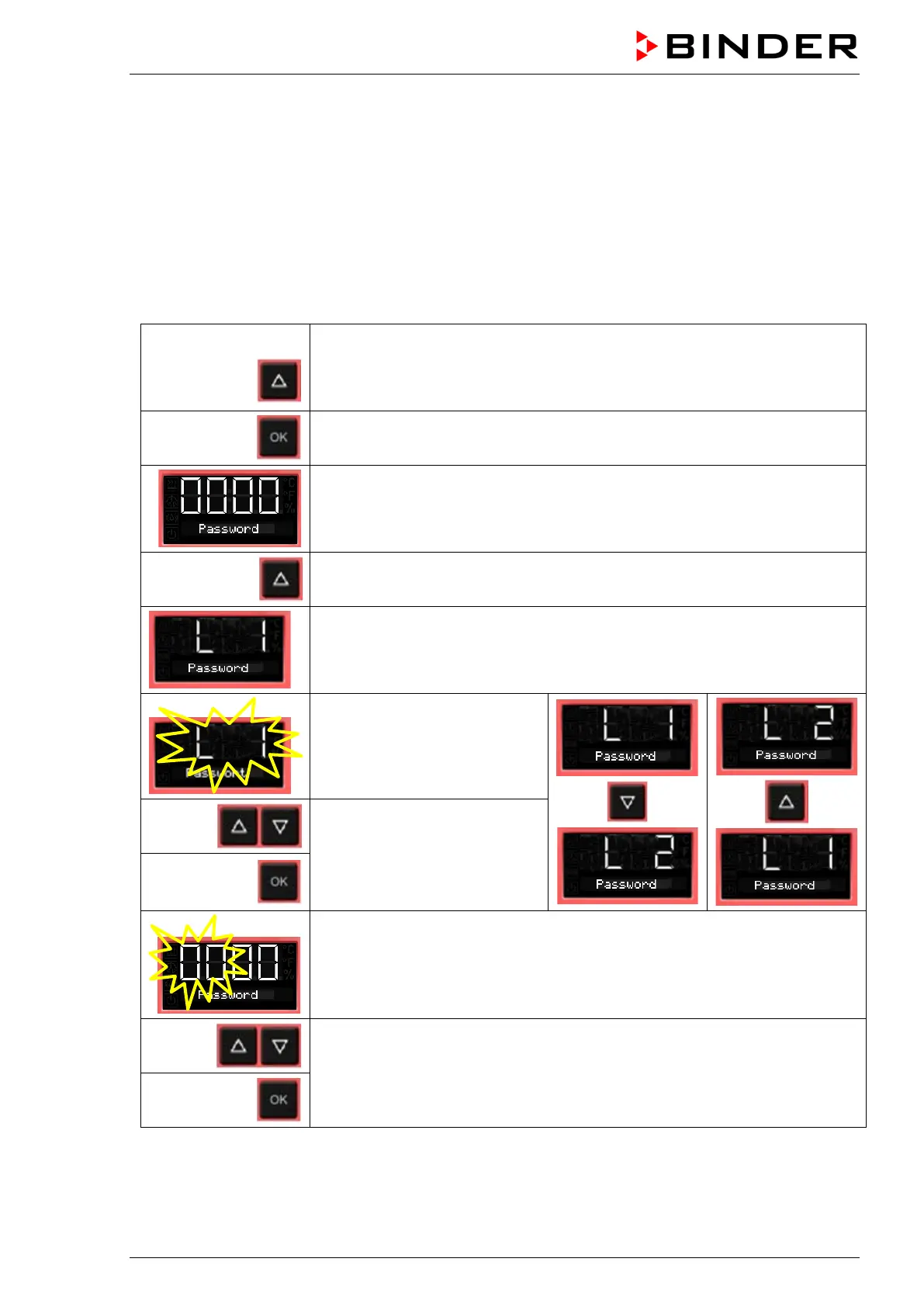
Enter the password (factory setting: 00 00)
and confirm each entry with OK.
2 x
With the arrow-up button to the password setting menu.
Password L1 for access to the user level.
Confirm with OK.
The current password level L1
is shown. The setting flashes.
You can change beween L1
and L2 with arrow buttons.
Select the setting with arrow
buttons (if desired)
and confirm with OK.
The current password for the selected password level is shown. The left two
digits are flashing.
Enter the desired numbers with arrow buttons,
confirm with OK and go on.



 To Next Page