BD / BF / ED / FD / FED (E3.1) 02/2022 page 31/116
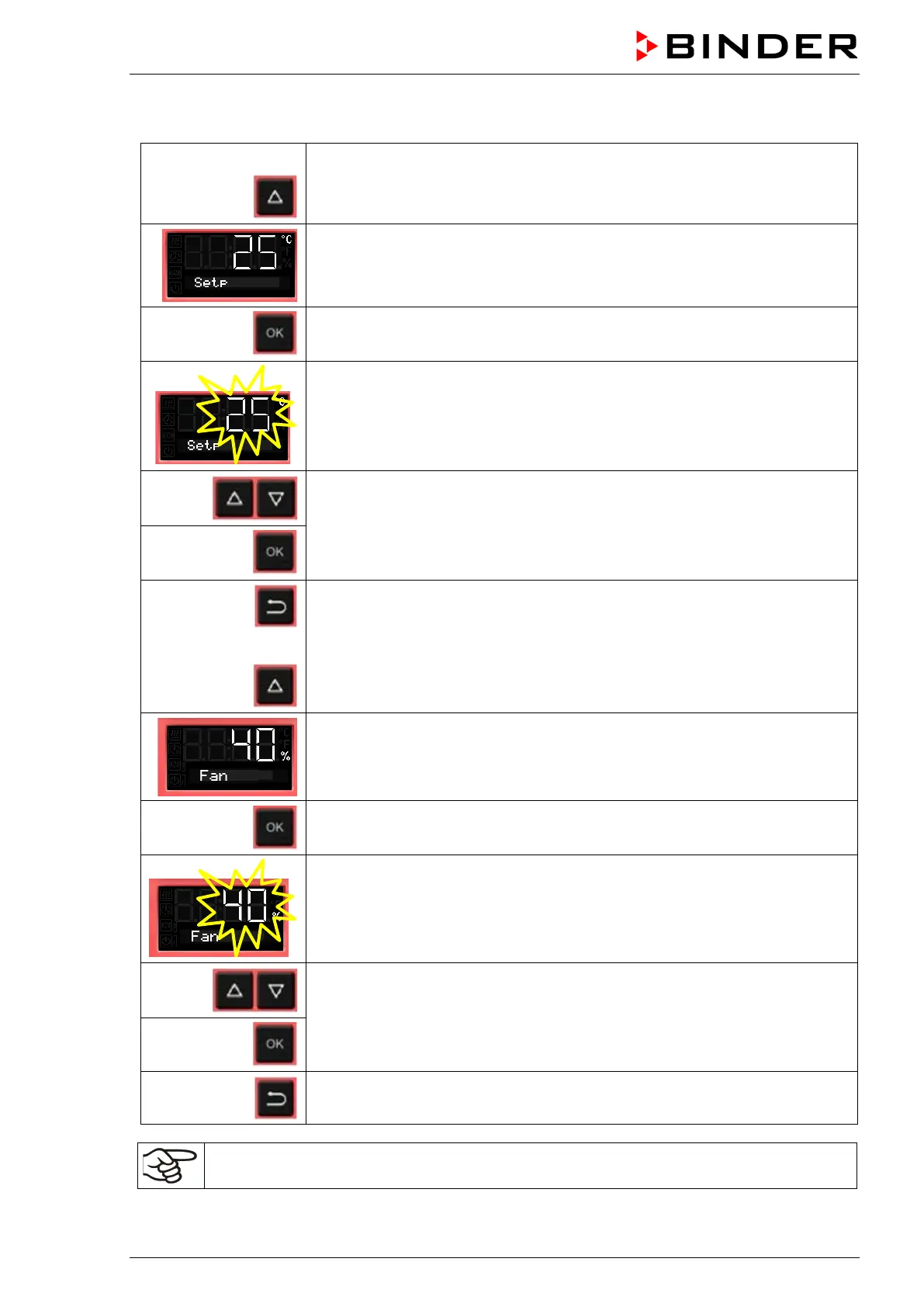
6.6 Set-point entry for temperature and fan speed
From Normal display
with the arrow-up button to the Set-point entry menu.
The current temperature set-point is displayed.
Press OK to enter the temperature set-point.
The temperature set-point flashes.
Enter the temperature set-point with arrow buttons with an accuracy of a tenth
of a degree (BD, BF) or of one degree (ED, FD, FED)
and confirm with OK.
Back to Normal display.
or with chambers with adjustable fan speed (BF, FED):
go on to enter the fan speed.
The fan speed set-point is displayed.
Press OK to enter the fan speed
The fan speed set-point flashes
Adjust the fan speed in steps of 10 % with arrow buttons
and confirm with OK.
Back to Normal display.
Check and/or adjust the safety controller following any changes of the set-point (chap. 7).



 To Next Page