BD / BF / ED / FD / FED (E3.1) 02/2022 page 53/116
9.2 Setting and displaying the ramp function
From Normal display
without fan 3x
with fan 4x
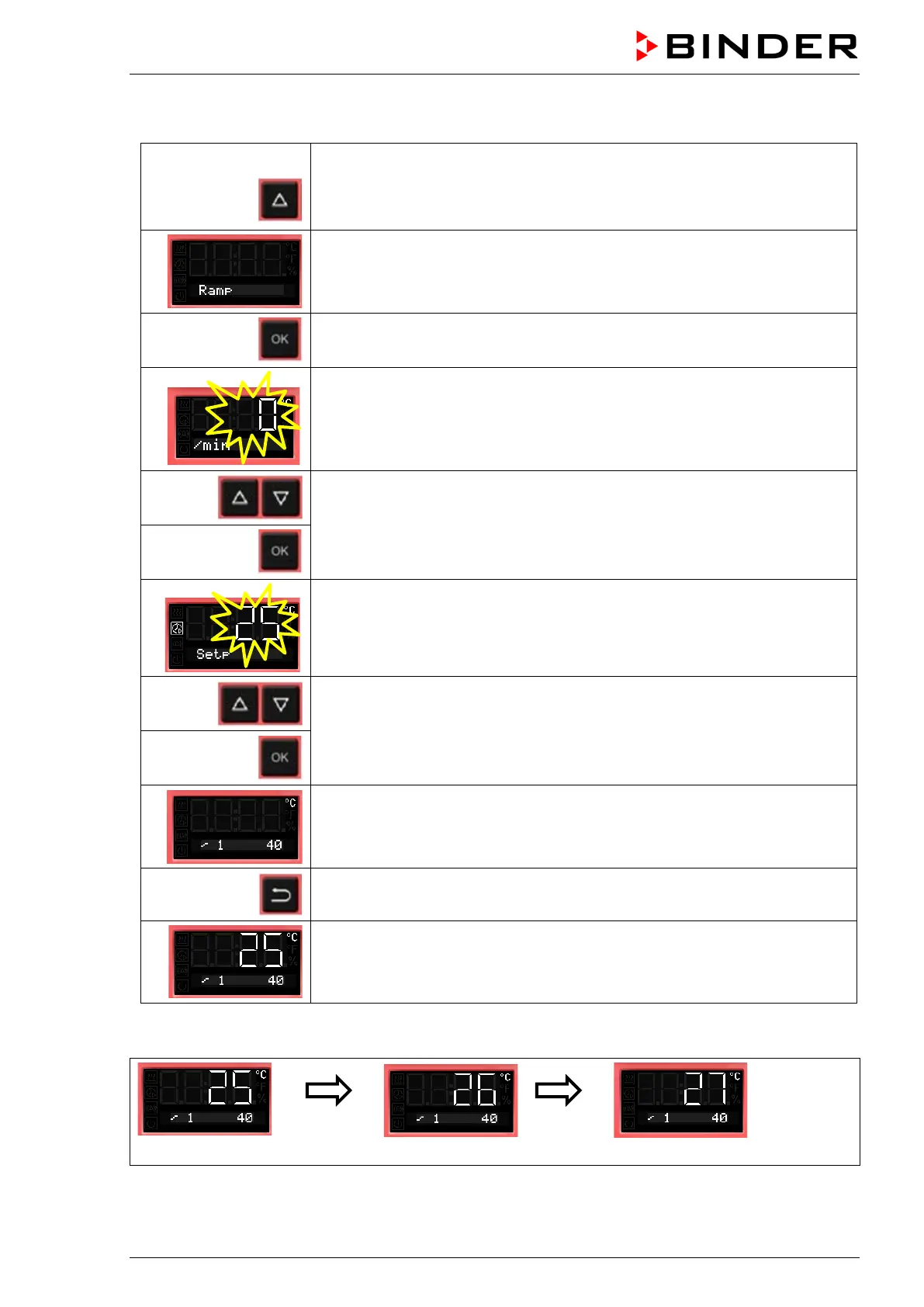
with the arrow-up button to the Ramp function menu.
Ramp function (not programmed)
Press OK to enter the gradient in degree per minute.
The gradient flashes.
Enter the gradient (0 up to 9)
confirm with OK and go on toenter the target ramp set-point
The target ramp set-point value flashes.
Enter the target ramp set-point
and confirm with OK.
Selected ramp with gradient 1 and target ramp set-point 40 °C (example)
Back to Normal display.
Normal display showing the actual temperature, the gradient and the target
ramp set-point (example: 40 °C)
Temperature course with ramp function
Normal display
after 1
minute
Normal display
after 2
minutes
Normal display
Etc.



 To Next Page