BD / BF / ED / FD / FED (E3.1) 02/2022 page 47/116
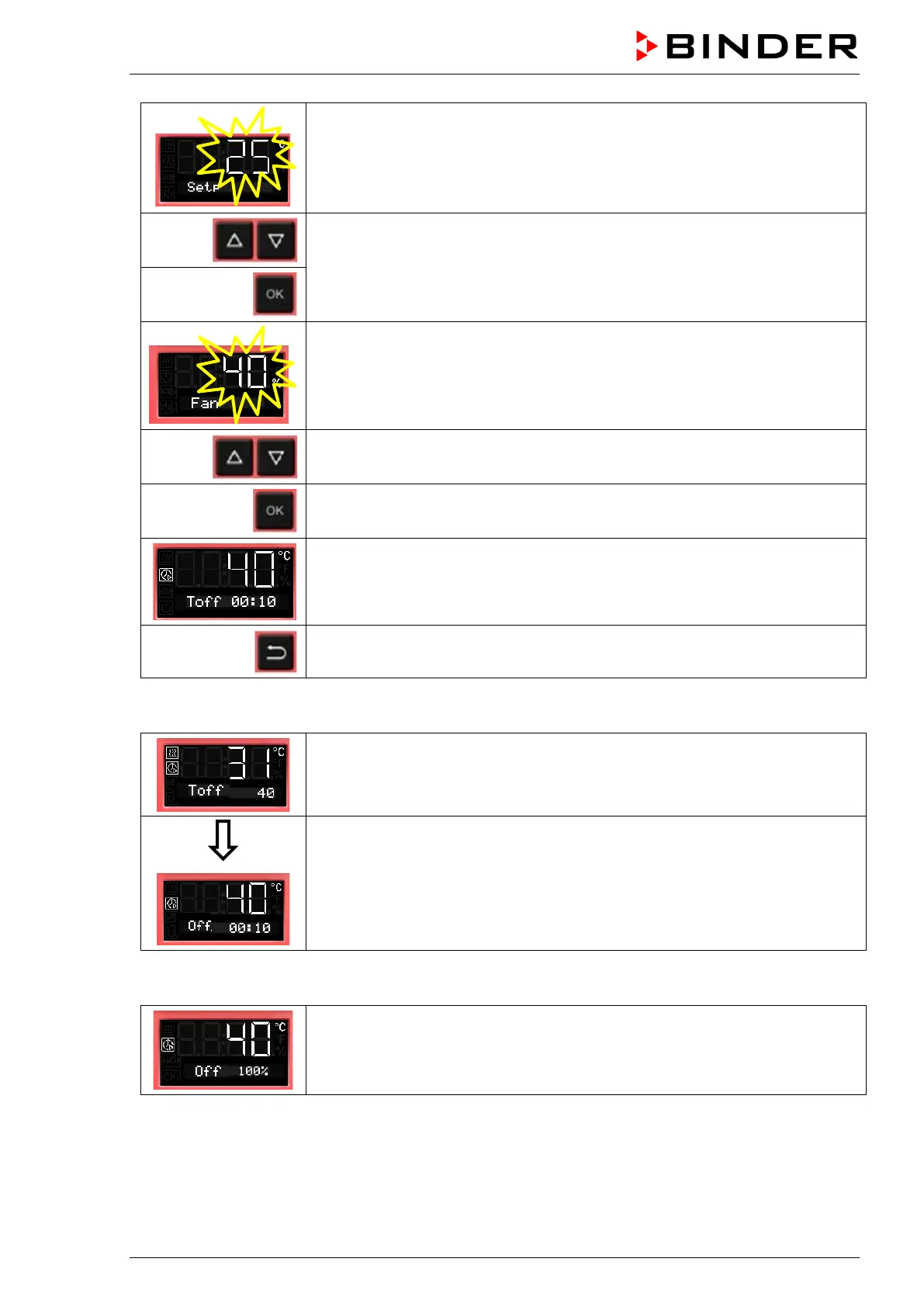
The temperature set-point flashes.
When the set-point is reached, the timer starts running down.
Enter the temperature set-point,
confirm with OK and go on to enter the fan speed set-point valid for the time af-
ter the timer has expired
The current fan speed is shown
Enter the fan speed in steps of 10 %
0 % and 40 % up to 100 %
and confirm with OK.
The timer function “Temperature dependent Delayed Off” is activated
Back to Normal display.
Normal display during timer operation with timer function „Temperature dependent Delayed Off“
Normal display while the timer is running
If the entered set-point exceeds the current actual value, the chamber heats
up.
The defined time only begins to run when the current value is by 1 °C below
the set point. After the defined time has expired, the heating is turned off.
Normal display during the timer run-time.
The timer run-time until turning off the heating (and possibly the fan) is running.
Normal display after the timer has expired:
Timer function “Temperature dependent Delayed Off”.
The timer has expired. The heating is off. The fan operates with the selected
fan speed.
When the timer has expired, the heating is off. The chamber cools down to ambient temperature.
To restart the chamber you need to turn off the timer function (chap. 8.3.2).



 To Next Page