50 CT-600-2
HMI
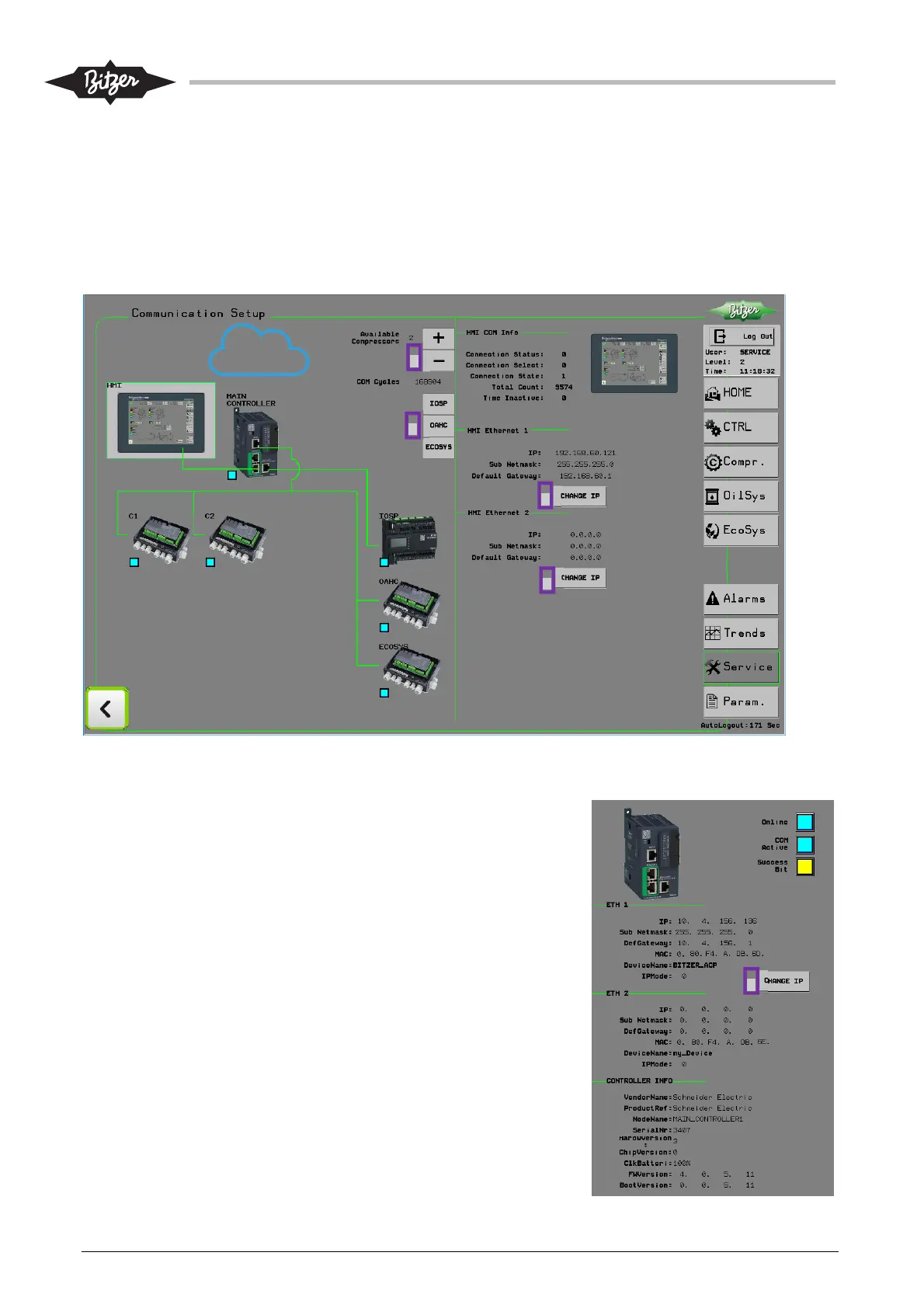
The HMI is connected to the ACP LINK PLC, communicating with a Schneider protocol. The IP addresses for
the two Ethernet connections on the HMI can be changed here. Ethernet 1 [3] is used for connection to the
PLC. It must be configured, so the HMI is on the same network as the PLC. Ethernet 2 [4] is used for a WIFI
access point.
The IP address of the HMI can also be configured by using its ‘offline’ functionality, but the dialogue here is
sufficient for normal configuration.
ACP LINK PLC
If the PLC icon is pressed, information about its network and status
is shown in the right column. Important for the communication to
the HMI are the IP address for Ethernet 1 connection and the PLC
node name. The PLC and HMI must be on the same network and
the HMI must know which PLC node name to look for.
The IP address of the PLC can be changed from the HMI.It is very
important to make a note of the IP address from the PLC if any
changes need to be done. There is no facility to enquire the IP
address from the PLC if the communication to the HMI is lost. See
section 8.1.5 if this happens.
If more than one ACP needs to connect to the same network, it is
necessary to have unique node names for each PLC, as the
protocol between PLC and HMI looks for the PLC name to connect
to. See also section 8.1.3.
1
1
2
3
4



 To Next Page