27
1. 87 7. 8 7 7. 2 2 6 9 BLACKBOX.COM
NEED HELP?
LE AVE THE TECH TO US
LIVE 24/7
TECHNICAL
SUPPORT
1. 87 7. 87 7. 2 26 9
CHAPTER 6: DISCOVERY—ADDING DEVICES
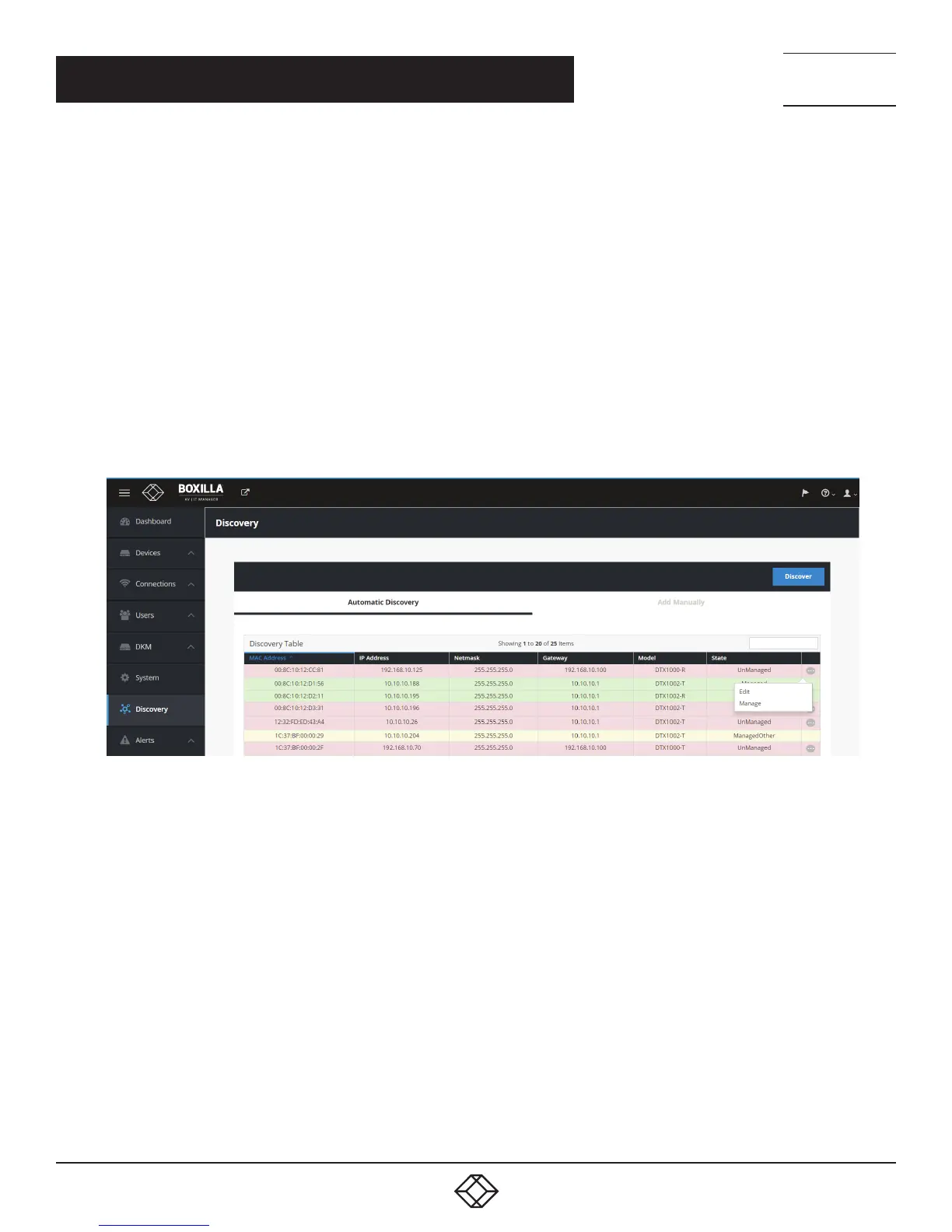
The state of a device shown in the table can be one of the following:
UnManaged—this device is currently not part of any managed domain
Managed—this device is part of the domain managed by this Boxilla manager
ManagedOther—this device is part of a domain managed by another Manager—and cannot be managed by this Boxilla manager
Orphaned—there is a conflict between the reported state on the Manager and that of the device. This may occur where the device
was removed from the Manager’s database when the device was off-line, or if the Manager was restored to factory default settings.
A device in the orphaned state can be set back to “Managed” by selecting the Manage button and following the same process as for
unmanaged devices
To edit a discovered device, click on the “•••” icon on the row for the device as shown in Figure 18 and select the Edit option.
This allows the Network configuration of a device to be changed as shown in Figure 19. Typically, this is used to change a device
from its default IP address to a unique address.
FIGURE 18. DISCOVERY—EDIT DEVICE



 To Next Page