Chapter 4: Configuration
724-746-5500 | blackbox.com
Page 23
4.5 The Configure pages
The Configure menu option expands when clicked to reveal three sub-sections:
• Central Switch - settings related directly to the DCX3000 Switch.
• Consoles - settings related to the DCX3000 Remote modules and their connected peripherals.
• Computers - settings related to the DCX3000 SAM modules and their host computers.
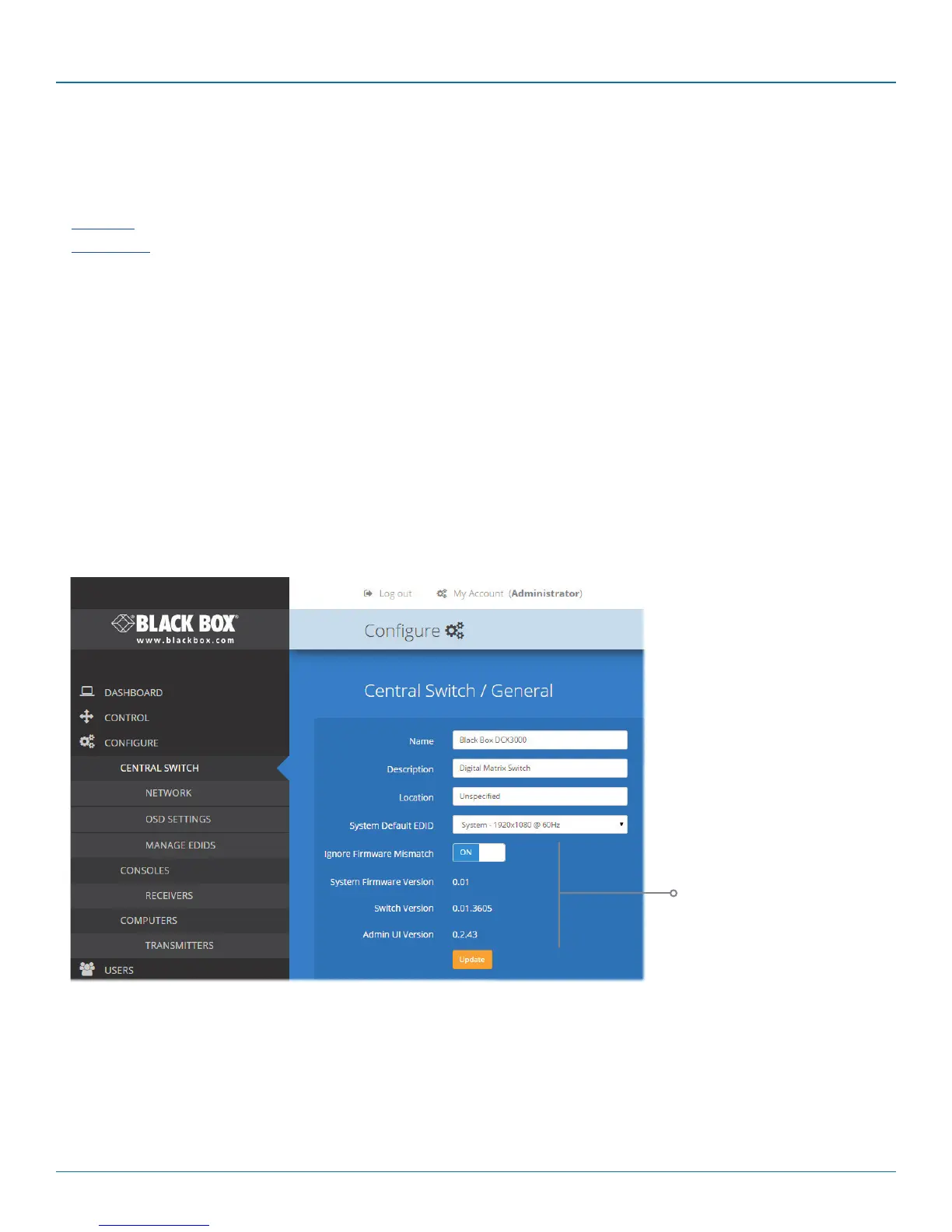
4.5.1 Central Switch > General
Basic descriptive settings for the DCX3000 Switch. These are most useful when multiple DCX installations are being managed and
labelling each installation as you go, is a good habit to get into:
• Name - displayed on the dashboard page of DCX Matrix to identify this switch.
• Description - a further opportunity to add more information about the switch.
• Location - a useful feature if you have multiple DCX3000 Switches distributed around.
• System Default EDID - determines the default EDID to use for the installation.
• Ignore Firmware Mismatch - when set to On, this overrides the checks that are made to ensure all modules are running
compatible firmware versions. This override should be used in exceptional circumstances only.
• System Firmware Version - shows the version of the main system firmware.
• Switch Version - shows the version of the main system circuitry.
• Admin UI Version - shows the version of the DCX Matrix admin user interface.
These items are
shown only when
the Maintenance
> Settings > Web
UI Mode is set to
Advanced.













 To Next Page