DCX3000 Switch
724-746-5500 | blackbox.com
Page 30
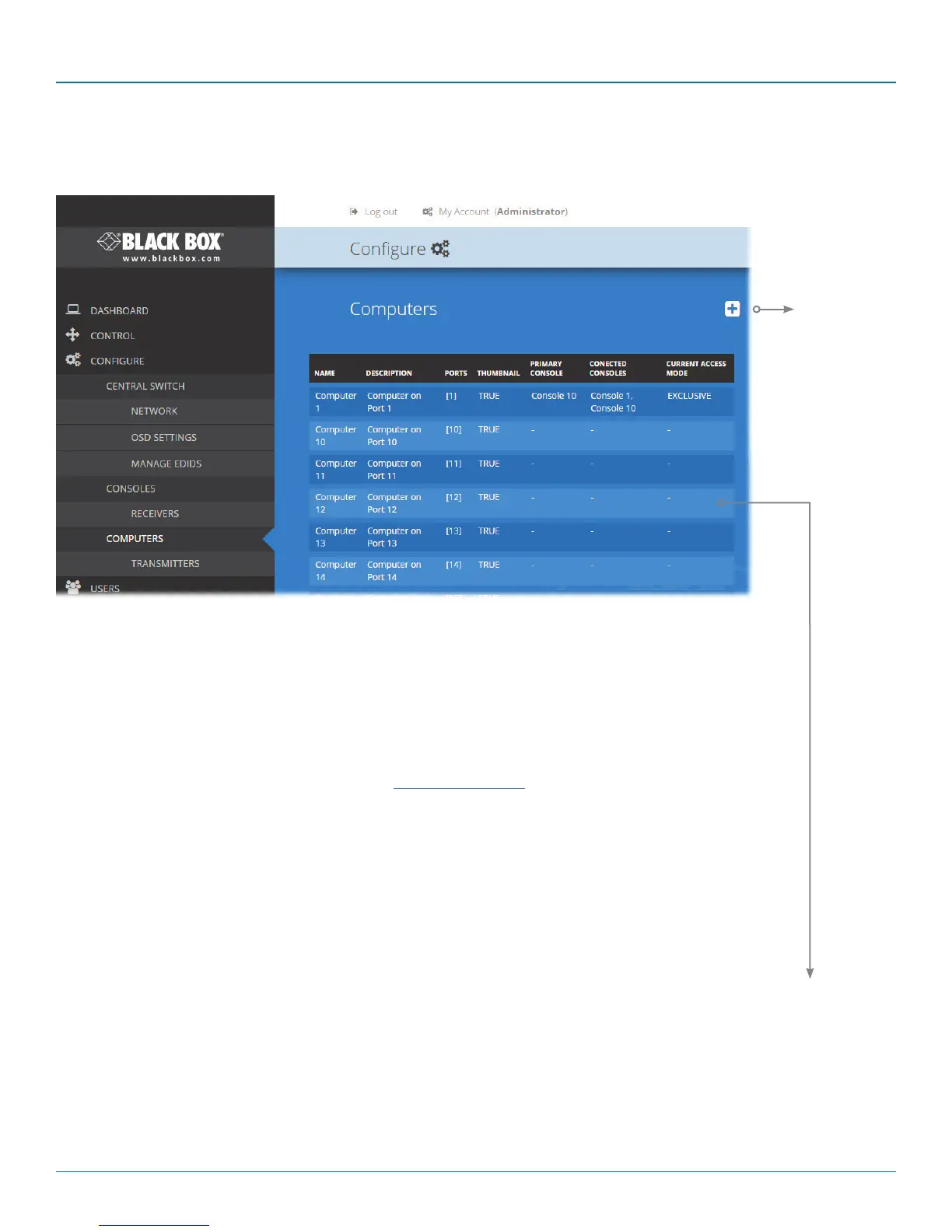
4.8 Configure > Computers
This page lists the computer systems that are connected to the DCX3000 Switch unit via individual DCX3000 SAM modules:
In addition to the Name and Description, the columns also provide the following useful details for
each computer entry:
• Ports - each DCX3000 SAM module connects to a single port on the DCX3000 Switch. This
column lists the port(s) used by the DCX3000 SAM module(s) associated with each computer.
Two or more DCX3000 SAM modules can be combined to support extra displays (multi-
head), each connecting to a separate port. It may be necessary to delete existing (but unused)
computer/port associations in order to free up ports for the additional module(s). Additionally,
three of the user console ports (21 to 23) can be changed into computer ports, if there are
fewer user consoles within your installation. See Reallocating ports
• Thumbnail - indicates whether a thumbnail image of the computer’s video output will be
shown on the OSD screen for each user. If set to False, a black image will be shown in the OSD
screen.
• Primary Console - indicates the console that currently has control of the computer.
• Connected Consoles - lists all consoles to which each computer is attached.
• Current Access Mode - indicates how the console is permitted to access computers, e.g. View
only, Shared, Exclusive, or Private.
Edit
Click an entry to view/edit its details and options.
See opposite.
Add new
Click to add a
new comput-
er. See oppo-
site.













 To Next Page