DCX3000 Switch
724-746-5500 | blackbox.com
Page 24
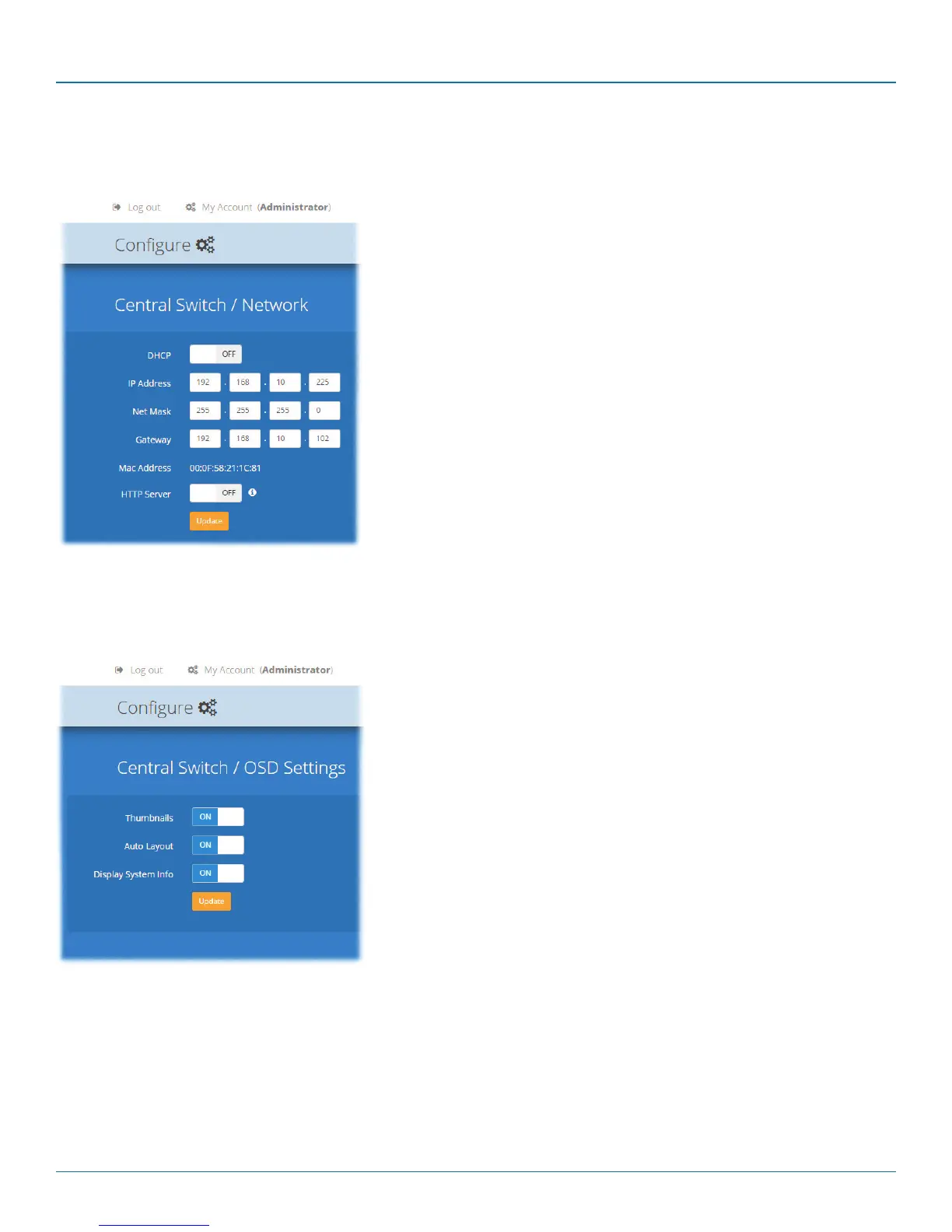
• DHCP - allows you to choose to use DHCP (Dynamic Host Configuration
Protocol) to automatically determine all network settings or set them
manually. When set to On, all other options in this page will be grayed out.
• IP Address - set the IP address for the switch.
• Net Mask - set a subnet mask to accompany the IP address.
• Gateway - optionally define a suitable address for a gateway device (only
needed if external access to DCX Matrix is required).
• MAC Address - displays the unique (and fixed) MAC address for the switch.
• HTTP Server - switches to the use of insecure HTTP for web admin - switch
reboot required. IMPORTANT: Do not enable this option when the
switch is connected to external networks.
4.5.2 Central Switch > Network
All of the key settings for the network capabilities of the DCX3000 Switch are here:
4.5.3 Central Switch > OSD Settings
Options related to the on screen display are presented in this section:
• Thumbnails - when set to Off, this option will hide the thumbnail views of
each computer within each user’s OSD main page.
• Auto Layout - when set to Off, this option will maintain a 5x5 grid for the
displayed computers within the OSD main page, regardless of the number
of available computers. When set to On, the OSD view grid will be re-scaled
accordingly.
• Display System Info - when set to On, the IP address and firmware version
details for the DDX switch will be shown in the bottom corner of the OSD.













 To Next Page