Page 101
877-877-2269 | blackbox.com
Chapter 5: Configuring the Router
• Enable MLD Proxy—Enable the Multicast Listener Discovery (MLD) Proxy function if you need it.
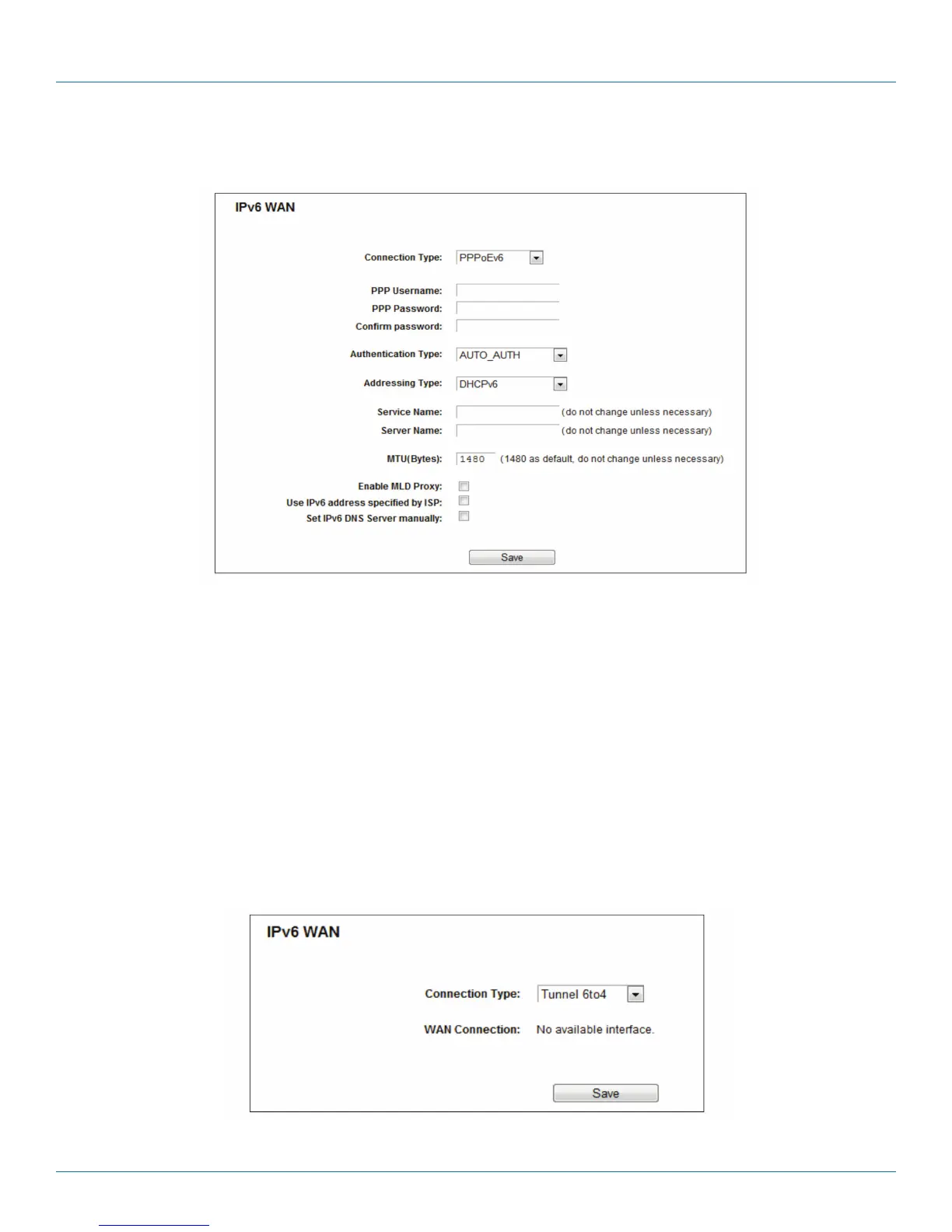
3. PPPoEv6
Figure 5-111. PPPoEv6.
• PPP Username/Password—Enter the User Name and Password provided by your ISP. These fields are case-sensitive.
• Authentication Type—Choose one authentication type from AUTO-AUTH, PAP, CHAP, and MS-CHAP.
• Addressing Type—There are two types of assignments for the IPv6 address: SLAAC (Stateless address auto-configuration) and
DHCPv6 (Dynamic Host Configuration Protocol for IPv6) Server.
• MTU (Bytes)—The normal MTU (Maximum Transmission Unit) value for most Ethernet networks is 1500 Bytes. For some ISPs,
you may need to modify the MTU. But this is rarely required, and should not be done unless you are sure it is necessary for your
ISP connection.
• Enable MLD Proxy—Enable the Multicast Listener Discovery (MLD) Proxy function if you need it.
• Use the IP address specified by the ISP—Input a static IPv6 address from the ISP.
• Set the IPv6 DNS Server manually—Enter the IP address of the IPv6 DNS server and secondary IPv6 DNS server.
4. Tunnel 6to4
Figure 5-112. Tunnel 6to4.



 To Next Page